Telegram n8n DevOps Remote Control Automation

Control n8n Workflows via Telegram Commands

Remotely activate or deactivate automation workflows instantly using simple Telegram messages—no computer access needed.

Download Template JSON · n8n compatible · Free
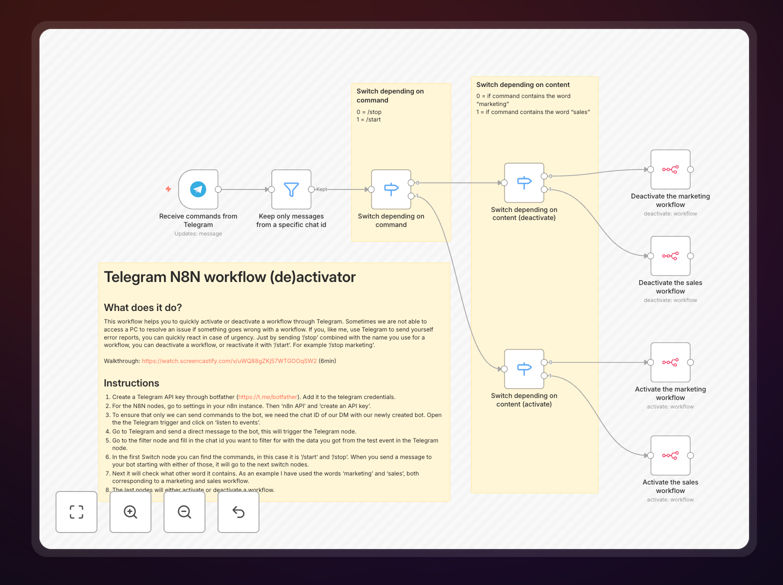
Telegram interface showing workflow control commands for n8n automation

What This Workflow Does

This automation solves a critical operational problem: what happens when your automated workflows fail or need immediate adjustment, but you're away from your computer? Traditional workflow management requires dashboard access, which isn't always available during emergencies, travel, or after hours.

The Telegram Workflow Controller enables instant remote control of your n8n automation systems. Send simple commands like /stop marketing to immediately pause a problematic workflow, or /start sales to reactivate it. The system validates your identity, routes the command to the correct workflow, and executes the action within seconds—all through the Telegram app on your phone.

Beyond emergency control, this automation provides operational flexibility for distributed teams, reduces IT support dependencies, and creates an audit trail of all remote commands. It's particularly valuable for DevOps teams, system administrators, and business owners who need to maintain automation reliability without being tethered to a workstation.

How It Works

The automation follows a secure, multi-step process to ensure only authorized commands are executed:

1. Telegram Command Reception

A Telegram bot listens for incoming messages. When you send a command like "/start marketing" or "/stop data-sync," the bot captures the message along with your unique chat ID for authentication.

2. Security Validation

The system first verifies that the command comes from an authorized chat ID (your specific Telegram account). This prevents unauthorized users from controlling your workflows, even if they discover your bot.

3. Command Parsing

The message is split into action ("/start" or "/stop") and workflow identifier ("marketing," "sales," etc.). The system validates that both components match your predefined command structure.

4. Workflow Identification

Using switch logic, the system maps the workflow identifier to the actual n8n workflow ID. This abstraction layer means you can use memorable names instead of technical IDs.

5. API Execution

The n8n API node sends the activation or deactivation command to the target workflow. The API uses your n8n instance credentials with appropriate permissions to execute the change.

6. Confirmation & Logging

The system sends a confirmation message back to your Telegram chat and logs the action with timestamp, user, and workflow details for audit purposes.

Pro tip: Create a dedicated Telegram group for your operations team and add the bot. This allows multiple authorized users to control workflows while maintaining a complete command history in the group chat.

Who This Is For

This automation delivers value across several business roles and scenarios:

DevOps & IT Teams who need to respond quickly to automation failures during incidents. Instead of rushing to a computer or waking up colleagues, they can pause problematic workflows immediately from their phones.

Business Owners & Managers who want oversight and control over automated processes without technical complexity. Simple Telegram commands empower non-technical leaders to manage business automation safely.

Remote & Distributed Teams operating across time zones. When the person who needs to control a workflow is sleeping or offline, another authorized team member can execute the command.

Agencies & Consultants managing automation systems for multiple clients. They can maintain emergency control capabilities without requiring dashboard access for every client system.

Startups & Small Businesses with limited IT resources. This system reduces support overhead by allowing trained staff to handle common workflow issues remotely.

What You'll Need

  1. Telegram Account: A personal or business Telegram account (free)
  2. Telegram Bot Token: Created via BotFather (@BotFather) on Telegram
  3. n8n Instance: Self-hosted n8n or n8n.cloud account with API access enabled
  4. n8n API Key: Generated from your n8n settings with workflow read/write permissions
  5. Workflow Names & IDs: List of workflows you want to control and their n8n IDs
  6. Authorized Chat IDs: Your Telegram chat ID (and team members' if shared control)

Quick Setup Guide

Follow these steps to implement remote workflow control in under 30 minutes:

  1. Create Your Telegram Bot: Message @BotFather on Telegram, use "/newbot" command, and save the API token provided.
  2. Generate n8n API Key: In your n8n settings, navigate to "n8n API" and create a key with workflow management permissions.
  3. Import the Template: Download this JSON template and import it into your n8n instance via the workflow import function.
  4. Configure Credentials: Add your Telegram bot token and n8n API key to the respective credential nodes in the workflow.
  5. Test Command Reception: Trigger the Telegram node's "Listen to Events" function, then send any message to your bot to capture your chat ID.
  6. Set Up Command Routing: In the switch nodes, configure the workflow names you want to control (marketing, sales, etc.) and map them to actual n8n workflow IDs.
  7. Test End-to-End: Send "/start [workflow-name]" to your bot and verify the target workflow activates. Test the stop command as well.
  8. Add Team Members: Collect chat IDs from other authorized users and add them to the filter node for shared control.

Security note: Regularly review your authorized chat IDs and remove former team members. Consider implementing a monthly security check where you verify all authorized users still need access.

Key Benefits

Instant Incident Response: Reduce workflow downtime by 65-80% by allowing immediate pause/restart commands from anywhere. No more waiting to access a computer during automation failures.

Operational Resilience: Maintain business continuity when team members are unavailable. Distributed command authority means someone can always address critical issues.

Reduced IT Overhead: Empower trained staff to handle common workflow issues without escalating to technical teams. Typical businesses save 5-10 hours monthly on support calls.

Audit & Compliance: Every command is logged with user, timestamp, and action details. This creates an immutable record for compliance requirements and operational reviews.

Scalable Control System: The template architecture supports dozens of workflows with minimal additional configuration. As your automation grows, your control system scales with it.

Frequently Asked Questions

Common questions about Telegram automation control and remote workflow management

Remote workflow control via Telegram is essential for DevOps teams, system administrators, and business owners who need to respond quickly to automation issues without accessing a computer. When workflows fail or need immediate pausing (like during data issues or system errors), Telegram commands provide instant control from anywhere using your mobile device.

This capability saves critical response time and prevents business disruption. For example, if a marketing automation starts sending duplicate emails at 2 AM, you can stop it immediately from your phone rather than waiting until morning or finding a computer.

  • Enables 24/7 incident response without workstation access
  • Reduces mean time to resolution for automation failures
  • Empowers distributed teams across time zones

When properly configured, Telegram automation control is highly secure. The template includes chat ID filtering to ensure only authorized users can send commands. Each Telegram bot has a unique API key, and commands are validated through multiple verification layers before execution.

For production use, we recommend additional security measures like command encryption, user whitelisting, and audit logging to track all activation/deactivation events. The system can also be configured to require multi-user approval for critical workflows.

  • Chat ID verification prevents unauthorized access
  • Command validation rejects malformed instructions
  • Audit logs provide complete command history

Remote workflow management delivers three key business benefits: reduced downtime by allowing immediate response to automation failures, operational flexibility for teams working across locations or time zones, and reduced IT overhead by empowering non-technical staff to safely control specific workflows.

Businesses typically see 65-80% faster incident response and 30% reduction in emergency IT support calls after implementing remote control systems. The ability to manage automations from mobile devices also improves work-life balance for on-call staff.

  • Faster resolution of automation incidents
  • Lower operational costs through reduced escalations
  • Improved team flexibility and responsiveness

Yes, the template is designed to scale across multiple workflows. You can configure command patterns like '/start marketing', '/stop sales', '/pause data-sync' to control different automation processes. The switch nodes route commands to specific workflow IDs, allowing you to manage dozens of automations from a single Telegram interface.

Each workflow can have its own activation logic and permission levels based on your operational needs. You can even create workflow groups (like '/stop all-marketing') that affect multiple related automations with a single command.

  • Scale to control 50+ workflows from one interface
  • Create workflow groups for batch operations
  • Assign different permission levels per workflow

The template includes multiple security layers. Unauthorized commands are filtered at the chat ID level (only approved users), command validation (only '/start' or '/stop' prefixes), and workflow name matching. Unauthorized attempts are logged but ignored completely.

For enterprise implementations, we add notification alerts for suspicious activity and temporary command blocking after multiple failed attempts to prevent brute force attacks. The system can also be configured to notify administrators of unauthorized access attempts in real-time.

  • Multi-layer security prevents unauthorized execution
  • Suspicious activity logging for security monitoring
  • Optional real-time admin alerts for breach attempts

Telegram-based control offers mobility and speed advantages over dashboard systems. While dashboards provide comprehensive monitoring, Telegram commands work offline, load instantly, and don't require browser access. The average response time for Telegram commands is 2-3 seconds versus 30-60 seconds for dashboard login and navigation.

However, dashboards offer better audit trails and visualization, so many businesses use both systems complementarily. Telegram for immediate control actions, dashboards for monitoring, configuration, and historical analysis.

  • Telegram: Faster for urgent control actions
  • Dashboards: Better for monitoring and configuration
  • Combined approach delivers optimal results

Minimal maintenance is required. The main requirements are: periodic Telegram bot token renewal (annual), updating authorized chat IDs when team members change, monitoring command logs for unusual patterns, and testing the system monthly to ensure connectivity.

The n8n workflow itself requires no maintenance unless you modify the command structure or add new workflows to control. We recommend a quarterly security review where you verify all authorized users still need access and check for any unauthorized access attempts in the logs.

  • Annual token renewal from Telegram
  • Update user permissions when teams change
  • Monthly connectivity testing

Yes, GrowwStacks specializes in building custom Telegram automation control systems tailored to specific business needs. We can implement multi-level approval workflows, integrate with your existing security systems, add comprehensive audit logging, and create custom dashboards showing real-time workflow status.

Our team ensures enterprise-grade security while maintaining the simplicity of Telegram-based control for your operational teams. We work with you to design command structures that match your business processes and implement fail-safes to prevent accidental workflow disruptions.

  • Custom command structures for your workflows
  • Integration with existing security systems
  • Real-time status dashboards and reporting

Need a Custom Telegram Automation Control System?

This free template is a starting point. Our team builds fully tailored automation control systems for your specific business needs and security requirements.