n8n AI Summarization Market Research Email Automation Bright Data

Automated News Briefing & AI Summarization

Fetch Reuters news by keyword, summarize with Google Gemini AI, and deliver clean email briefings—fully automated.

Download Template JSON · n8n compatible · Free
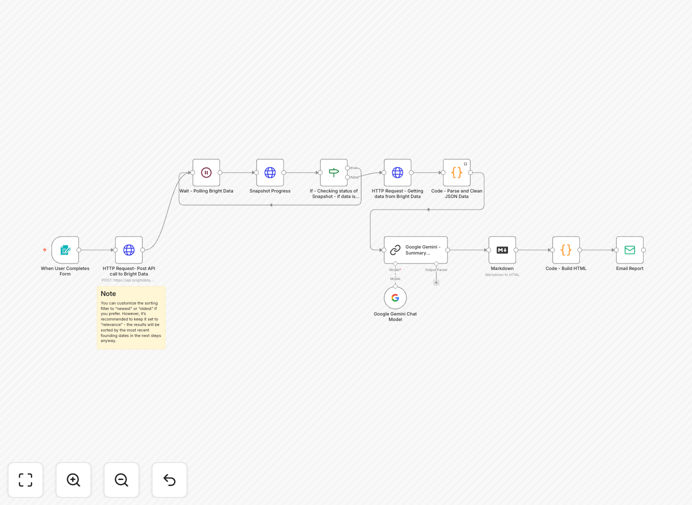
n8n workflow diagram showing news collection, AI summarization, and email delivery automation

What This Workflow Does

Manual news monitoring consumes valuable analyst time and often misses critical updates. This automation solves that by continuously scanning Reuters for articles matching your keywords, using AI to extract the essential insights, and delivering a polished briefing directly to your inbox.

The workflow transforms overwhelming data streams into actionable intelligence. It handles the entire pipeline: API calls to Bright Data's Reuters dataset, intelligent filtering of the latest articles, Google Gemini-powered summarization, HTML formatting, and reliable email delivery. You specify the topic once, and the system delivers ongoing insights.

How It Works

1. Keyword Input & API Trigger

The workflow starts with an n8n form trigger accepting your search keyword (e.g., "quantum computing", "EV tariffs"). This keyword is sent to Bright Data's Reuters API to discover relevant recent articles.

2. Data Collection & Polling

Bright Data processes the request and creates a data snapshot. The workflow intelligently polls the API until the dataset is ready, then downloads the structured news data including titles, publication dates, and content snippets.

3. Filtering & Sorting

A Python Code node filters and sorts the top 10 most recent articles by publication date, ensuring you receive the latest developments rather than historical content.

4. AI Summarization

The filtered articles are sent to Google Gemini (Flash) with a custom prompt asking for a cohesive summary highlighting main developments, date ranges, and key topics.

5. Formatting & Delivery

The AI's markdown response is converted to clean HTML with readable styling. The final briefing is sent via email to your specified address, complete with source links for deeper investigation.

Pro tip: Start with 2-3 core keywords and schedule weekly briefings. Adjust frequency based on article volume. Always review AI summaries initially to ensure quality before full automation.

Who This Is For

This workflow delivers immediate value to market researchers, competitive intelligence teams, executives needing industry updates, PR agencies monitoring client mentions, and startups tracking competitor movements. If you spend more than 2 hours weekly scanning news sources, this automation will save you time while improving coverage.

What You'll Need

  1. n8n instance (cloud or self-hosted)
  2. Bright Data API key for Reuters dataset access
  3. Google Gemini API credentials (Gemini Flash works well)
  4. Email SMTP configuration for sending briefings
  5. Basic understanding of n8n node configuration

Quick Setup Guide

  1. Download & Import: Click the download button above and import the JSON into your n8n instance.
  2. Configure Credentials: Set up your Bright Data, Google Gemini, and email SMTP credentials in n8n's credentials management.
  3. Update API Keys: Replace the "YOUR_API_KEY" placeholders in the HTTP Request nodes with your actual Bright Data API key.
  4. Customize Keywords: Modify the form trigger node to accept your desired search terms or hardcode initial keywords.
  5. Set Recipient Email: Update the Email Send node with your briefing recipient address.
  6. Test & Schedule: Trigger the workflow manually to verify, then schedule it for daily or weekly execution.

Key Benefits

Save 5-10 hours weekly on manual news monitoring and analysis. The automation handles data collection, filtering, and summarization that would take a human analyst hours to complete.

Never miss critical updates with continuous, scheduled monitoring. The system polls for new articles based on your schedule, ensuring you receive developments as they happen.

Receive distilled insights instead of data overload. AI summarization extracts the signal from the noise, highlighting what matters most for your decision-making.

Fully customizable intelligence tailored to your industry. Change keywords, adjust AI prompts for specific analysis needs, or add additional data sources as required.

Cost-effective alternative to expensive news monitoring services. Pay only for API usage rather than thousands in subscription fees to rigid SaaS platforms.

Frequently Asked Questions

Common questions about news monitoring automation and AI summarization

Automating news monitoring saves 5-10 hours per week for analysts and executives, ensures you never miss critical industry updates, and provides distilled insights instead of raw data overload. It transforms reactive reading into proactive intelligence.

For example, a financial analyst tracking regulatory changes can receive automated briefings on new policies instead of manually scanning multiple government sites. The time saved can be redirected to higher-value analysis and decision-making.

AI summarization extracts key trends, sentiment, and actionable insights from dozens of articles in seconds. Instead of manually reading 20+ sources, you get a concise briefing highlighting competitive moves, regulatory changes, and emerging opportunities with source links for deeper dives.

The AI identifies patterns humans might miss—like multiple companies announcing similar partnerships or emerging regulatory consensus across different regions. This pattern recognition accelerates strategic planning.

Start with 2-3 core keywords relevant to your industry. Schedule briefings weekly initially, then adjust frequency based on volume. Include a mix of broad industry terms and specific competitor/product names. Always verify AI summaries against original sources for critical decisions.

Effective practices include: using boolean operators for precise filtering, setting up alert thresholds for volume spikes, and creating separate briefings for different stakeholder groups (executive vs. analyst summaries).

Reuters provides highly reliable, timestamped data through APIs like Bright Data. Automation ensures you get the most recent articles sorted by publication date. The system handles API polling, error recovery, and data validation so you receive complete, current datasets.

The workflow includes error handling for API timeouts, retry logic for failed requests, and data validation checks to ensure you receive structured, usable information rather than partial or corrupted data.

Yes, you can modify the keyword input, adjust the AI prompt for industry-specific analysis, change the email formatting, or add additional data sources. The workflow is modular—swap Reuters for other news APIs or add sentiment analysis nodes for deeper insights.

Common customizations include: adding competitor mention tracking, integrating with CRM systems to alert sales teams, creating dashboard visualizations of news volume trends, and setting up Slack alerts for breaking news.

Using too broad keywords that generate irrelevant articles, not setting date filters for recency, skipping human review of AI summaries initially, and over-automating before validating data quality. Start simple, verify outputs, then expand.

Other pitfalls include: not monitoring API usage costs, failing to handle duplicate articles from different sources, and neglecting to update keywords as industry terminology evolves. Regular review cycles prevent these issues.

This automation costs only API fees versus thousands for premium services. It's fully customizable unlike rigid SaaS platforms. It delivers insights faster than manual monitoring and integrates directly into your existing tools like email, Slack, or CRM.

While paid services offer broader source coverage, this automation provides tailored intelligence for your specific needs at a fraction of the cost. You control the data sources, analysis depth, and delivery format rather than accepting generic outputs.

Yes, GrowwStacks builds tailored news monitoring systems for specific industries, competitive intelligence needs, and executive briefing requirements. We integrate multiple data sources, add custom analytics dashboards, and connect to your internal systems for seamless intelligence workflows.

Our custom solutions include: multi-language news monitoring, sentiment analysis across social and news sources, competitive alert systems, and integration with business intelligence platforms. We design around your specific decision-making processes.

  • Industry-specific keyword optimization
  • Multi-source data aggregation and deduplication
  • Executive vs. operational level briefing formats

Need a Custom News Monitoring Automation?

This free template is a starting point. Our team builds fully tailored automation systems for your specific business needs.