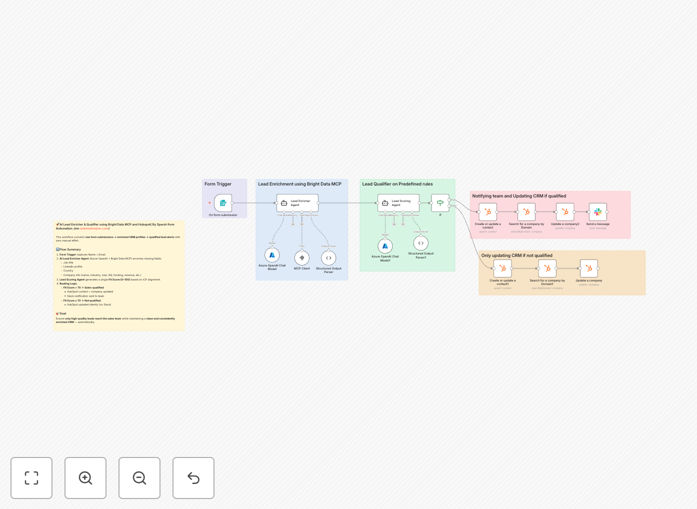
What This Workflow Does
Manual lead research is a silent revenue killer. Sales reps waste hours Googling prospects, trying to piece together company details and job titles, while hot leads go cold. This automation solves that by turning a simple name and email into a fully enriched, scored, and CRM-ready profile in minutes.
The workflow acts as an intelligent gatekeeper for your sales pipeline. It captures a new lead, uses AI and web search to gather verified contact and company data, calculates a fit score based on your ideal customer profile, updates HubSpot automatically, and only alerts your team when a lead meets your qualification threshold. This ensures your CRM is always accurate and your sales team's time is spent on conversations, not data entry.
How It Works
1. Lead Capture & Trigger
A new lead submits a form with their name and email. This event triggers the entire automation sequence instantly, ensuring no lead is left waiting.
2. AI-Powered Data Enrichment
An AI agent, powered by Azure OpenAI and Bright Data MCP, searches the public web. It intelligently finds and validates missing information like the lead's job title, LinkedIn profile, company name, industry, employee count, and funding status.
3. Structured Data Parsing
The AI's findings are passed through a structured output parser. This guarantees clean, consistent JSON data, preventing errors and "hallucinations" before the data touches your CRM.
4. Intelligent Lead Scoring
A second AI agent analyzes the enriched data against your business's ideal customer profile. It assigns a numeric "Fit Score" (0-100), evaluating factors like industry relevance, company size, and the lead's seniority.
5. Automated Decision Routing
An "IF" node checks the Fit Score. Leads scoring above your set threshold (e.g., 70) are flagged as "qualified" and routed for immediate sales follow-up. Others are updated in the CRM but don't trigger an alert, keeping the pipeline clean.
6. CRM Synchronization
The workflow creates or updates the Contact and Company records in HubSpot, populating dozens of custom properties with the newly enriched data. This happens for every lead, guaranteeing a single source of truth.
7. Smart Team Notification
For qualified leads only, a detailed Slack message is sent to your sales channel. It includes the lead's name, score, company, and a direct link to their HubSpot record, enabling instant, informed action.
Who This Is For
This template is ideal for B2B companies, marketing agencies, and SaaS businesses that generate inbound leads and want to maximize sales efficiency. It's perfect for sales teams tired of manual research, RevOps managers focused on CRM hygiene, and growth marketers who need to prove lead quality. If you use HubSpot and want to leverage AI without a complex in-house data science team, this workflow provides a production-ready starting point.
What You'll Need
- An n8n instance (Cloud or self-hosted).
- A HubSpot account with API access.
- An Azure OpenAI Service endpoint and API key.
- A Bright Data MCP account for web search capabilities.
- A Slack workspace and a webhook URL for a sales channel.
- A basic understanding of your Ideal Customer Profile (ICP) to configure scoring.
Pro tip: Start by defining 3-5 key attributes of your perfect customer (e.g., "SaaS industry," "50-200 employees," "Head of Ops title"). Configure the AI scoring agent to prioritize these for the most accurate fit scores from day one.
Quick Setup Guide
- Import the template: Download the JSON file and import it into your n8n workspace.
- Configure credentials: Set up the credentials nodes for HubSpot, Azure OpenAI, Bright Data MCP, and Slack with your API keys.
- Adjust the trigger: Replace the sample form trigger with your actual lead capture source (e.g., a webhook from your website form, Typeform, or Calendly).
- Customize the AI instructions: Review and tweak the prompts in the "AI Lead Enricher" and "Lead Scoring Agent" nodes to better match your industry and ICP.
- Set your threshold: In the "IF" node, adjust the Fit Score threshold (default is 70) to match your sales team's qualification criteria.
- Map HubSpot properties: Verify that the property names in the "HubSpot: Create/Update" nodes match your custom HubSpot field names.
- Test with a sample lead: Run the workflow once manually with a test email to ensure all connections work and data flows correctly into HubSpot and Slack.
Key Benefits
Eliminate 2-3 hours of manual research per lead. What used to take a sales rep half a morning now happens automatically in the background, freeing them for high-value conversations.
Improve lead response time from hours to seconds. Qualified leads trigger instant Slack alerts, allowing your team to reach out while the prospect is still engaged, dramatically increasing conversion rates.
Ensure 100% CRM data hygiene. Every lead, qualified or not, gets a complete and standardized profile in HubSpot. This eliminates data decay and provides accurate reporting for marketing and sales leadership.
Scale your lead qualification process without hiring. The system works consistently 24/7, handling any volume of inbound leads without additional overhead, allowing your business to grow efficiently.
Make data-driven prioritization decisions. The objective Fit Score removes guesswork and bias from lead routing, ensuring your best reps are always working on the highest-potential opportunities.