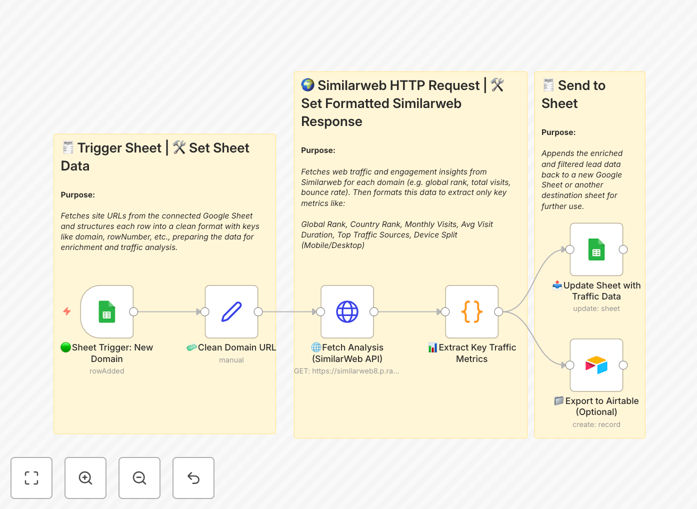
What This Workflow Does
Manually researching website traffic for a list of companies is a tedious, time-consuming task that stalls business development, sales prospecting, and market analysis. This free n8n automation template solves that by connecting Google Sheets or Airtable directly to the SimilarWeb API.
Whenever a new domain is added to your spreadsheet, the workflow automatically cleans the URL, fetches comprehensive traffic insights—including global rank, monthly visits, bounce rate, traffic sources, and geographic data—and writes the enriched data back into your sheet. It transforms raw domain lists into actionable intelligence, enabling data-driven decisions without manual effort.
The process eliminates human error, ensures consistency, and scales to handle thousands of domains, making it perfect for agencies, investors, sales teams, and marketers who need to quickly assess digital presence at scale.
How It Works
The automation follows a logical, step-by-step process to ensure accurate and reliable data enrichment.
1. Trigger on New Domain Entry
The workflow is activated whenever a new row is added to your designated Google Sheet. It captures the raw domain or URL input by the user, ready for processing. This setup allows for both batch processing of existing lists and real-time enrichment as new prospects are identified.
2. Clean & Standardize the Domain
Many domain entries contain inconsistencies like "http://", "https://", "www.", or trailing slashes. This step programmatically strips these elements, outputting a clean, standardized domain format (e.g., "example.com"). It also preserves the original row reference to ensure data is written back to the correct location.
3. Fetch Traffic Insights from SimilarWeb
Using the cleaned domain, the workflow makes an authenticated API call to SimilarWeb. It retrieves a rich dataset including global and country rank, category rank, total visits, bounce rate, pages per visit, average visit duration, and breakdowns of traffic sources (direct, search, social, etc.).
4. Extract & Structure Key Metrics
The raw API response is parsed to extract the most valuable business metrics. The workflow structures this data into clear categories: ranking data, engagement metrics, traffic source percentages, top countries, and device split (mobile vs. desktop). This transforms complex API data into a spreadsheet-ready format.
5. Update Your Google Sheet
The structured insights are written back into your Google Sheet, appending new columns with the enriched data. Each row is updated with the corresponding metrics, creating a comprehensive, analysis-ready dataset without ever leaving your spreadsheet.
6. (Optional) Sync to Airtable
For teams using Airtable, the workflow can simultaneously create or update a record in a specified base. This allows you to maintain a centralized, relational database of enriched company profiles, linking traffic data with other business information for richer reporting and segmentation.
Who This Is For
This automation is designed for professionals and teams who rely on web data to inform their strategy. It's particularly valuable for Sales & Business Development teams who need to prioritize leads based on company digital footprint; Market Researchers & Analysts conducting competitive landscape analysis; Investors & VCs screening potential portfolio companies; Digital Marketing Agencies auditing prospect websites; and Recruiters identifying high-growth companies for talent sourcing.
If you currently spend hours copying and pasting domains into SimilarWeb or other analytics tools, this workflow will save you significant time and improve data accuracy.
Pro tip: Use the "Device Split" data to tailor your outreach. A mobile-heavy audience might prefer different communication channels (like SMS or mobile apps) compared to a desktop-dominant one.
What You'll Need
- A running n8n instance (cloud or self-hosted).
- Google Sheets credentials with edit access to your target spreadsheet.
- A SimilarWeb API key (obtainable from their developer portal).
- (Optional) An Airtable account and base with a prepared table schema.
- A spreadsheet containing a list of company domains or URLs you wish to enrich.
Quick Setup Guide
Import and configure this workflow in under 10 minutes to start automating your domain research.
- Download the template using the button above and import it into your n8n workspace.
- Configure the Google Sheets trigger node to point to your source spreadsheet and the column containing domains.
- Add your SimilarWeb API key to the HTTP Request node's authorization headers.
- Map the output fields in the Google Sheets update node to your desired column structure.
- (Optional) Configure the Airtable node with your base ID, table name, and API key.
- Test the workflow with a single domain row to ensure data flows correctly from sheet to SimilarWeb and back.
- Activate the workflow and let it process your entire list automatically.
Key Benefits
Eliminate Manual Grunt Work: Stop the copy-paste cycle. Automate the enrichment of hundreds of domains in the time it used to take for one.
Improve Data Accuracy & Consistency: Automated cleaning and API calls remove human typos and ensure every domain is processed with the same logic, yielding reliable, comparable metrics.
Enable Scalable Prospecting & Analysis: Process large lead lists, competitor databases, or market landscapes without proportional increases in research time, allowing your team to scale efforts efficiently.
Centralize Intelligence: Bring valuable external web data directly into your primary work surfaces (Sheets, Airtable) where your team already operates, eliminating context switching.
Build a Foundation for Advanced Automation: The enriched data becomes a trigger for further actions—like scoring leads, segmenting campaigns, or prioritizing outreach—creating a fully automated intelligence pipeline.