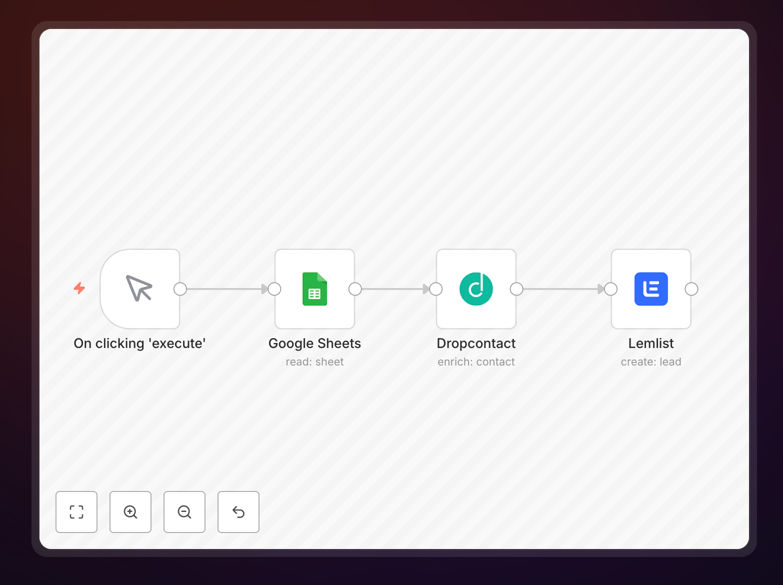
What This Workflow Does
Manual lead research is one of the biggest time-wasters in sales and marketing. Teams spend hours searching for email addresses, verifying contact information, and manually transferring data between spreadsheets and outreach tools. This workflow eliminates that manual process by creating a fully automated pipeline that transforms raw contact lists into enriched, verified leads ready for personalized outreach.
The automation pulls contact information from Google Sheets, uses Dropcontact to find and verify professional email addresses, enriches each contact with additional professional data, and then automatically adds qualified leads to your Lemlist campaigns. What used to take hours of manual research now happens automatically in minutes, ensuring your sales team always works with accurate, up-to-date contact information.
How It Works
Step 1: Read Contacts from Google Sheets
The workflow begins by reading your contact list from a specified Google Sheet. It processes each row containing basic information like names, companies, and job titles. The automation can be scheduled to run daily, weekly, or triggered whenever new contacts are added to your spreadsheet.
Step 2: Enrich Data with Dropcontact
Each contact is sent to Dropcontact's API, which performs several critical functions: it verifies email deliverability, finds professional email addresses when only basic information is provided, and enriches the contact with additional professional data like LinkedIn profiles, company information, and social media links.
Step 3: Filter and Qualify Leads
Based on the enrichment results, the workflow can filter contacts by specific criteria. You might exclude contacts with invalid emails, prioritize leads from target companies, or segment contacts by job title. This ensures only qualified, relevant leads proceed to the next stage.
Step 4: Add to Lemlist Campaigns
Finally, enriched and verified contacts are automatically added to your designated Lemlist campaigns. The workflow passes all the enriched data, allowing for highly personalized email sequences from day one. You can configure different campaigns based on lead quality, industry, or other segmentation criteria.
Who This Is For
This workflow is ideal for B2B sales teams, marketing agencies, SaaS companies, and any business conducting outbound lead generation. It's particularly valuable for teams that:
- Maintain lead lists in Google Sheets or CSV files
- Struggle with email bounce rates and invalid contact data
- Spend excessive time manually researching contact information
- Want to scale their outbound efforts without increasing manual work
- Need to ensure GDPR compliance in their data enrichment processes
What You'll Need
- n8n instance (self-hosted or n8n.cloud account)
- Google Sheets with your contact list containing at least names and company information
- Dropcontact account with API access for email verification and enrichment
- Lemlist account with API credentials and existing campaigns set up
- Basic understanding of how to import and configure n8n workflows
Quick Setup Guide
- Download the template using the button above
- Import the JSON file into your n8n instance
- Configure the Google Sheets node with your spreadsheet ID and range
- Add your Dropcontact API credentials to the Dropcontact node
- Configure the Lemlist node with your API key and campaign ID
- Test the workflow with a few sample contacts
- Schedule the workflow or set up a webhook trigger for automation
Pro tip: Start with a small batch of contacts (10-20) to test the workflow before processing your entire list. This helps you verify data quality and adjust any filtering criteria without using excessive API credits.
Key Benefits
Save 10+ hours per week on manual lead research. What used to require hours of manual searching and data entry now happens automatically, freeing your sales team to focus on actual selling and relationship building.
Improve email deliverability by 80-90%. By verifying every email address before outreach, you dramatically reduce bounce rates, protect your sender reputation, and ensure your messages reach their intended recipients.
Increase response rates with better personalization. Enriched contact data allows for more personalized outreach from the first touchpoint, significantly improving engagement and conversion rates.
Scale your outbound efforts without adding headcount. The automation handles the repetitive work, allowing your existing team to manage significantly larger lead volumes without additional manual effort.
Maintain data accuracy and compliance. Automated enrichment ensures your contact data stays current and accurate, while using GDPR-compliant services like Dropcontact helps maintain regulatory compliance.