What This Workflow Does
Managing contracts manually is a major operational bottleneck. When a new contract is signed, someone has to manually open the PDF, find key details like the client name, effective date, expiration date, and contract value, and then type them into a spreadsheet. This is time-consuming, prone to typos, and contracts often get lost in email threads or forgotten.
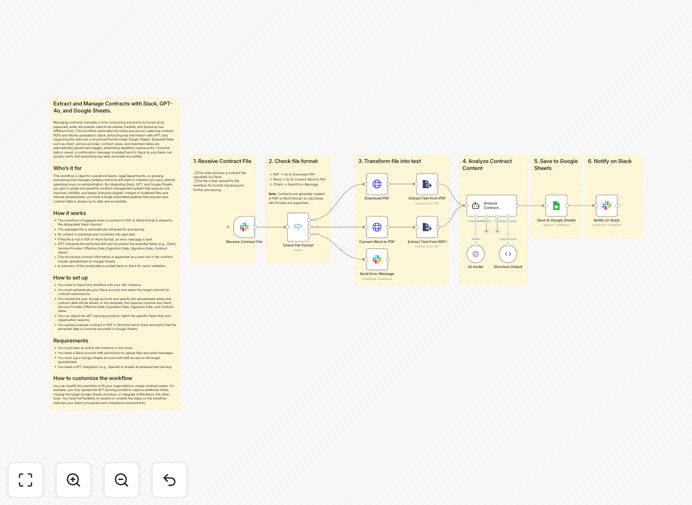
This automation solves that by creating a seamless pipeline from contract sharing to data storage. The moment a contract PDF (or Word doc) is uploaded to a designated Slack channel, this workflow springs into action. It retrieves the file, converts its content to text, uses GPT-4o's intelligence to identify and extract the crucial information, and then neatly appends it as a new row in your master Google Sheets contract tracker. Finally, it posts a confirmation back to Slack so the team knows it's been processed.
The result is a contract management system that runs itself. Your data is always accurate, up-to-date, and searchable in one place, giving you instant visibility into all agreements without any manual work.
How It Works
The workflow follows a logical, step-by-step process to transform a raw contract file into structured, actionable data.
Step 1: Trigger from Slack
The workflow is activated when a new file is uploaded to a specific Slack channel you choose (e.g., #contracts). It listens continuously for PDF or .doc/.docx files.
Step 2: File Retrieval & Text Extraction
The automation downloads the uploaded file. It then uses a document processing node to extract all the text content from the PDF or Word document, preparing it for analysis.
Step 3: AI-Powered Data Parsing
The extracted text is sent to GPT-4o (or another AI model). A carefully crafted prompt instructs the AI to find and structure specific fields: Client, Service Provider, Effective Date, Expiration Date, Signature Date, and Contract Value. The AI understands the context and pulls these details accurately from the contract language.
Step 4: Data Validation & Formatting
The workflow includes checks to ensure the AI returned usable data. It formats dates consistently and handles any missing fields gracefully before proceeding.
Step 5: Log to Google Sheets
The structured data is appended as a new row in your pre-configured Google Sheet. Each column corresponds to a data field, creating a perfect, sortable, and filterable contract database.
Step 6: Confirmation & Notification
To close the loop, a summary message is posted back to the Slack channel (or to a different channel like #operations). This message confirms the contract has been logged and shows the extracted details for a quick visual verification by your team.
Pro tip: You can easily extend this workflow to also save the original PDF to a specific folder in Google Drive or SharePoint, linking the file to the row in Sheets for a complete digital paper trail.
Who This Is For
This automation is a game-changer for any business or team that deals with a steady stream of contracts.
Operations & Admin Teams: Free yourself from the tedious, repetitive task of data entry. Ensure every contract is captured in the system instantly, without chasing people for information.
Legal Departments & Law Firms: Maintain a master register of all agreements (NDAs, MSAs, SOWs) with key dates for renewal and compliance. Reduce the risk of missing a critical deadline.
Sales & Account Management: When a new deal is closed and the contract is signed, have the details automatically flow into your CRM or deal tracker, keeping sales pipelines and client records perfectly updated.
Startups & SMBs: Implement professional contract management processes without hiring dedicated staff. This system scales with you, handling 5 or 50 contracts a month with the same efficiency.
Finance Teams: Get automatic visibility into contract values and renewal dates for accurate revenue forecasting and cash flow planning.
What You'll Need
To use this template, you'll need a few accounts and permissions set up. Don't worry—they're common tools.
- An n8n Instance: You can use the free n8n.cloud account or a self-hosted version.
- Slack Workspace: With permissions to create an app and listen to file uploads in a channel.
- Google Account: With edit access to a Google Sheet that will serve as your contract tracker.
- OpenAI API Access (or equivalent): An API key for GPT-4o or another LLM to power the text parsing. Claude or Gemini models also work with minor adjustments.
Quick Setup Guide
You can have this automation running in under 30 minutes by following these steps.
- Download & Import: Click the "Download Template" button above to get the JSON file. In your n8n dashboard, go to Workflows > Import from File and select the downloaded file.
- Configure Slack Trigger: In the first node, authenticate your Slack account and select the channel (e.g., #contracts) where team members will upload contracts.
- Set Up AI Integration: In the "OpenAI Chat Model" node, add your API key. You can review and tweak the prompt if you want to extract additional or different fields from your contracts.
- Connect Google Sheets: In the "Google Sheets" node, authenticate your Google account. Paste the URL of your contract tracker spreadsheet and specify the worksheet name (e.g., "Sheet1"). Ensure your sheet has the correct column headers.
- Test & Activate: Turn the workflow on. Upload a sample contract PDF to your designated Slack channel. Within seconds, you should see a new row in your Google Sheet and a confirmation in Slack.
Key Benefits
Eliminate Manual Data Entry: Save 15-30 minutes of administrative work per contract. For a team processing 20 contracts a month, that's 5-10 hours reclaimed for higher-value tasks.
100% Data Accuracy: Remove human error from typing dates, names, and dollar amounts. The AI reads directly from the source document, ensuring your records are precise.
Instant Visibility & Searchability: Your entire contract portfolio is live in a filterable, sortable spreadsheet. Find any contract by client, date, or value in seconds, without digging through folders or emails.
Improved Compliance & Risk Management: Never miss a renewal or expiration date again. With all dates logged, you can set up additional automations for alerts 60 or 90 days in advance.
Scalable Process: This system works perfectly whether you have 5 contracts a year or 500. The workflow handles each one identically, ensuring consistency as your business grows.