What This Workflow Does
Manual receipt processing is a tedious, error-prone task that drains hours from your team each week. This automation solves that by creating a seamless, intelligent pipeline from receipt capture to structured data.
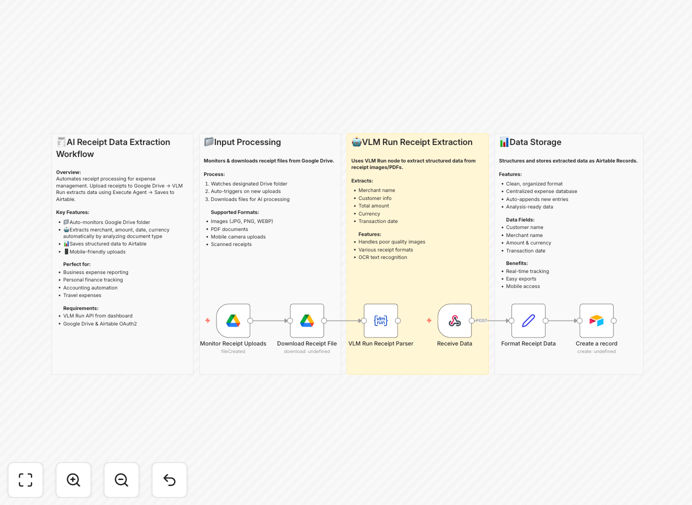
The workflow monitors a designated Google Drive folder for new receipt uploads—whether they're photos from a phone, scanned PDFs, or emailed attachments saved to Drive. When a new file appears, it's automatically processed by the VLM Run AI node, which extracts key details like merchant name, transaction date, total amount, currency, and often line items or tax amounts. This structured data is then instantly written to an Airtable base, creating a searchable, filterable expense log.
Beyond simple extraction, this system eliminates manual data entry, reduces human error, and accelerates expense reporting cycles from days to minutes. It's particularly valuable for freelancers, small businesses, and finance teams managing multiple employee expenses.
How It Works
The automation follows a logical, event-driven sequence that mimics how a human would process receipts—but at machine speed and accuracy.
1. Trigger: New File Detection
The workflow starts with a Google Drive trigger node that watches a specific folder (like "Receipts to Process") for new files. It can be configured to check at regular intervals or in real-time using webhooks if available.
2. File Preparation & AI Processing
When a new image or PDF is detected, the workflow downloads the file and prepares it for analysis. The VLM Run node then analyzes the receipt using vision-language models trained on document understanding. It identifies and extracts structured data fields regardless of receipt format or layout.
3. Data Validation & Transformation
Extracted data passes through a Set node that formats and validates information—ensuring dates are in correct format, amounts are numerical, and required fields are present. This step can include basic business logic, like flagging unusually high expenses for review.
4. Database Logging
The clean, structured data is then written to Airtable, creating a new record in your expense tracking base. Each record includes the extracted fields plus metadata like the original file link and processing timestamp for full auditability.
5. Optional Notifications & Follow-ups
The workflow can be extended to send confirmation emails or Slack messages, trigger approval requests, or even categorize expenses automatically based on merchant or amount rules.
Who This Is For
This automation delivers immediate value to several key audiences. Freelancers and solopreneurs can eliminate receipt clutter and streamline tax preparation. Small business owners and finance teams can process employee expenses faster with consistent data formatting. Accountants and bookkeepers can reduce manual data entry time by 80% or more, focusing instead on analysis and advisory work.
It's also ideal for project-based businesses that need to track expenses against specific clients or jobs, and startups wanting to implement professional expense tracking without expensive software subscriptions. Even larger organizations can use this as a departmental solution before enterprise system rollout.
Pro tip: Create a shared Google Drive folder for your team's receipts and set this workflow as the central processing hub. This creates a standardized expense submission process without requiring everyone to learn new software.
What You'll Need
- A Google Drive account with a dedicated folder for receipt uploads.
- An Airtable account with a base containing fields for: Merchant, Date, Amount, Currency, Category, and optionally File URL.
- VLM Run API credentials (sign up at app.vlm.run to get your API key).
- An n8n instance—either self-hosted or using n8n.cloud.
- The VLM Run node installed in your n8n instance via the "Install" feature in the node panel.
Quick Setup Guide
Follow these steps to implement this automation in under 30 minutes:
- Import the template into your n8n workspace using the downloaded JSON file.
- Configure Google Drive connection by authenticating with OAuth2 and specifying your receipt folder ID.
- Add your VLM Run API key in the VLM Run node settings (sign up at app.vlm.run if you haven't).
- Set up your Airtable base with the required fields and connect it to the Airtable node.
- Test with a sample receipt by uploading one to your Google Drive folder and verifying the data appears correctly in Airtable.
- Activate the workflow and set it to run on a schedule (e.g., every 15 minutes) or trigger via webhook for real-time processing.
Key Benefits
Save 5+ hours monthly per employee on manual receipt entry and categorization. What used to be a weekly chore becomes a background process that happens automatically.
Eliminate data entry errors from misread amounts or mistyped merchant names. AI extraction consistently reads information correctly, improving financial accuracy.
Accelerate reimbursement cycles from days to hours. Employees get paid faster, improving satisfaction and reducing administrative follow-up.
Create searchable expense records instantly. Find any transaction by merchant, date, or amount in seconds instead of digging through folders or emails.
Build a scalable foundation for more advanced automations like budget alerts, expense reporting, or integration with accounting software like QuickBooks or Xero.