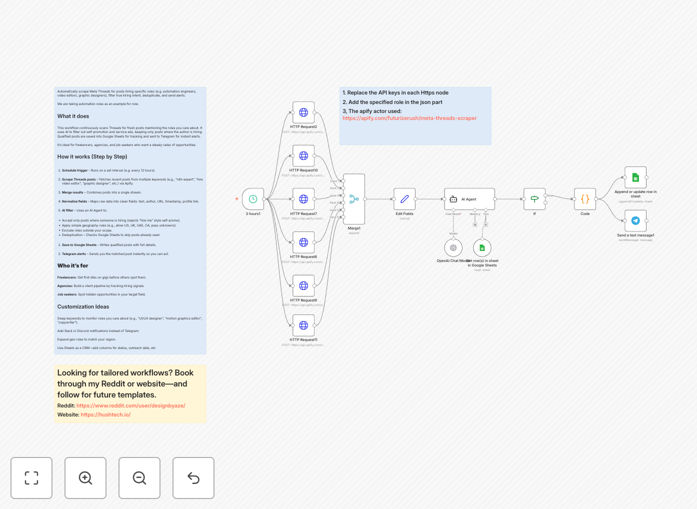
What This Workflow Does
For freelancers, recruiters, and agencies, finding relevant job posts on fast-moving platforms like Meta Threads is like searching for a needle in a haystack. Manual scrolling is inefficient, and you risk missing time-sensitive opportunities. This automation solves that by acting as your 24/7 lead radar.
It continuously scans Threads for posts containing keywords related to roles you target (like "automation engineer," "hire video editor," or "graphic designer needed"). It doesn't just collect links—it uses an AI agent to intelligently filter out noise, such as self-promotion ("hire me") or service ads, focusing only on posts where someone is genuinely looking to hire. Qualified leads are then logged in a Google Sheet for tracking and sent as instant alerts to your Telegram, so you can be among the first to apply.
How It Works
The workflow is a smart pipeline that transforms social media noise into actionable leads.
Step 1: Scheduled Trigger & Scraping
A schedule node activates the workflow at your chosen interval (e.g., every 6 hours). It then uses the Apify integration to scrape Threads for posts matching your configured search terms, returning data like post text, author, URL, and timestamp.
Step 2: Data Merging & Normalization
Results from multiple keyword searches are merged into a single stream. A function node cleans and standardizes the data, ensuring consistent field names for the next steps.
Step 3: AI-Powered Intent Filtering
This is the core intelligence. An AI Agent node (like OpenAI) analyzes each post to answer: "Is this post from someone looking to hire for a role?" It rejects "hire me" posts, service advertisements, and irrelevant content, passing only genuine hiring signals. You can also add geographic or role-specific rules.
Step 4: Deduplication & Logging
The workflow checks a Google Sheet to see if this post URL has already been captured, preventing duplicate alerts. New, unique posts are appended to the sheet, creating a historical database of opportunities.
Step 5: Instant Telegram Notification
Finally, a Telegram node sends a formatted message to your chosen chat or channel with the post details and a direct link, enabling you to engage immediately.
Pro tip: Use the Google Sheet not just as a log, but as a simple CRM. Add columns for "Contacted," "Status," and "Notes" to track your outreach and follow-ups directly within the automation.
Who This Is For
Freelancers & Solopreneurs: Digital marketers, developers, designers, and writers who need a steady stream of client work and want to discover gigs before their competition does.
Recruitment Agencies & Headhunters: Teams looking to source candidates from niche communities on Threads where professionals discuss their work and companies post informal hiring needs.
Small Business Owners: Those looking to hire talent for specific projects and want to tap into community-focused platforms beyond traditional job boards.
Job Seekers in Tech & Creative Fields: Individuals targeting roles in automation, AI, content creation, or design who want to uncover hidden opportunities not listed on mainstream sites.
What You'll Need
- An n8n instance (cloud or self-hosted).
- An Apify account and API token for scraping Threads.
- An OpenAI API key (or another LLM provider) for the AI filtering step.
- A Google Cloud Service Account with Sheets API enabled to write data to a spreadsheet.
- A Telegram Bot Token and Chat ID to receive alerts.
- A list of search keywords for your target roles (e.g., "looking for a developer," "hiring editor," "#hire").
Quick Setup Guide
Get this automation running in your n8n workspace in under 15 minutes.
- Download & Import: Click the "Download Template" button above and import the JSON file into your n8n workspace.
- Configure Apify: In the "Apify: Scrape Threads" node, enter your API token and set your search keywords and result limits.
- Set Up AI Agent: In the AI node, add your OpenAI API key and review the system prompt. Tweak the instructions if you have specific geographic or role filters.
- Connect Google Sheets: Create a new Google Sheet and share it with your service account email. Add the Sheet ID and range to the Google Sheets node in the workflow.
- Set Up Telegram Bot: Create a bot via @BotFather on Telegram to get your token. Start a chat with the bot and get your Chat ID. Add both to the Telegram node.
- Activate & Test: Turn on the workflow and run it once manually. Check your Telegram and Google Sheet to confirm it's working, then let the schedule trigger handle the rest.
Key Benefits
Save 10+ Hours Per Week: Eliminate the daily manual grind of scrolling through social media looking for opportunities. The automation works while you sleep or focus on billable work.
First-Mover Advantage: Be the first to respond to new hiring posts. In competitive freelance and job markets, responding within minutes instead of hours can be the difference between landing the gig and missing out.
High-Quality, Filtered Leads: The AI intent filter drastically reduces noise. You spend time only on genuine opportunities, not on sorting through irrelevant posts or self-promotion.
Build a Searchable Opportunity Database: Every captured post is saved to Google Sheets with metadata. Over time, you build a valuable, searchable database of leads and hiring trends you can analyze.
Fully Customizable for Any Niche: Easily adapt the search keywords and AI filters for any industry or role—from "SEO specialist" to "React developer" or "voiceover artist."