Fireflies.ai Slack ClickUp AI Summarization n8n

Fireflies AI Meeting Summaries to Slack & ClickUp

Automatically turn meeting transcripts into AI summaries and actionable tasks. Save hours of manual note‑taking.

Download Template JSON · n8n compatible · Free
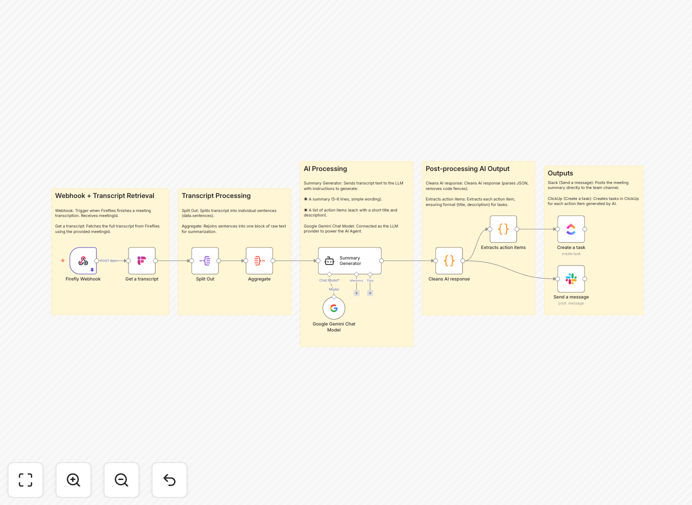
Fireflies AI meeting summary automation workflow diagram in n8n

What This Workflow Does

Meetings are essential for collaboration, but the follow‑up—writing summaries, extracting action items, and assigning tasks—is a massive time sink. This automation solves that by connecting Fireflies.ai (which records and transcribes meetings) with AI to generate concise summaries, then posts them to Slack for immediate visibility and creates actionable tasks in ClickUp.

Instead of someone spending 30–60 minutes after each meeting manually compiling notes and chasing down who said what, this workflow does it instantly, accurately, and consistently. It ensures no action item falls through the cracks and gives your entire team clarity the moment the meeting ends.

How It Works

1. Webhook Trigger

When Fireflies.ai finishes transcribing a meeting, it sends a notification to your n8n webhook. This triggers the workflow automatically—no manual intervention needed.

2. Transcript Retrieval

The workflow uses the meeting ID from the webhook to fetch the full transcript from Fireflies via its API. This includes every speaker, timestamp, and utterance.

3. AI Summarization

The raw transcript is sent to Google Gemini (or another AI model). The AI is instructed to generate a short, clear summary of key discussion points and a structured list of action items with owners and deadlines.

4. Distribution & Task Creation

The polished summary is posted to a designated Slack channel, giving everyone immediate visibility. Each extracted action item is then created as a task in ClickUp, assigned to the responsible person, added to the correct list, and given a due date.

Who This Is For

This template is ideal for teams that hold regular meetings and want to eliminate manual follow‑up work:

  • Project managers who run sprint planning, retrospectives, or client syncs.
  • Remote & hybrid teams that rely on clear, written communication to stay aligned.
  • Leadership teams conducting strategic reviews where decisions and next steps must be captured precisely.
  • Customer‑facing teams (sales, support, success) who need to document client conversations and commitments.
  • Any team using ClickUp, Asana, or similar for task management and Slack for day‑to‑day communication.

Pro tip: Start with your most repetitive meeting—like a weekly team sync—to validate the automation. Once you see the time saved, expand to other meetings.

What You'll Need

  1. A running n8n instance (cloud or self‑hosted).
  2. A Fireflies.ai account with API access enabled.
  3. Google Gemini API credentials (or another AI model like OpenAI) for the summarization step.
  4. A Slack workspace with OAuth2 app credentials configured in n8n.
  5. A ClickUp account with OAuth2 access set up.

Quick Setup Guide

Follow these steps to import and configure the template in your n8n environment:

  1. Download the template using the button above and save the JSON file.
  2. In your n8n dashboard, go to Workflows → Import from file and select the downloaded JSON.
  3. Configure credentials for Fireflies, Google AI, Slack, and ClickUp in the n8n credentials panel.
  4. Update the Slack channel ID and ClickUp list ID in the respective nodes to match your workspace.
  5. Set up the webhook URL in Fireflies.ai under integrations to point to your n8n webhook trigger.
  6. Activate the workflow and test with a recent meeting transcript.

Key Benefits

Save 5–10 hours per month per manager on manual note‑taking and follow‑up. That time can be reinvested in strategic work instead of administrative chores.

Eliminate “I thought you were doing that” moments by automatically creating assigned tasks in ClickUp. Accountability is built‑in, not an afterthought.

Improve meeting culture with consistent, searchable summaries in Slack. New team members can catch up quickly, and decisions are documented for reference.

Scale without adding overhead as your team grows. The automation handles 1 meeting or 100 with the same reliability—no linear increase in manual work.

Reduce human error and bias in note‑taking. AI captures every mention objectively, ensuring nothing important is missed or misrepresented.

Frequently Asked Questions

Common questions about meeting automation and integration

Automating meeting summaries saves 30–60 minutes per meeting, ensures no action items are forgotten, and gives your team immediate clarity. Manual note‑taking is error‑prone and time‑consuming, while AI automation delivers consistent, structured outputs instantly.

Beyond time savings, it creates a searchable knowledge base of decisions and commitments. This is invaluable for onboarding, audits, and keeping remote teams aligned without endless follow‑up emails.

Modern AI models like Google Gemini are highly accurate at extracting key discussion points and action items from transcripts. They avoid human biases, capture every mention, and provide objective summaries. For most business meetings, AI summaries are as good or better than manual notes.

AI doesn't get tired, distracted, or selectively listen. It treats every speaker equally and identifies action items based on linguistic patterns (e.g., “will do,” “by Friday,” “assign to Sarah”). This consistency improves over time as you refine the prompts.

Instant Slack sharing keeps everyone aligned without email clutter. Automatic ClickUp task creation ensures accountability, assigns owners, sets due dates, and integrates into your project workflow. This eliminates the “who does what by when” confusion post‑meeting.

The combination creates a closed‑loop system: discussion → summary → task → tracking. It bridges communication (Slack) with execution (ClickUp), turning talk into actionable outcomes.

Yes, it's ideal for recurring meetings. Once set up, it runs automatically after every Fireflies recording. It creates a searchable archive of summaries in Slack and a trackable task list in ClickUp, turning meeting overhead into a streamlined operational process.

You can customize the output for different meeting types—stand‑ups might focus on blockers and plans, while project reviews highlight risks and decisions. The template is flexible enough to adapt.

n8n integrates with Asana, Jira, Trello, Monday.com, and 300+ other apps. You can easily modify the template to create tasks in your preferred tool. The workflow logic remains the same—only the destination app changes.

Swapping ClickUp for Asana involves replacing one node and mapping the same fields (task title, assignee, due date, project). The rest of the automation—Fireflies, AI, Slack—stays identical.

When self‑hosting n8n, all data stays within your infrastructure. API calls are encrypted. You control which team channels receive summaries. For highly sensitive discussions, you can add approval steps or redact certain sections before sharing.

Best practices include using private Slack channels, restricting ClickUp access, and reviewing AI prompts to avoid exposing confidential info. The template can be extended with a “manager approval” node if needed.

Yes, GrowwStacks specializes in custom meeting automation systems tailored to your specific tools, workflows, and security requirements. We can integrate your CRM, project tools, and internal systems to create a complete meeting‑to‑action pipeline.

Our team will design a solution that matches your meeting cadence, tool stack, and reporting needs—whether you need executive summaries for leadership, detailed action items for engineering, or client‑facing notes for sales.

  • Integration with your existing tech stack (CRM, ERP, BI tools)
  • Custom approval workflows and compliance controls
  • Dashboard and reporting on meeting outcomes

Need a Custom Meeting Automation?

This free template is a starting point. Our team builds fully tailored automation systems for your specific business needs.