What This Workflow Does
Manual meeting scheduling is a time-consuming, error-prone process that frustrates both your team and your clients. This automation solves that by creating a seamless pipeline from initial request to confirmed meeting.
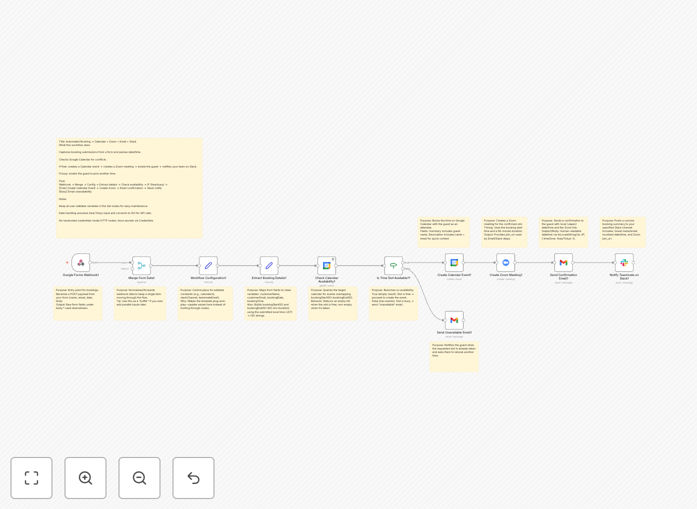
When someone submits a meeting request through your form, this workflow automatically checks your Google Calendar for availability. If the slot is free, it creates a calendar event, generates a Zoom meeting link, sends a professional confirmation email to the guest, and posts a summary to your team's Slack channel. If the requested time is busy, it sends a polite alternative-time request email—all without any human intervention.
The system handles time zone conversion internally (defaulting to Asia/Tokyo but configurable to any time zone), ensuring consistency across all integrated platforms and eliminating time zone confusion.
How It Works
Step 1: Form Submission Trigger
The workflow activates when a form submission arrives via webhook. It extracts the guest's name, email, preferred date, and time from the form data, then normalizes this information for consistent processing.
Step 2: Calendar Availability Check
The system queries your Google Calendar to see if the requested time slot is available. It uses the calendar ID you specify and checks for any existing events that would conflict with the proposed meeting.
Step 3: Conditional Branching
Based on the calendar check result, the workflow branches. If the slot is free, it proceeds to schedule the meeting. If busy, it triggers the "alternative time" email path.
Step 4: Meeting Creation & Notification
For available slots: creates a Google Calendar event with all details, generates a Zoom meeting with secure join link, sends a beautifully formatted Gmail confirmation to the guest, and posts a concise summary to your designated Slack channel for team awareness.
Step 5: Alternative Time Request
For busy slots: sends a professional email asking the guest to select another time, often including a link back to your scheduling page or suggesting specific alternative slots.
Who This Is For
This automation is ideal for customer success teams managing onboarding calls, sales teams scheduling demos, education providers coordinating tutoring sessions, agencies booking client consultations, and community managers organizing office hours.
Any business that collects meeting requests through forms—whether it's a "Contact Us" form, consultation request, demo signup, or interview scheduling—will benefit from eliminating the manual back-and-forth that typically follows form submission.
What You'll Need
- Active accounts for Google Calendar, Zoom, Gmail, and Slack
- n8n credentials configured for each of these services
- A form or webhook source that sends structured data (name, email, datetime)
- Google Calendar ID where meetings should be scheduled
- Slack channel ID for team notifications
- Sender email address for confirmation messages
Pro tip: Before going live, test with a separate test calendar and Slack channel to ensure everything works as expected without affecting your real operations.
Quick Setup Guide
- Import the downloaded JSON template into your n8n instance
- Open the "Workflow Configuration (Set)" node and update the variables: calendar ID, meeting duration, Slack channel, and sender information
- Map your form fields in the "Extract Booking Details" section to match your form's data structure
- Connect credentials in each service node (Google Calendar, Zoom, Gmail, Slack) using n8n's credential manager
- Test the workflow with a real form submission to verify all connections work correctly
- Activate the workflow and connect it to your live form's webhook
Key Benefits
Save 15-30 minutes per scheduled meeting by eliminating manual coordination, calendar checking, link generation, and notification sending.
Reduce no-shows by up to 40% with immediate, professional confirmations that include calendar invites and clear meeting details.
Eliminate double-bookings entirely through automated calendar conflict checking before any meeting is created.
Improve team visibility with automatic Slack notifications that keep everyone informed about scheduled meetings without manual updates.
Create consistent branded experiences with professionally formatted confirmation emails that reinforce your company's professionalism.