What This Workflow Does
This automation solves a critical bottleneck in digital content creation: converting 2D images into 3D models. Traditionally, this process requires specialized 3D modeling skills, expensive software, and hours of manual work per model. For e-commerce businesses, game developers, and AR/VR creators, this creates a scalability problem.
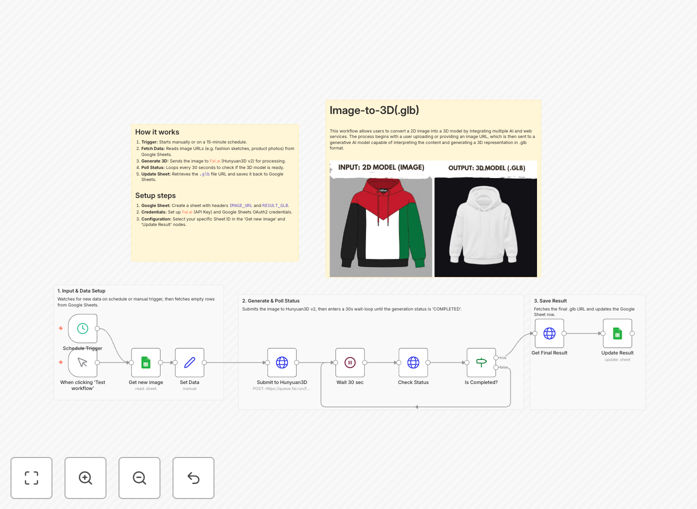
The workflow automates the entire pipeline by connecting Google Sheets (where you manage your image URLs) with the Hunyuan3D v2 AI model via Fal.ai. It monitors your spreadsheet for new images, sends them for 3D generation, polls for completion, and writes the resulting .glb file links back to your sheet—all without manual intervention.
What used to take days of artist time now happens automatically in the background, enabling businesses to create 3D assets at scale for product visualization, virtual environments, and interactive content.
How It Works
The automation follows a systematic process to ensure reliable 3D model generation from your image database.
1. Image Detection & Retrieval
The workflow checks your Google Sheet at scheduled intervals, looking for rows where the IMAGE_URL column is populated but the RESULT_GLB column is empty. This allows you to add new images to process simply by pasting URLs into your spreadsheet.
2. AI 3D Generation Initiation
Each detected image URL is sent to the Hunyuan3D v2 API on Fal.ai. This advanced AI model analyzes the 2D image, interprets depth and perspective cues, and begins constructing a three-dimensional representation in .glb format—the standard for web-based 3D content.
3. Intelligent Status Polling
Since 3D generation takes time (typically 1-5 minutes per image), the workflow enters a polling loop, checking the job status every 30 seconds. It only proceeds once the model is marked "COMPLETED," ensuring you don't get partial or failed generations.
4. Result Delivery & Tracking
Once generation completes, the workflow retrieves the download link for the finished .glb file and writes it back to the corresponding row in your Google Sheet. This creates a complete audit trail and makes the 3D assets immediately accessible to your team.
Who This Is For
This automation delivers value across multiple industries and use cases where 3D content creation is becoming essential but remains resource-intensive.
E-commerce & Retail: Convert product catalog images into 3D models for interactive product viewers, virtual try-ons, and augmented reality shopping experiences.
Game Development & Entertainment: Rapidly prototype game assets, environment props, and character models from concept art, dramatically accelerating pre-production.
Architecture & Real Estate: Generate basic 3D representations of spaces from photographs for client presentations and virtual tours.
Education & Training: Create 3D educational materials from textbook illustrations or reference images for interactive learning experiences.
Marketing & Agencies: Produce 3D content for social media, advertisements, and interactive campaigns without needing in-house 3D modeling expertise.
What You'll Need
- A Google Sheets document with two columns: IMAGE_URL and RESULT_GLB
- Fal.ai account and API key for accessing the Hunyuan3D v2 model
- n8n instance (cloud or self-hosted) to run the automation
- Image URLs accessible online (hosted on your server, Google Drive, or cloud storage)
- Basic understanding of spreadsheet management for organizing your image database
Pro tip: For best results with AI 3D generation, use clear, well-lit product photos against simple backgrounds. The AI interprets depth from shadows and lighting cues, so consistent lighting across your image set improves model quality.
Quick Setup Guide
Get your automated 3D generation pipeline running in under 15 minutes with these steps.
- Import the template: Download the JSON file above and import it into your n8n instance using the "Import from File" option.
- Configure Google Sheets: Create your spreadsheet with the required columns and connect n8n to it using Google Sheets OAuth credentials.
- Set up Fal.ai authentication: Create a Header Auth credential in n8n with "Authorization" as the name and "Key YOUR_API_KEY" as the value (replace with your actual Fal.ai key).
- Test with sample images: Add 2-3 image URLs to your sheet and trigger the workflow manually to verify the complete pipeline works.
- Schedule automation: Set the Schedule Trigger node to run at intervals matching your production needs (hourly, daily, or on-demand).
Key Benefits
Reduce 3D modeling costs by 80-90%. What traditionally requires $500-1000 per model in artist fees now costs pennies in API calls, making 3D content economically viable at scale.
Accelerate production timelines from weeks to hours. Process hundreds of images simultaneously instead of queuing them with limited artist bandwidth, dramatically speeding up project delivery.
Democratize 3D content creation across your organization. Marketing teams, product managers, and content creators can initiate 3D model generation without specialized software skills or waiting for technical resources.
Create consistent, standardized 3D assets. The AI applies the same generation parameters to every image, ensuring visual consistency across your entire 3D catalog—something difficult to achieve with multiple human artists.
Future-proof your content strategy. As AR, VR, and 3D web experiences become standard, you'll have a scalable pipeline to convert your existing 2D assets into the 3D formats these platforms require.