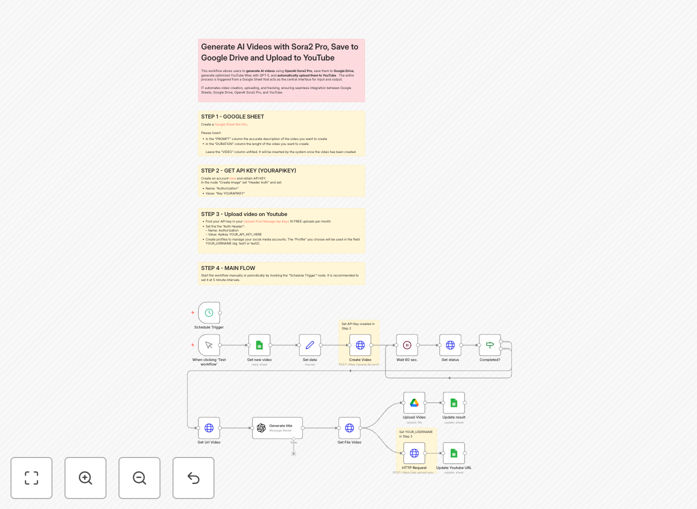
What This Workflow Does
This automation solves the time-consuming, manual process of creating and publishing video content. Businesses today need consistent video output for marketing, social media, and training, but traditional production is expensive and slow. This workflow bridges that gap by creating a fully automated pipeline from idea to publication.
Using a Google Sheet as your control panel, you simply enter video prompts and desired durations. The system then generates professional-quality videos using OpenAI's Sora2 Pro, stores them in Google Drive for organization and backup, and publishes them directly to your YouTube channel with SEO-optimized titles. What used to take hours or days now happens automatically while you focus on strategy.
How It Works
1. Trigger & Data Collection
The workflow checks your designated Google Sheet for new video requests. It identifies rows where the prompt and duration are filled but no video URL exists, ensuring it only processes new entries.
2. AI Video Generation
For each new request, the system sends the prompt and duration to the Sora2 Pro API via Fal.ai. It then polls the API every 60 seconds until video generation is complete, handling the asynchronous nature of AI video creation automatically.
3. Parallel Processing & Upload
Once the video is ready, three actions happen simultaneously: the video file is retrieved and uploaded to your specified Google Drive folder; the original prompt is sent to GPT-5 to generate an SEO-optimized YouTube title; and the video is published to your YouTube channel via Upload-Post.com.
4. Completion & Logging
The workflow updates the original Google Sheet row with both the Google Drive URL (for archiving) and the new YouTube video URL, creating a complete audit trail. Conditional checks ensure any errors are caught and handled appropriately.
Who This Is For
This automation is ideal for marketing teams needing consistent social media content, content creators scaling their video production, educators creating tutorial materials, small businesses building their YouTube presence, and agencies managing multiple client channels. If you produce more than 5-10 videos per month manually, this workflow will save you significant time and resources.
What You'll Need
- A Google Sheet with specific columns (PROMPT, DURATION, VIDEO, YOUTUBE_URL)
- API keys for Fal.ai (Sora2 Pro access) and Upload-Post.com (YouTube publishing)
- Google Drive folder for video storage
- YouTube channel connected to Upload-Post.com
- Optional: OpenAI API credentials for GPT-5 title generation
- n8n instance (cloud or self-hosted) to run the workflow
Quick Setup Guide
Follow these steps to implement this automation in under 30 minutes:
- Import the template: Download the JSON file above and import it into your n8n instance.
- Configure Google Sheets: Update the "Get new video" and update nodes with your Google Sheet document ID and sheet name.
- Set up API credentials: Add your Fal.ai and Upload-Post.com API keys to the respective HTTP Request nodes using header authentication.
- Connect YouTube: In Upload-Post.com, connect your YouTube channel as a profile and update the username parameter in the workflow.
- Specify storage: Enter your Google Drive folder ID in the "Upload Video" node.
- Test and activate: Add a test row to your Google Sheet and run the workflow manually first. Once confirmed, activate the schedule trigger for automatic operation.
Pro tip: Start with shorter videos (5-15 seconds) to test prompt effectiveness and manage API costs before scaling to longer content. Use specific, descriptive prompts with style references for more consistent results.
Key Benefits
Reduce video production time by 80-90%. What traditionally requires scriptwriting, filming, editing, and uploading now happens automatically from a single text prompt.
Maintain consistent content output. Schedule the workflow to run daily or weekly to ensure a steady stream of video content without manual intervention.
Centralize control through familiar tools. Manage your entire video pipeline through Google Sheets—no need to learn new dashboards or interfaces.
Scale production without scaling costs. Generate multiple videos in parallel without additional human resources, perfect for A/B testing or multi-platform content.
Ensure reliability with built-in error handling. Conditional checks, status polling, and comprehensive logging prevent failed processes from going unnoticed.