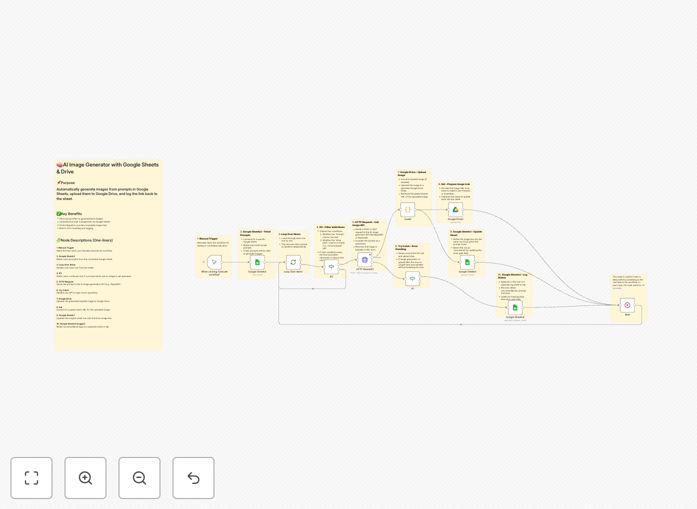
What This Workflow Does
This automation solves the tedious, error-prone process of manually creating AI images for business purposes. Creative teams, marketers, and e-commerce businesses often waste hours copying prompts from spreadsheets, generating images one-by-one, downloading files locally, uploading to cloud storage, and updating tracking sheets with links.
The workflow transforms a simple Google Sheet into a complete image production pipeline. It reads prompts from your spreadsheet, sends them to an AI image generation API (like Image-to-Image GPT), automatically uploads the resulting images to Google Drive, and logs the file links and timestamps back into your sheet—all without human intervention.
Beyond basic generation, it includes intelligent error handling that logs failed attempts separately, rate limiting to avoid API overages, and modular design that lets you extend it with notifications, quality checks, or integration with other marketing tools.
How It Works
1. Trigger & Data Collection
The workflow starts either manually or on a schedule, reading all rows from your designated Google Sheet. It filters for rows where the "Prompt" column isn't empty but the "Drive Path" column is—ensuring only new, ungenerated prompts are processed.
2. AI Image Generation
Each prompt is sent to the AI image generation API via HTTP request. The workflow handles API authentication, proper formatting, and includes error checking. If the API returns an error, details are logged to a separate error tracking sheet for later review.
3. Image Processing & Upload
Successful API responses contain base64-encoded images. A Code node decodes this data into proper image files, which are then uploaded to your specified Google Drive folder with consistent naming conventions based on the prompt or row ID.
4. Results Logging
Once uploaded, the workflow updates the original Google Sheet row with the Google Drive file link, generation timestamp, and status. A built-in wait node prevents hitting API rate limits when processing multiple prompts in sequence.
Pro tip: Start with a small batch of 5-10 test prompts to verify your API configuration and folder structure before scaling to hundreds of images. This helps identify prompt formatting issues early.
Who This Is For
This automation delivers immediate value to e-commerce businesses needing product mockups, marketing agencies producing campaign visuals, content teams creating article headers, SaaS companies generating UI illustrations, and any organization with regular visual content needs.
It's particularly valuable for teams managing product catalogs, content calendars, or marketing campaigns where visual consistency and volume matter. If you're currently paying for designer time or stock images, or if your team spends more than 5 hours weekly on manual image tasks, this workflow will show rapid ROI.
What You'll Need
- A Google Sheets document with columns for prompts, image URLs, drive paths, and timestamps
- Google Drive folder for storing generated images
- Access to an AI image generation API (like Image-to-Image GPT via RapidAPI, DALL-E, Stable Diffusion, or Midjourney API)
- n8n instance (cloud or self-hosted) with Google Sheets and Drive nodes configured
- API keys for your chosen image generation service
Quick Setup Guide
1. Download and import the JSON template into your n8n workspace.
2. Configure the Google Sheets node with your spreadsheet ID and range.
3. Set up the Google Drive node with your target folder ID.
4. Update the HTTP Request node with your AI API endpoint and authentication headers.
5. Test with a single row containing a simple prompt to verify the complete flow.
6. Once verified, you can add a Schedule Trigger node to run automatically daily or weekly.
Pro tip: Create a separate "Log" tab in your Google Sheet for error tracking. The workflow automatically sends failed generations here with error details for easy troubleshooting.
Key Benefits
Save 5-10 hours weekly per team member by eliminating manual image generation tasks. What previously required switching between browser tabs, download folders, and upload interfaces now happens automatically while your team focuses on higher-value work.
Reduce image production costs by 90%+ compared to manual designer work or stock photo purchases. API-based generation typically costs pennies per image versus dollars for human-created alternatives.
Ensure brand consistency through standardized prompt templates and generation parameters. Every image follows the same style guidelines without requiring manual oversight for each creation.
Scale visual content production instantly from dozens to hundreds of images without adding team members. The workflow processes prompts as quickly as your API limits allow, often generating overnight what would take weeks manually.
Maintain perfect organization with automatically named files in structured Google Drive folders and complete audit trails in your source spreadsheet. Never lose track of which prompt generated which image again.