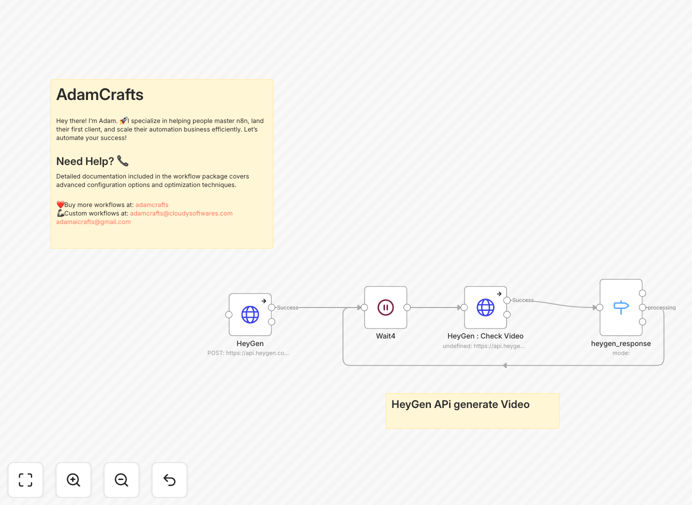
What This Workflow Does
This automation solves the critical business problem of video content creation being too slow, expensive, and difficult to scale. Traditional video production requires cameras, actors, studios, editors, and weeks of work for just a few minutes of content. This workflow eliminates all those barriers by connecting directly to HeyGen's AI video generation platform.
When you provide a script, the automation instantly sends instructions to HeyGen to create a professional video with your chosen digital avatar and voice. It manages the entire generation process, waits for completion, and delivers the finished video—transforming what used to take days into a process that happens automatically in minutes.
How It Works
Step 1: Script Submission
The workflow receives your video script through various triggers—this could be from a form submission, database update, scheduled run, or API call. The script includes all spoken content and any specific instructions for the video.
Step 2: HeyGen API Request
The automation sends a structured request to HeyGen's API with your script, selected avatar, voice preferences, background settings, and video dimensions. This happens instantly without any manual intervention.
Step 3: Status Monitoring
After initiating video generation, the workflow waits 30 seconds then checks the status. It continues checking at intervals until the video is either completed successfully or fails.
Step 4: Video Delivery
Once the video is ready, the workflow captures the download URL and can distribute it through your preferred channels—saving to cloud storage, sending via email, posting to social media, or integrating with your content management system.
Pro tip: Combine this with customer data from your CRM to create truly personalized video messages. Use merge tags to insert names, company details, or specific offers into the script automatically.
Who This Is For
This automation is ideal for marketing teams needing scalable video content, training departments creating educational materials, customer success teams sending personalized onboarding videos, and content creators producing regular social media updates. It's particularly valuable for businesses that need to produce video content in multiple languages or for different customer segments.
What You'll Need
- A HeyGen account with API access
- n8n instance (cloud or self-hosted)
- Basic understanding of video script structure
- Selected digital avatar from HeyGen's library
- Destination for finished videos (cloud storage, CMS, etc.)
Quick Setup Guide
- Download the template JSON file using the button above
- Import it into your n8n instance via the workflow import feature
- Connect your HeyGen credentials in the HTTP Request node
- Configure your preferred avatar, voice, and video settings
- Set up your trigger (manual, schedule, or webhook)
- Test with a simple script and activate the workflow
Key Benefits
Reduce video production time from weeks to minutes. What traditionally required scheduling, filming, editing, and rendering now happens automatically with a simple text input.
Cut video production costs by 80-95%. Eliminate expenses for equipment, studio time, actors, and professional editors while maintaining professional quality.
Scale personalized video content effortlessly. Create unique videos for different customers, regions, or use cases without additional production time or cost.
Maintain brand consistency across all video content. Use the same avatar, voice, and styling guidelines for every video, ensuring cohesive brand presentation.
Integrate video creation into existing workflows. Trigger video generation from CRM updates, form submissions, purchase confirmations, or any other business event.