What This Workflow Does
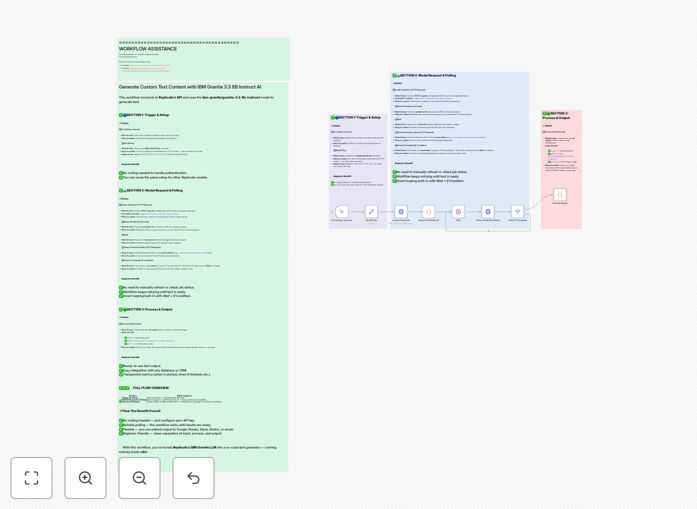
This automation connects your business to IBM's advanced Granite 3.3 8B Instruct AI model through the Replicate API platform, creating an intelligent text generation system. Instead of manually writing marketing copy, product descriptions, email content, or blog posts, you can automate these repetitive writing tasks with AI-powered precision.
The workflow handles the entire process from API authentication to content delivery. It manages secure API key storage, sends properly formatted requests to the AI model, monitors the generation process, and returns polished text ready for your business use. This eliminates hours of manual writing while maintaining consistent quality and brand voice across all your content.
Whether you need to generate 50 product descriptions for an e-commerce launch, create personalized email sequences for customer onboarding, or produce weekly blog content, this automation scales to meet your content production needs without increasing your team's workload.
How It Works
The workflow follows a structured approach to ensure reliable text generation with proper error handling and quality control.
1. Secure API Configuration
The workflow begins by securely storing your Replicate API credentials. This separation of sensitive data from the main logic follows security best practices and allows for easy credential rotation without modifying the core automation.
2. Intelligent Request Formation
Based on your input parameters—such as desired tone, word count, and content type—the workflow constructs optimized prompts for the IBM Granite model. It includes temperature controls for creativity vs. consistency, token limits for length management, and specific instructions to align with your brand guidelines.
3. Asynchronous Processing with Status Monitoring
Since AI text generation can take several seconds, the workflow implements intelligent polling. It sends the request to Replicate's API, receives a prediction ID, then periodically checks the status until generation completes. This asynchronous approach ensures your automation doesn't timeout while waiting for results.
4. Quality Validation and Output Structuring
Once the AI completes text generation, the workflow extracts the content, validates it meets basic quality thresholds, and structures it into a consistent format. It can add metadata like generation timestamp, model version, and performance metrics for tracking and optimization.
5. Integration with Your Systems
The final generated text can be automatically sent to your CMS, email marketing platform, social media scheduler, or internal documentation system. This creates a seamless content pipeline from ideation to publication.
Pro tip: Create template prompts for different content types (blog posts, product descriptions, social media updates) and store them as variables in your workflow. This allows non-technical team members to generate consistent content by simply selecting a template rather than writing complex prompts.
Who This Is For
This automation delivers value across multiple business functions and team sizes. Marketing teams can generate campaign copy and social media content at scale. E-commerce businesses can automate product description creation for new inventory. Content agencies can produce client drafts faster. SaaS companies can generate documentation and help articles. Solopreneurs and small businesses can maintain professional content output without dedicated writers.
The workflow is particularly valuable for businesses experiencing content bottlenecks, those expanding into new markets requiring localized content, or organizations implementing consistent brand voice across multiple channels. It's also ideal for technical teams that want to integrate AI capabilities into their existing systems without building custom infrastructure.
What You'll Need
- Replicate API account: Sign up for a Replicate account and obtain your API key for accessing the IBM Granite model.
- n8n instance: Either self-hosted n8n or n8n.cloud account with workflow execution capabilities.
- Content parameters: Define your typical content requirements—tone, style guidelines, word counts, and use cases.
- Target systems: Identify where generated content should be delivered (Google Docs, WordPress, email platform, etc.).
- Quality review process: Establish a human review step for important content before publication.
Quick Setup Guide
- Download and import: Click the download button above to get the JSON template file, then import it into your n8n instance.
- Configure API credentials: Add your Replicate API key to the secure credential node in the workflow.
- Customize prompts: Modify the prompt templates in the HTTP request node to match your content needs and brand voice.
- Set output parameters: Adjust temperature (creativity), max tokens (length), and other generation parameters based on your quality requirements.
- Connect destination systems: Add nodes to send generated content to your CMS, email platform, or other business systems.
- Test and refine: Execute the workflow with sample inputs, review the output quality, and fine-tune prompts as needed.
- Schedule or trigger: Set up automation triggers based on events (new products, weekly content calendar) or schedule regular execution.
Pro tip: Start with a small set of well-defined use cases rather than trying to automate all content at once. Perfect the workflow for product descriptions before expanding to blog content, then to email sequences. This iterative approach builds confidence and identifies optimization opportunities.
Key Benefits
Reduce content creation time by 70-80%. What typically takes hours of writing, editing, and formatting can be accomplished in minutes with AI assistance, freeing your team for higher-value strategic work.
Maintain consistent brand voice across all channels. Once configured with your brand guidelines, the AI produces content that aligns with your established tone and style, reducing the variability that comes from multiple human writers.
Scale content production without proportional cost increases. Generate hundreds of product descriptions, emails, or social posts without adding to your team size or agency budget, creating significant cost efficiencies.
Improve content quality through structured optimization. The workflow allows systematic testing of different prompts and parameters, enabling data-driven improvements to output quality over time.
Integrate AI capabilities into existing business processes. Rather than using standalone AI tools that create data silos, this workflow brings AI generation directly into your operational systems for seamless content pipelines.