What This Workflow Does
This n8n workflow automates the entire process of creating professional interior design moodboards from a simple client brief. Instead of spending hours manually searching for inspiration images, compiling visuals, and designing presentation layouts, this system does it all automatically. Clients submit their design preferences through a form, and within minutes, they receive a beautifully formatted, two-page PDF moodboard delivered directly to their inbox.
The workflow combines multiple AI technologies: Claude and Gemini agents analyze the design brief and generate detailed image prompts, Hugging Face's FLUX model creates high-quality interior visuals, and automated systems compile everything into a polished, brand-consistent presentation. This eliminates the most time-consuming parts of the design consultation process while delivering superior visual results that help clients visualize concepts before any physical work begins.
For interior designers, architects, and design studios, this represents a fundamental shift in how client presentations are created. What traditionally took 6-8 hours of manual work now happens automatically, freeing up creative professionals to focus on higher-value tasks like client relationships, project management, and detailed design development.
How It Works
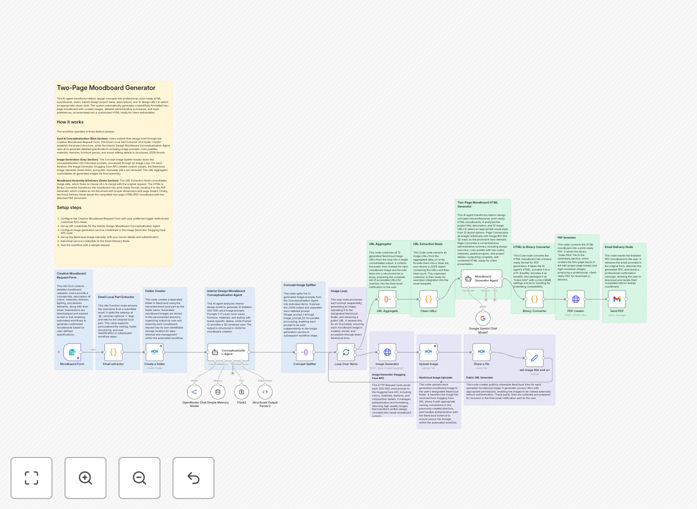
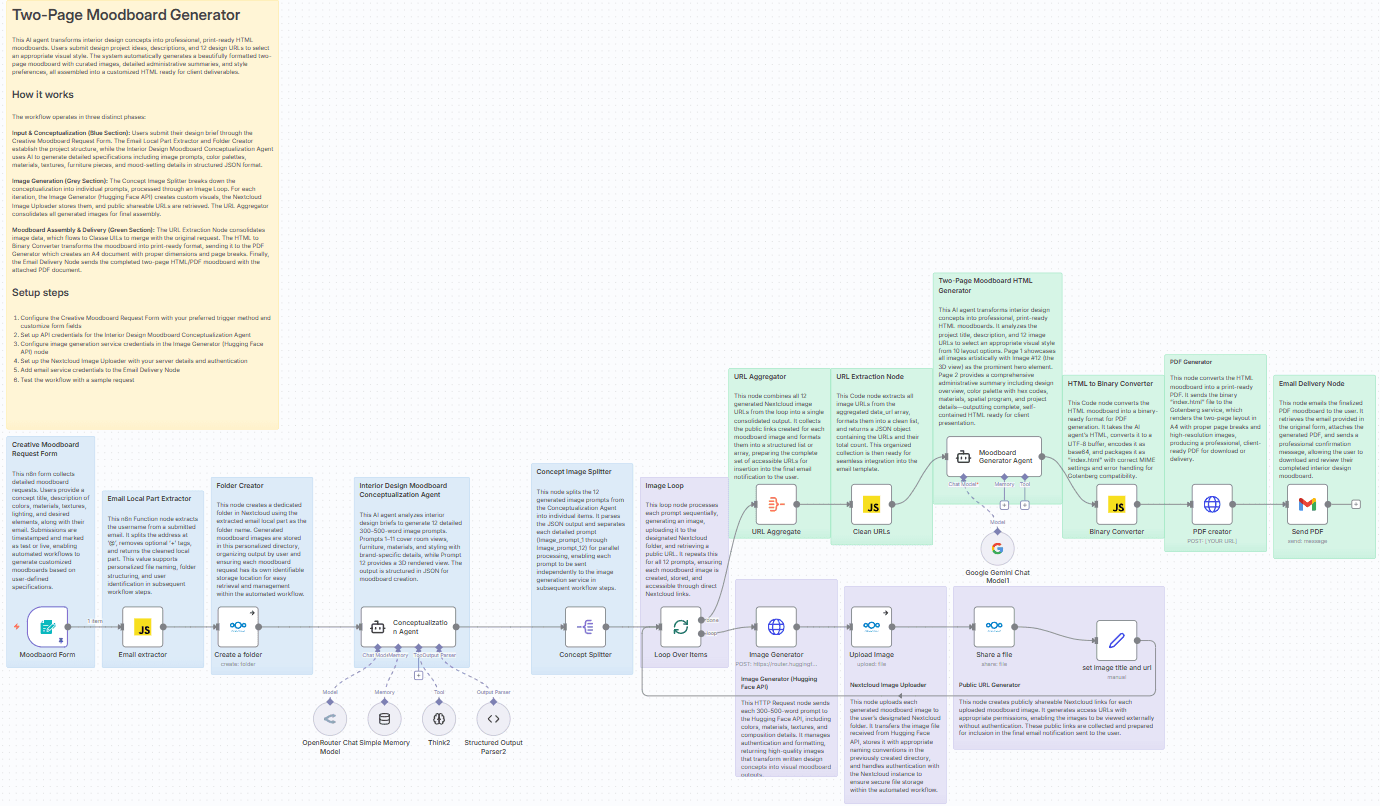
The automation follows a sophisticated seven-stage process that transforms a text description into a complete visual presentation.
1. Client Brief Collection
The process begins with a simple web form where clients describe their vision. They provide a project title, detailed description (including colors, materials, mood, and lighting preferences), and contact email. This form can be embedded on your website or sent directly to clients.
2. AI-Prompt Refinement
Claude Sonnet 4 (via OpenRouter) analyzes the client's brief and expands it into 12 detailed image prompts (300-500 words each). The AI considers architectural styles, material textures, color psychology, and spatial relationships to create comprehensive visual descriptions that will generate coherent images.
3. Visual Generation Loop
Each of the 12 prompts is sent sequentially to Hugging Face's FLUX.1-schnell model, which generates high-quality interior design images. The system creates 11 individual element shots (furniture, materials, details) plus one comprehensive 3D-rendered room view that integrates all design elements.
4. Secure Storage & Sharing
Generated images are automatically uploaded to your Nextcloud instance (or any cloud storage) and made available via public shareable URLs. This creates a permanent archive of all generated assets while ensuring clients can view them without needing login credentials.
5. Professional Layout Creation
Google Gemini 2.5 Pro receives all 12 image URLs and the original design brief, then generates a two-page HTML moodboard. Page 1 features a visually striking collage with the main 3D render prominently displayed. Page 2 includes an administrative summary with design overview, color palette, material specifications, and project details.
6. PDF Conversion
The HTML moodboard is converted to a print-ready PDF using the Gotenberg service, ensuring proper A4 dimensions, page breaks, and high-resolution image rendering. The system handles all formatting complexities automatically.
7. Automated Delivery
The final PDF is emailed directly to the client with a personalized message. The entire workflow—from brief submission to delivered moodboard—typically completes in 5-8 minutes, compared to days in traditional design processes.
Who This Is For
This automation is ideal for interior designers, residential architects, commercial design firms, real estate stagers, and furniture retailers. It's particularly valuable for:
- Freelance designers who need to produce professional presentations quickly to win more clients
- Design studios looking to standardize their client presentation process across team members
- Real estate professionals who want to visualize renovation or staging concepts for properties
- Architecture firms needing to communicate interior concepts during early project phases
- Home renovation companies that want to show clients potential outcomes before construction begins
The system scales from individual practitioners to large firms, handling everything from residential kitchen remodels to commercial office design concepts.
What You'll Need
- n8n instance (cloud or self-hosted) with workflow execution capabilities
- OpenRouter API key for accessing Claude Sonnet 4 (approximately $0.01 per moodboard)
- Google Gemini API key from Google AI Studio (free tier available)
- Hugging Face account with API access to FLUX.1-schnell or similar image generation model
- Nextcloud instance or alternative cloud storage (Dropbox, Google Drive via n8n nodes)
- Gotenberg PDF service (self-hosted via Docker or cloud service)
- Email service (Gmail SMTP or professional email service provider)
- Basic understanding of n8n node configuration and API key management
Pro tip: Start with the free tiers of each service to test the workflow. OpenRouter offers initial credits, Google Gemini has a generous free tier, and Hugging Face provides limited free inference. You can upgrade as your volume increases.
Quick Setup Guide
- Download and import the JSON template into your n8n instance using the download button above.
- Configure credentials for each service node (OpenRouter, Google Gemini, Hugging Face, Nextcloud, Gmail).
- Test the form trigger by accessing the webhook URL generated by the "Moodboard Form" node.
- Submit a sample brief with a room type, style description, color preferences, and your email address.
- Monitor execution in n8n's workflow history to ensure all nodes complete successfully.
- Check your email for the delivered PDF and review the generated images in your Nextcloud folder.
- Customize the email template and PDF styling to match your brand before client use.
Key Benefits
Save 80-90% of design presentation time. What typically takes 6-8 hours of manual image searching, layout design, and client communication now happens automatically in under 10 minutes.
Increase client conversion rates with professional visuals. AI-generated moodboards provide clearer visualization than verbal descriptions or mood word collections, helping clients commit faster with fewer revisions.
Handle 3-4x more projects without additional staff. By automating the most time-consuming part of client presentations, designers can focus on higher-value activities like detailed planning and client relationships.
Ensure brand consistency across all client presentations. The automated system applies the same layout, formatting, and quality standards to every moodboard, creating a professional, reliable client experience.
Create scalable, repeatable processes that grow with your business. Once configured, the system handles any volume of moodboard requests without additional effort, perfect for seasonal spikes or business growth.