What This Workflow Does
Sharing valuable content on LinkedIn is crucial for building professional authority, but the process is time-consuming. Reading articles, drafting posts, creating visuals, and scheduling updates manually eats into productive hours. This automation solves that by transforming any webpage—blog posts, case studies, news articles—into a complete, engaging LinkedIn post in minutes.
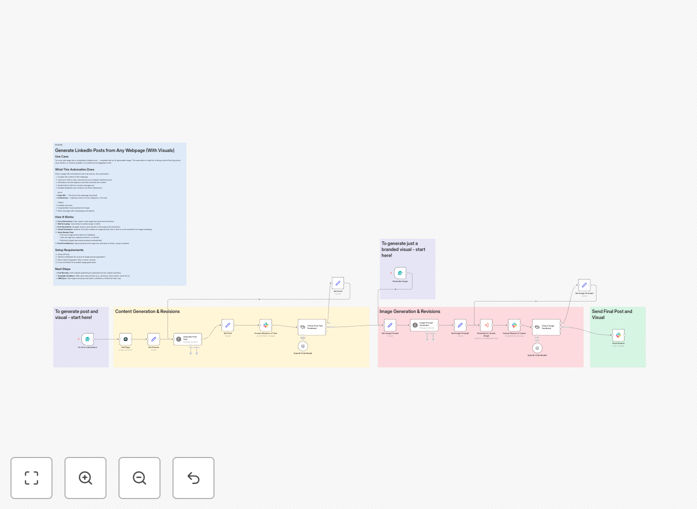
The workflow scrapes the content, uses AI to craft a compelling summary optimized for LinkedIn's algorithm, generates a unique AI image relevant to the topic, and sends everything to a Slack channel for team review. It handles feedback loops and revisions automatically, creating a seamless pipeline from discovery to publication-ready content.
For businesses and content teams, this means consistent, high-quality LinkedIn activity without the manual labor, driving better engagement and freeing up time for strategic work.
How It Works
The automation follows a logical, multi-step process to ensure quality and control.
1. Input & Web Scraping
You provide a URL to any webpage. The workflow uses Airtop to intelligently extract the main content, ignoring navigation, ads, and footers. It captures the article's core message, key points, and context.
2. AI-Powered Post Generation
GPT-4 (or your chosen AI model) analyzes the scraped text. Following your brand guidelines and optional instructions (e.g., "make it inspirational," "focus on the data"), it writes a clear, educational LinkedIn post. This includes a strong hook, a concise summary, relevant hashtags, and a call to action.
3. AI Image Creation
Simultaneously, another AI model interprets the article's theme to generate a descriptive visual prompt. This prompt is sent to a sub-workflow or image generation service (like DALL-E or Midjourney) to create a unique, brand-aligned graphic for the post.
4. Slack Review & Approval
The drafted post and generated image are posted to a designated Slack channel. Team members can react with emojis (✅ for approve, 🔄 for revise) or use interactive buttons. If revisions are requested, the feedback is fed back into the AI for a new draft.
5. Final Output & Next Steps
Once approved, the final post text and image are delivered back to Slack, ready to be copied and published. The workflow can be extended to auto-publish to LinkedIn or save the assets to a content calendar like Airtable or Notion.
Pro tip: Use the "instructions" field to guide the AI's tone. For example, "Write for a technical CTO audience" or "Keep it under 200 characters" yields much better results.
Who This Is For
This template is ideal for marketing teams, founders, consultants, and content creators who regularly share industry insights. It's perfect for:
- Marketing Managers: Who need to maintain an active company LinkedIn page but lack the time to craft each post.
- Solo Entrepreneurs & Consultants: Who want to build their personal brand by sharing relevant content without daily writing.
- Content Agencies: Managing multiple client accounts who need efficient, scalable content repurposing.
- DevRel & Developer Advocates: Sharing technical blog posts and tutorials with a broader professional audience.
- Any team using Slack for internal communication and seeking a streamlined approval process.
What You'll Need
- Airtop API Key: For reliable web scraping and content extraction.
- OpenAI API Credentials: Access to GPT-4 or GPT-3.5-Turbo for post generation and image prompt creation.
- Slack Workspace: With OAuth permissions set up to post messages and listen for reactions/interactions in a specific channel.
- An Image Generation Service: Such as OpenAI's DALL-E, or another service integrated via a sub-workflow, to create the final graphic.
- n8n Instance: Either self-hosted or n8n.cloud, with the necessary nodes installed.
Quick Setup Guide
Get this automation running in your environment in under 15 minutes.
- Download & Import: Click the "Download Template" button above and import the JSON file into your n8n instance.
- Configure Credentials: In your n8n settings, add your Airtop, OpenAI, and Slack API keys. Ensure the Slack bot has the correct scopes (chat:write, reactions:read, commands).
- Set Up Slack Channel: Create a dedicated Slack channel (e.g., #linkedin-content-review) and note its Channel ID for the workflow.
- Test the Trigger: Use the n8n Form Trigger node or a manual webhook to test. Input a blog URL and optional instructions.
- Review & Approve: Check your Slack channel for the draft post and image. Use the provided reactions to approve or request changes.
- Extend (Optional): Connect the final output to LinkedIn's API for auto-posting, or to Airtable/Notion for content calendar tracking.
Key Benefits
Save 5-10 hours per week. Eliminate the manual cycle of reading, summarizing, designing, and scheduling each LinkedIn post.
Improve post quality and consistency. AI ensures every post is well-structured, on-brand, and includes optimized hashtags and a clear call-to-action.
Maintain team oversight without bottlenecks. The Slack review loop keeps everyone in sync and allows for quick feedback before anything goes live.
Create unique visuals for every post. Move beyond generic stock photos. AI-generated images are tailored to your content, increasing click-through rates.
Scale your content strategy effortlessly. Share more articles, case studies, and updates without increasing your team's workload, building authority and engagement over time.