What This Workflow Does
Job searching is a time-consuming, repetitive process. Crafting a unique resume and cover letter for each application can take hours, leading to burnout and inconsistent quality. This automation solves that problem by turning a single LinkedIn job URL into a complete, personalized application package in minutes.
The workflow acts as your AI-powered career assistant. It extracts key details from a job posting—required skills, company values, role responsibilities—and uses multiple AI agents to generate a resume that highlights your matching experience, a compelling cover letter that addresses the specific hiring manager's needs, and a set of intelligent interview questions to help you prepare. All documents are automatically formatted and saved to your Google Drive, creating an organized portfolio of your applications.
This isn't just about saving time; it's about increasing your success rate. Tailored applications significantly outperform generic ones, and this system ensures every submission is optimized, giving you a competitive edge in a crowded job market.
How It Works
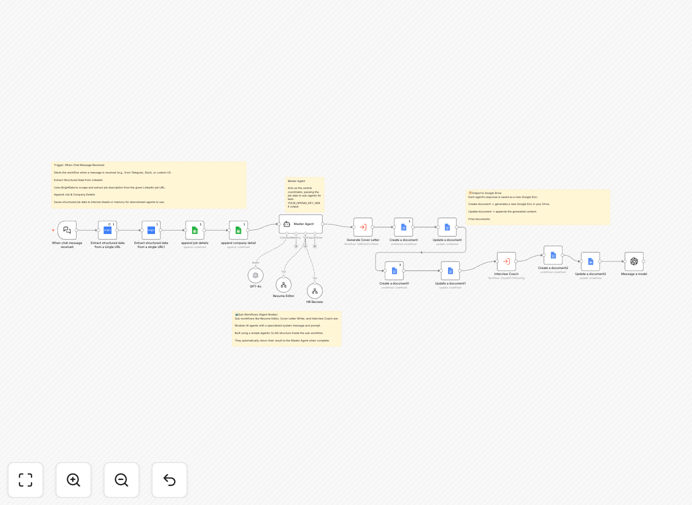
The workflow uses a multi-agent AI architecture, where specialized "agents" handle different parts of the task sequentially, mimicking a professional recruitment assistant's workflow.
Step 1: Input & Job Scraping
You provide a LinkedIn job URL. The workflow uses a web scraping service (like BrightData) to extract the full job description, title, company name, and key requirements. This data is cleaned and structured for the AI to process.
Step 2: AI Analysis & Strategy
The first AI agent analyzes the scraped job data. It identifies core competencies, technical keywords, soft skills, and company culture cues. It creates a "personalization strategy" outlining how your application should be framed.
Step 3: Resume Tailoring
A second AI agent takes your master resume (stored as a template) and the personalization strategy. It rewrites your professional summary, reorders bullet points to prioritize relevant experience, and injects keywords from the job description to ensure it passes through Applicant Tracking Systems (ATS).
Step 4: Cover Letter Generation
A third agent writes a unique cover letter. It doesn't just fill in blanks; it constructs a narrative that connects your background to the company's challenges, using tone and language pulled from the company's own website and the job ad.
Step 5: Interview Prep & Storage
A final agent generates a list of 10-15 likely interview questions based on the job role and your tailored resume. All three documents—the resume, cover letter, and question list—are then created as new Google Docs in a designated folder, ready for your final review and submission.
Pro tip: Maintain a "master" resume in Google Docs with all your experiences, skills, and achievements. The AI will pull from this comprehensive source to create targeted versions, ensuring you never forget to include a relevant accomplishment.
Who This Is For
This automation is ideal for active job seekers, career changers, recruitment agencies, and outplacement services. It's perfect for anyone applying to multiple roles who wants to maintain a high standard of personalization without the manual effort. Recruiters can also use it to quickly prepare candidate profiles for specific roles.
What You'll Need
- An n8n instance (Cloud or self-hosted).
- OpenAI API key (or another supported LLM provider) for the AI analysis and content generation.
- Google Cloud Platform (GCP) credentials with the Google Drive API enabled to create and store documents.
- A web scraping service API key (like BrightData) to extract data from LinkedIn job pages. (Note: Always comply with LinkedIn's Terms of Service).
- A master resume template saved in a consistent format (e.g., in Google Docs) that the AI can use as a source.
Quick Setup Guide
Import and configure this workflow in under 15 minutes to start automating your job applications.
- Download & Import: Click the "Download Template" button above. In your n8n interface, go to Workflows > Import from File and select the downloaded JSON file.
- Configure Credentials: In the n8n canvas, set up the following credentials:
- OpenAI: Add your API key in the AI Agent nodes.
- Google Drive: Set up OAuth 2.0 credentials to allow n8n to create documents in your Drive.
- Web Scraping Service: Enter your API key for the HTTP Request node configured for scraping.
- Set Your Master Resume: Update the "HTTP Request" or "Google Docs" node that fetches your master resume template with the correct document ID or URL.
- Test the Trigger: Run the workflow once manually. Paste a LinkedIn job URL into the starting node's parameter and click "Execute Node". Check your Google Drive for the newly generated documents.
- Automate (Optional): Set the trigger to run on a schedule (e.g., daily) or connect it to a form where you or candidates can submit job links.
Important: Respect rate limits on the scraping service and LinkedIn. Use this automation for a reasonable number of personal applications. For high-volume commercial use, ensure you have the proper licensing and comply with all platform terms.
Key Benefits
Save 5-10 hours per week. Eliminate the manual, repetitive work of reformatting resumes and writing cover letters from scratch for every application.
Increase application quality and response rates. AI-tailored applications that speak directly to the job description are far more likely to get past ATS filters and catch a recruiter's eye.
Reduce human error and inconsistency. The automated process ensures every document is formatted correctly, includes all required information, and maintains a professional tone.
Get interview-ready instantly. By generating potential interview questions based on the specific job, you can begin preparing immediately, turning application time into productive practice time.
Build an organized application portfolio. All generated materials are automatically saved with clear filenames in a dedicated Google Drive folder, making it easy to track and reference your submissions.