What This Workflow Does
This n8n workflow automates the extraction of bibliographic metadata from your Zotero reference management library. Instead of manually copying and pasting citation information for each article in your collections, this template connects to Zotero's API, authenticates securely, and pulls structured data for all items in a specified collection.
The automation extracts comprehensive metadata including article titles, authors, publication dates, journal names, volume and issue numbers, page ranges, DOIs, URLs, abstracts, and citation keys. This eliminates hours of tedious manual work for researchers, academics, students, and anyone managing extensive reference libraries.
Once extracted, the data can be formatted, filtered, and exported to various destinations. You can create formatted reading lists, generate publication databases, prepare references for manuscript submissions, or integrate with other research tools—all without touching a single citation manually.
How It Works
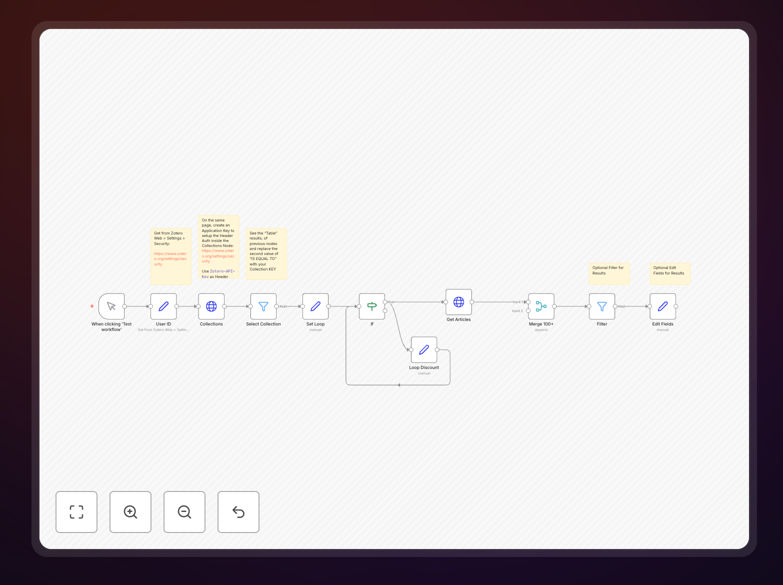
The workflow follows a logical sequence to authenticate with Zotero, retrieve collection data, extract item metadata, and output structured results.
Step 1: Zotero API Authentication
The workflow begins by establishing a secure connection to Zotero's API using your private API key and user ID. This authentication happens through a configured HTTP Request node with header-based authentication, ensuring your data remains private and secure throughout the process.
Step 2: Collection Selection
After authentication, the workflow retrieves a list of all your Zotero collections. You specify which collection to process by entering its unique key. This allows you to target specific research projects, course reading lists, or topic-based libraries without affecting your entire Zotero database.
Step 3: Metadata Extraction
The core of the workflow queries Zotero for all items within the selected collection. For each item, it extracts the complete bibliographic record including all available metadata fields. The template handles Zotero's data structure, parsing nested author information, publication details, and custom fields you may have added.
Step 4: Data Processing & Filtering
Extracted data passes through processing nodes where you can filter specific item types (articles, books, conference papers), select which metadata fields to keep, and format the output. Conditional logic lets you include or exclude items based on criteria like publication year, item type, or tag presence.
Step 5: Output & Integration
The final step formats the cleaned bibliographic data for your preferred destination. You can output to CSV for spreadsheet analysis, JSON for database import, or connect directly to other applications like Notion, Airtable, Google Sheets, or your research management system.
Pro tip: Use the Filter node to exclude items without DOIs or publication dates, ensuring your exported data contains only complete, citable references for your literature review or publication.
Who This Is For
This automation template is ideal for academic researchers, graduate students, librarians, research assistants, and anyone managing substantial reference collections. If you regularly compile bibliographies for papers, maintain reading lists for courses, track publications for lab groups, or need to export citation data to other systems, this workflow will save you significant time.
University departments can use it to maintain shared reference databases. Research teams can automate the creation of publication lists for grant applications. Individual scholars can streamline their literature review process by automatically extracting metadata from hundreds of saved articles.
What You'll Need
- A Zotero account (free or institutional)
- Your Zotero User ID from account settings
- A Zotero Private API key generated in security settings
- n8n installed (cloud or self-hosted)
- Basic familiarity with navigating n8n's visual interface
- The collection key for the Zotero collection you want to process
Quick Setup Guide
Follow these steps to implement this Zotero automation in under 10 minutes:
- Download the template using the button above and import it into your n8n instance.
- Get your Zotero credentials: Log into Zotero.org, go to Settings → Security, and copy your User ID. Create a new private key if you don't have one.
- Configure authentication: In the "Collections" HTTP Request node, create a new Generic Credential with Header Auth. Name it "Zotero-API-Key" and paste your private key as the value.
- Test the connection: Execute the workflow once to verify authentication works. Check the "Select Collection" node output to see your collections listed as a table.
- Select your target collection: Copy the "KEY" value from the collection you want to process and paste it into the appropriate workflow parameter.
- Customize output: Modify the Filter and Edit Fields nodes to include only the metadata you need in your preferred format.
- Add destinations: Connect output nodes to send data to Google Sheets, databases, or other applications as needed.
Important: Keep your Zotero API key secure. Never share it publicly or commit it to version control. The template uses credential management to keep your key encrypted within n8n.
Key Benefits
Save 5-10 hours per month on manual citation management and bibliography creation. What typically takes hours of copying, pasting, and formatting now happens automatically with consistent accuracy.
Eliminate citation errors that can undermine research credibility. Automated extraction ensures metadata consistency across all your references, reducing the risk of incorrect author names, publication dates, or journal titles in your bibliographies.
Maintain always-current reference lists for ongoing research projects. Schedule the workflow to run weekly or monthly, automatically updating your publication databases as you add new items to Zotero collections.
Enable seamless integration between your reference manager and other research tools. Export formatted data to literature review software, grant management systems, or collaborative platforms without manual data entry.
Scale your research management as your library grows. Process hundreds or thousands of references with the same efficiency as a dozen, making comprehensive literature reviews and systematic reviews more manageable.