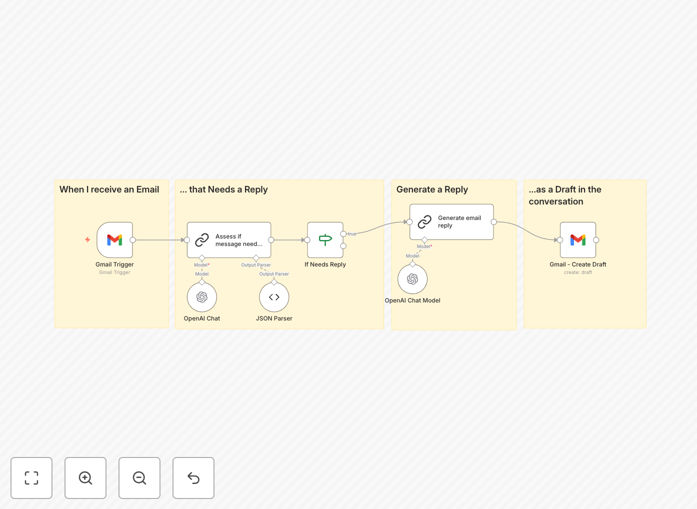
What This Workflow Does
Email overload is a real productivity killer for professionals, entrepreneurs, and customer-facing teams. This AI-powered automation tackles the problem head-on by generating intelligent draft replies for incoming Gmail messages. Instead of staring at a blank screen or typing repetitive responses, you get AI-crafted drafts that understand the context of each email.
The workflow is designed for control and safety—it creates drafts in your Gmail, not sent replies. You maintain final approval over every communication while eliminating the mental effort of initial response composition. This is particularly valuable for common inquiries, follow-ups, information requests, and situations where you experience writer's block.
By integrating directly with Gmail and OpenAI's advanced models, this system analyzes incoming emails, determines if a response is needed, crafts appropriate replies based on your preferred tone and style, and places them as drafts in the correct email threads—all automatically.
How It Works
The automation follows a logical four-step process that mimics how a thoughtful human assistant would handle your emails.
1. Email Trigger & Capture
When a new email arrives in your Gmail inbox, the workflow immediately captures it. It extracts all relevant information including sender details, subject line, body content, and any attachments or previous conversation history.
2. AI Assessment & Decision Making
Using OpenAI's gpt-4o model with a JSON parser, the system intelligently assesses whether the email requires a response. It filters out newsletters, automated notifications, spam, and emails that are better handled by other systems or don't need replies.
3. Context-Aware Reply Generation
For emails requiring responses, OpenAI's GPT-4 Turbo crafts a thoughtful, context-appropriate draft reply. The AI considers your specified tone (professional, friendly, concise), includes relevant information, and references specific details from the original email for personalization.
4. Draft Integration & Ready for Review
The generated text is converted to proper HTML format and inserted as a draft reply in the original Gmail thread. The draft appears in your Gmail interface exactly where you'd expect it, ready for your quick review, editing if needed, and sending.
Pro tip: Configure the system prompt in the "Generate email reply" node to match your specific communication style. Include key phrases, disclaimers, or information you frequently share to make the drafts even more useful.
Who This Is For
This automation delivers value to anyone overwhelmed by email volume or slowed by response composition. Customer support teams handling repetitive inquiries will see immediate time savings. Executives and entrepreneurs managing multiple correspondence streams can maintain responsiveness without the time investment. Sales professionals following up with leads can ensure timely, personalized communication. Freelancers and consultants juggling client communications will appreciate the reduced cognitive load.
It's particularly beneficial for professionals who receive predictable types of emails—information requests, meeting scheduling, status updates, or clarification questions—but still want to provide personalized, thoughtful responses. The system works alongside you, not instead of you, ensuring your authentic voice comes through in every communication.
What You'll Need
- n8n instance (cloud or self-hosted) with access to custom workflows
- Google Cloud Console account with Gmail API enabled and OAuth credentials configured
- OpenAI API key with access to gpt-4o and GPT-4 Turbo models
- Gmail account with sufficient storage for draft management
- Basic understanding of OAuth setup and API credential management
Quick Setup Guide
You can have this automation running in about 10 minutes with these straightforward steps.
- Download and import the template JSON file into your n8n instance using the import functionality.
- Configure Google OAuth by following n8n's documentation to set up Gmail API access with the "modify" scope in Google Cloud Console.
- Add your OpenAI API key in n8n's credential management system to enable AI capabilities.
- Test the workflow by sending a test email to your connected Gmail account and verifying that a draft reply appears correctly.
- Customize the system prompt in the "Generate email reply" node to match your preferred communication style and tone.
- Activate the workflow and let it run continuously to handle incoming emails automatically.
Important: Remember to add n8n's redirect URI to your Google Cloud Console consent screen settings during OAuth setup—this is a common oversight that prevents proper authentication.
Key Benefits
Save 5-10 hours weekly on email management by eliminating manual response drafting for routine inquiries. Professionals typically spend 28% of their workweek on email; this automation reclaims a significant portion of that time.
Maintain consistent response quality even during busy periods or outside normal working hours. The AI ensures every draft is thoughtful, complete, and professionally formatted according to your standards.
Reduce email response time from hours to minutes while actually improving communication quality. Recipients appreciate timely responses, and the AI ensures those quick replies are still personalized and valuable.
Eliminate writer's block and repetitive typing for common email scenarios. The system handles the initial composition, allowing you to focus on strategic editing and relationship-building aspects of communication.
Scale your email responsiveness without adding staff or working longer hours. As email volume grows, the automation scales with you, ensuring you can maintain your reputation for prompt, helpful communication.