Gmail Google Gemini AI Telegram Email Automation n8n

AI Gmail Assistant with Google Gemini & Telegram

Automatically classify emails, get instant notifications, and generate AI-powered replies. Reclaim 5+ hours weekly from email overload.

Download Template JSON · n8n compatible · Free
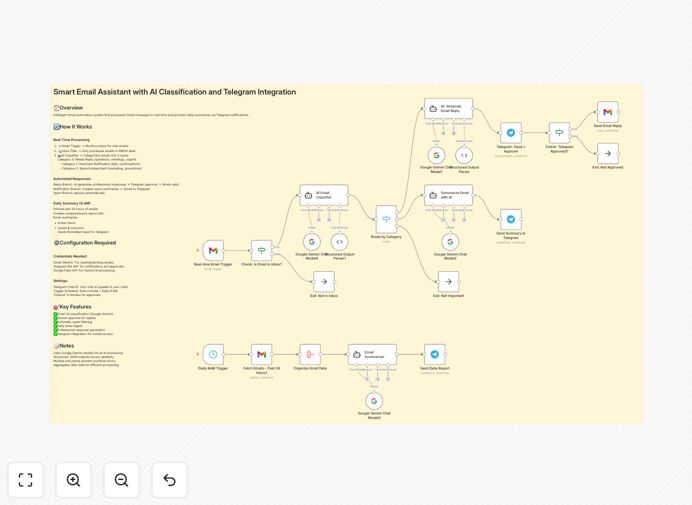
AI Gmail Assistant workflow diagram showing Gmail, Google Gemini AI classification, and Telegram notifications integration

What This Workflow Does

Email overload is a universal productivity killer. Professionals spend hours daily sorting, reading, and responding to messages, often missing critical communications buried in the noise. This intelligent automation system solves that problem by creating your personal AI email assistant.

The workflow monitors your Gmail inbox in real-time, uses Google Gemini AI to understand and categorize every email, sends instant Telegram notifications for important messages, and can even generate professional replies for your approval. It transforms your chaotic inbox into an organized, prioritized communication hub that works while you focus on actual business.

How It Works

The system operates on a continuous automation loop, processing emails as they arrive and taking intelligent actions based on their content and importance.

1. Real-Time Email Monitoring

The workflow checks your Gmail inbox every minute for new messages. When an email arrives, it extracts the sender, subject, body content, and any attachments for processing.

2. AI-Powered Classification

Google Gemini AI analyzes the email content and assigns it to one of three categories: Needs Immediate Reply (urgent business matters), Important Notification (bills, confirmations), or Low Priority (marketing, newsletters).

3. Smart Notification Routing

Based on the classification, the system takes different actions. Urgent emails trigger Telegram notifications with the sender and key details. Important notifications get summarized and logged. Low-priority emails are archived for later review.

4. Response Generation & Approval

For emails requiring replies, Gemini AI generates a professional, context-aware response. This draft is sent to your Telegram for quick review and approval before being automatically sent from your Gmail account.

5. Daily Digest & Reporting

Every morning at 8 AM, you receive a comprehensive Telegram summary of the previous day's email activity, including pending actions, response statistics, and priority items needing attention.

Who This Is For

This automation is ideal for busy professionals drowning in email. Freelancers and consultants who need to maintain rapid client responsiveness. Small business owners managing customer inquiries, vendor communications, and operational emails. Sales teams tracking leads and follow-ups. Executives and managers who need to prioritize strategic communications over routine messages.

If you receive 50+ emails daily and find yourself constantly switching between your inbox and actual work, this system will transform your productivity. It's particularly valuable for solopreneurs and small teams without dedicated administrative support.

What You'll Need

  1. A Gmail account with API access enabled (standard Gmail or Google Workspace)
  2. A Telegram account and bot token (created via @BotFather in 2 minutes)
  3. Google Cloud Platform account with Gemini API enabled (free tier available)
  4. n8n instance (self-hosted, cloud, or desktop version)
  5. Basic understanding of connecting APIs (we provide step-by-step instructions)

Pro tip: Use separate Telegram channels for different email categories. Create one channel for urgent client communications and another for internal notifications to keep your alerts organized.

Quick Setup Guide

Follow these steps to implement your AI email assistant in under 30 minutes:

  1. Import the template into your n8n instance using the downloaded JSON file.
  2. Configure Gmail credentials using OAuth2 authentication in n8n's credential management.
  3. Create your Telegram bot via @BotFather and add the bot token to n8n credentials.
  4. Set up Google Gemini API in Google Cloud Console and add the API key to n8n.
  5. Update all Telegram chat IDs with your personal chat ID (found via @userinfobot).
  6. Test with sample emails to verify classification accuracy and notification delivery.
  7. Activate the workflow and experience transformed email management immediately.

Key Benefits

Reclaim 5-10 hours weekly previously spent on email triage and management. The AI handles sorting and prioritization, freeing you for revenue-generating activities.

Never miss critical communications with instant Telegram notifications for urgent emails. Important messages get your attention immediately, regardless of where you are.

Maintain professional responsiveness with AI-generated reply drafts. Review and send approved responses in seconds, maintaining excellent communication standards.

Reduce email anxiety and overload by transforming your inbox from a source of stress to an organized system. Know exactly what needs attention and what can wait.

Gain valuable insights from daily email digests that show communication patterns, response times, and pending actions for better business management.

Implementation note: Start by using the AI classification and notifications only for the first week. Once comfortable with the system's accuracy, enable the response generation feature for maximum productivity gains.

Frequently Asked Questions

Common questions about AI email automation and integration

AI can automatically read, categorize, and prioritize incoming emails based on content, sender, and urgency. It can identify which messages need immediate replies, which are notifications, and which are low-priority. This saves professionals hours each week by eliminating manual triage and ensuring critical communications are never missed.

For example, an AI system can distinguish between a client emergency, a routine newsletter, and a meeting request, routing each appropriately. Over time, it learns your preferences and communication patterns, becoming more accurate in its classifications and actions.

Telegram provides instant, real-time push notifications directly to your phone or desktop. By integrating Gmail with Telegram, you get immediate alerts for important emails without constantly checking your inbox. This creates a streamlined workflow where urgent messages are flagged instantly, allowing for faster response times and better communication management.

The integration also enables two-way communication—you can approve AI-generated replies or request more information directly from Telegram. This mobile-first approach keeps you connected to critical business communications while away from your desk.

Traditional email rules rely on simple filters like sender addresses or keywords. Google Gemini uses advanced natural language processing to understand the actual meaning and context of email content. It can distinguish between a sales inquiry, a customer complaint, a meeting request, or a newsletter with much higher accuracy, adapting to your specific communication patterns over time.

This contextual understanding means the system recognizes urgency even when specific keywords aren't used. It can identify tone, intent, and priority based on the full email content rather than just surface-level triggers.

When implemented correctly with proper security measures, AI email automation is safe. The workflow should use secure API connections (OAuth for Gmail), never store sensitive credentials in plain text, and include human approval steps for generated responses. For highly sensitive communications, you can configure the system to flag those emails for manual review only.

Best practices include using environment variables for API keys, implementing approval workflows for financial or legal communications, and regularly reviewing the AI's classification accuracy to ensure it meets your security standards.

Freelancers, consultants, small business owners, sales teams, customer support departments, and executives who receive 50+ emails daily benefit most. These professionals face email overload that distracts from core work. Automation helps them maintain responsiveness while reclaiming 5-10 hours weekly previously spent on email management.

Businesses with client-facing roles, time-sensitive communications, or multiple stakeholders benefit particularly. The system ensures nothing falls through the cracks while reducing the cognitive load of constant inbox monitoring.

Yes, AI classification prompts can be tailored to recognize industry-specific terminology, urgency indicators, and communication patterns. For example, a law firm's workflow can prioritize legal notices, while an e-commerce business can flag order issues. The response generation can also be customized to match professional tone and industry standards.

Customization options include industry-specific classification categories, specialized response templates, integration with industry software (like CRMs for sales or project tools for agencies), and compliance-focused logging for regulated industries.

  • Legal: Prioritize court dates and client communications
  • Healthcare: Flag patient inquiries and appointment requests
  • E-commerce: Highlight order issues and customer complaints

Yes, GrowwStacks specializes in building custom email automation systems tailored to your specific business needs, industry requirements, and existing tech stack. We can create workflows that integrate with your CRM, help desk, project management tools, and internal systems to create a complete communication automation solution.

Our team will analyze your email patterns, identify pain points, and design a system that addresses your unique challenges. We handle the technical implementation, security configuration, and staff training, ensuring you get maximum value from your automation investment.

  • Integration with your existing tools (Salesforce, HubSpot, Zendesk)
  • Custom AI training for your industry terminology
  • Multi-channel notification systems (Slack, Teams, SMS)
  • Compliance and security auditing for regulated industries

Need a Custom Email Automation?

This free template is a starting point. Our team builds fully tailored automation systems for your specific business needs.