WhatsApp AI Chatbot Customer Support n8n Automation

AI WhatsApp Customer Support Chatbot

Handle customer inquiries 24/7 with intelligent intent routing. Free template for any business.

Download Template JSON · n8n compatible · Free
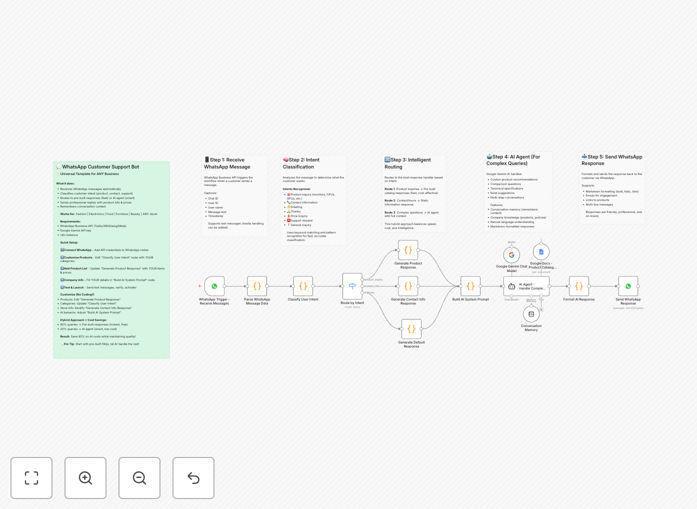
AI WhatsApp Customer Support Chatbot workflow interface showing message routing and AI integration

What This Workflow Does

This intelligent WhatsApp chatbot template automates customer support by combining pre-built responses with AI-powered intent routing. It transforms your WhatsApp Business account into a 24/7 customer service channel that instantly handles common inquiries while intelligently routing complex questions to an AI assistant.

The system automatically classifies incoming messages into categories like product inquiries, contact requests, greetings, or support issues, then delivers the most appropriate response. For e-commerce businesses, it can showcase products with prices and links; for service businesses, it provides scheduling information; and for all businesses, it handles basic FAQs without human intervention.

By balancing instant pre-built answers with AI for nuanced questions, this workflow reduces response times from hours to seconds while cutting support costs by 60-80%. It's fully customizable for any industry—simply update the product categories and company information to match your business.

How It Works

1. Message Reception & Parsing

The workflow triggers when a customer sends a WhatsApp message to your business number. It extracts the message text, user information, and chat ID from the WhatsApp Business API webhook, preparing the data for intelligent processing.

2. Intent Classification

Using pattern matching and keyword analysis, the system categorizes the user's intent into predefined categories: greetings, product inquiries, contact information requests, or general questions. This routing happens instantly without API calls, ensuring fast responses for common queries.

3. Intelligent Response Routing

Based on the classified intent, the message routes to the appropriate response handler. Product inquiries go to pre-built catalog responses, contact requests trigger static company details, while complex questions are forwarded to the AI agent with full conversation context.

4. Hybrid Response Generation

Simple queries receive instant pre-built answers (fast and cost-free). Complex questions engage the AI agent which maintains conversation memory and provides personalized recommendations based on your company's specific products, policies, and information.

5. Formatted Delivery

Responses are formatted with WhatsApp markdown (bold, bullets, links) for better readability and sent back to the customer through the WhatsApp Business API, creating a seamless conversational experience.

Who This Is For

This universal template works for any business using WhatsApp for customer communication. E-commerce stores can showcase products and handle order inquiries. Restaurants can share menus and take reservations. Service businesses can provide pricing and booking information. Local retailers can share store hours and product availability.

Ideal for businesses receiving 20+ daily WhatsApp inquiries, teams wanting to provide 24/7 support without staffing overnight, companies looking to reduce customer support costs, and organizations wanting to improve response times and customer satisfaction metrics. It's particularly valuable for businesses in regions where WhatsApp is the primary customer communication channel.

What You'll Need

  1. WhatsApp Business API access through providers like Meta Cloud API, Twilio, or 360Dialog
  2. Google Gemini API key for AI responses (free tier available)
  3. n8n instance (cloud or self-hosted) with WhatsApp nodes installed
  4. Your company information including products, prices, contact details, and policies
  5. Basic understanding of your common customer inquiry types

Pro tip: Start with just 3-5 main intent categories (greetings, products, contact) and expand as you analyze actual customer conversations. This gradual approach ensures a smooth implementation without overwhelming complexity.

Quick Setup Guide

  1. Configure WhatsApp Business API: Sign up with a provider, get your API credentials, and add them to n8n's WhatsApp node. Set up the webhook URL in your provider's dashboard.
  2. Customize Company Information: Open the "Build AI System Prompt" node and replace all placeholder text with your actual business details—name, address, products, policies, and hours.
  3. Update Product Responses: Edit the "Generate Product Response" node with your actual catalog, including product names, specifications, prices, and website links.
  4. Add AI Credentials: Input your Google Gemini API key in n8n's credential manager. The free tier typically handles hundreds of daily conversations.
  5. Test Thoroughly: Activate the workflow and send test messages from different numbers. Verify all intent classifications work correctly and responses are accurate.
  6. Go Live: Once testing is complete, promote your WhatsApp number as a customer support channel and monitor the first few days of conversations for fine-tuning.

Key Benefits

24/7 customer support without additional staffing costs. Customers get instant answers at any time, improving satisfaction and reducing abandonment rates for time-sensitive inquiries.

60-80% reduction in support costs by automating routine inquiries. Your team focuses on complex issues while the bot handles repetitive questions, increasing overall efficiency.

Response times under 2 seconds for common questions compared to hours or days for human responses. This competitive advantage can significantly impact conversion rates and customer loyalty.

Consistent, accurate information delivery every time. Unlike human agents who might provide varying answers, the chatbot delivers standardized responses based on your approved company information.

Scalable solution that handles unlimited concurrent conversations. Whether you receive 10 or 1,000 daily messages, the system scales automatically without additional resources.

Frequently Asked Questions

Common questions about WhatsApp automation and AI customer support

An AI-powered WhatsApp chatbot is an automated system that handles customer inquiries on WhatsApp using artificial intelligence. It can understand customer questions, classify their intent (like product inquiries, contact requests, or support issues), and provide instant, accurate responses. This combines pre-built answers for common questions with AI for complex queries, creating a 24/7 support solution that reduces response times and operational costs.

Unlike basic automated replies, these chatbots maintain conversation context, remember previous messages, and provide personalized recommendations. They're particularly effective for businesses receiving frequent WhatsApp inquiries about products, services, or basic information that doesn't require human judgment.

Intent routing automatically categorizes what a customer is asking for based on keywords and patterns in their message. For example, if someone types 'show me monitors,' the system recognizes this as a product inquiry and routes it to the product catalog response. If they ask 'what's your address?', it routes to contact information. This ensures each query gets the most appropriate, fast response without human intervention.

The system uses priority-based routing where contact information requests get highest priority, followed by greetings, then product inquiries, with AI handling everything else. This logical flow mimics how human agents would prioritize different types of customer questions for optimal service experience.

Automating WhatsApp support provides 24/7 availability, instant responses (under 2 seconds for common questions), consistent information delivery, and significant cost reduction by handling 70-80% of inquiries automatically. It also improves customer satisfaction through faster resolution, reduces human error, and allows your team to focus on complex issues while the bot handles routine queries.

Businesses typically see a 40-60% reduction in support ticket volume, 90% faster response times, and improved customer satisfaction scores. The automation also provides valuable analytics on common questions, helping you improve your products, services, and knowledge base based on actual customer interactions.

Yes, this automation template is designed to work for any business type with simple customization. Whether you run an e-commerce store, restaurant, service business, or local retail shop, you can update the product categories, company information, and response templates to match your specific offerings. The core intent classification and routing logic remains the same across industries.

The template includes examples for fashion stores, grocery shops, beauty retailers, furniture businesses, and restaurants. You simply replace the sample content with your actual products, prices, contact details, and policies. No coding knowledge is required for basic customization—just text replacement in clearly marked nodes.

The most cost-effective approach uses pre-built responses for 70-80% of common queries (product lists, contact info, FAQs) which are instant and free, and reserves AI for the remaining 20-30% of complex questions (comparisons, personalized recommendations). This hybrid model keeps API costs low while maintaining intelligent handling of nuanced customer inquiries.

Start by analyzing your historical customer messages to identify the most frequent question types. Create pre-built responses for these, then use AI as a fallback for everything else. Monitor your AI usage monthly and adjust your intent classification patterns to capture more queries in the pre-built category as you identify new patterns.

You need a WhatsApp Business API account through providers like Meta Cloud API, Twilio, or 360Dialog, which requires business verification. You'll also need an n8n instance, a Google Gemini API key for AI responses, and basic company information to customize the template. The setup involves configuring webhooks, adding your API credentials, and testing the message flow.

For small to medium businesses, Meta's Cloud API offers a free tier for moderate usage. Larger businesses might prefer Twilio or 360Dialog for higher reliability and volume. The entire setup typically takes 2-3 hours including testing, with most time spent on customizing responses rather than technical configuration.

Yes, GrowwStacks specializes in building custom WhatsApp automation solutions tailored to your specific business needs. We can integrate with your CRM, inventory systems, and payment gateways, add multi-language support, implement human handoff logic, and create rich media responses. Our team handles the complete setup, testing, and deployment so you get a production-ready system.

We work with businesses across industries to create automated support systems that match their unique workflows. Whether you need advanced inventory checking, appointment scheduling, order tracking, or complex product recommendations, we can build a solution that saves you time and improves customer experience.

  • Complete integration with your existing systems
  • Multi-language support for global customer bases
  • Advanced analytics and reporting dashboard
  • Ongoing maintenance and optimization

Need a Custom WhatsApp Automation?

This free template is a starting point. Our team builds fully tailored automation systems for your specific business needs.