What This Workflow Does
Email overload is a universal business challenge. Professionals spend hours weekly manually sorting through inboxes, missing important messages while drowning in newsletters, notifications, and low-priority communications. This intelligent automation solves that problem by applying artificial intelligence to your Gmail account.
The workflow automatically analyzes every incoming email's content and context, then applies appropriate labels based on what the email actually contains—not just simple rule-based filtering. It distinguishes between invoices, customer inquiries, internal updates, promotional content, and urgent requests, organizing your inbox with precision that manual sorting can't match.
Unlike basic email filters, this system understands nuance and intent. It can identify that an email from "[email protected]" with "Q1 Payment" in the subject and a PDF attachment is an invoice, while recognizing that "[email protected]" discussing "project timeline" is an internal update requiring different handling.
How It Works
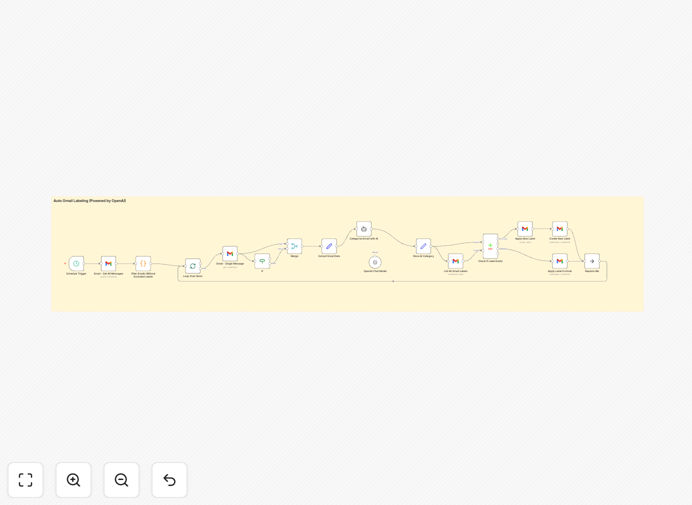
Step 1: Email Retrieval
The workflow connects to your Gmail account via secure API and retrieves new messages at regular intervals. It only processes emails without existing labels, ensuring efficient operation and avoiding redundant analysis.
Step 2: Content Analysis
Each email's subject and body text are extracted and sent to an AI model (like OpenAI's GPT). The AI analyzes the content to determine its purpose, category, and urgency based on predefined classification criteria.
Step 3: Intelligent Classification
The AI model evaluates the email against 18+ categories including Newsletter, Invoice, Inquiry, Proposal, Action Required, Follow-up Reminder, Task, Personal, Urgent, Bank, Job Update, Spam/Junk, Social/Networking, Receipt, Event Invite, Subscription Renewal, and System Notification.
Step 4: Automated Labeling
Based on the AI's classification, the workflow applies the appropriate Gmail label. The system can be configured to also trigger additional actions like forwarding urgent emails, creating tasks in project management tools, or logging invoices in accounting software.
Who This Is For
This automation is ideal for solopreneurs, small business teams, customer support departments, sales professionals, and anyone receiving 50+ emails daily. It's particularly valuable for businesses that receive diverse email types requiring different handling—like agencies getting client requests, invoices from vendors, and internal communications all in one inbox.
Freelancers juggling multiple clients benefit from automatically separating project communications from administrative emails. E-commerce businesses can distinguish customer inquiries from order confirmations and supplier communications. Professional service firms can ensure urgent client requests don't get buried in newsletters.
What You'll Need
- A Gmail account or Google Workspace email
- Access to an AI service (OpenAI API key or compatible alternative)
- n8n instance (cloud or self-hosted)
- Pre-configured Gmail labels matching your desired categories
- Basic understanding of API key management
Pro tip: Start with 5-7 core categories that match your actual email patterns. You can expand to more specific labels once the system is running smoothly. Common starting points are: Client, Internal, Invoice, Newsletter, and Urgent.
Quick Setup Guide
- Download the template file using the button above
- Import it into your n8n instance (Settings → Workflows → Import from file)
- Configure your Gmail credentials in the Gmail node
- Add your AI service API key to the AI model node
- Ensure your Gmail account has labels matching the categories in the workflow
- Adjust the schedule trigger interval if needed (default: every 2 minutes)
- Test with a few sample emails before enabling full automation
Key Benefits
Save 2-3 hours weekly per team member previously spent manually sorting emails. For a 5-person team, that's 40-60 hours monthly regained for productive work.
Never miss urgent communications as AI identifies time-sensitive emails and applies appropriate labels immediately, ensuring critical messages get attention when they should.
Maintain consistent organization across your entire team. Unlike manual sorting where individuals apply labels inconsistently, AI uses the same criteria for every email, creating reliable email management systems.
Reduce mental fatigue from email triage by automating the cognitive load of deciding where each email belongs. Your team can focus on responding to messages rather than organizing them.
Scale your email management without adding administrative overhead. As email volume grows, the system handles increased load without additional time investment from your team.