What This Workflow Does
Retrieval-Augmented Generation (RAG) systems power modern AI assistants by combining language models with your company's documents. However, when those documents change in Google Drive—updated policies, new pricing, revised procedures—your AI can quickly become outdated, providing incorrect information that damages trust and decision-making.
This n8n workflow solves the data freshness problem by automatically detecting when files are modified in your monitored Google Drive folders. It complements initial document ingestion workflows by handling updates through a smart "delete-then-re-insert" process that ensures your vector database always contains the most current version of every document.
The automation prevents duplicate processing, intelligently versions updates, and maintains metadata integrity while processing various file formats. This means your customer support chatbots, internal knowledge assistants, and AI research tools always reference the latest information without manual intervention.
How It Works
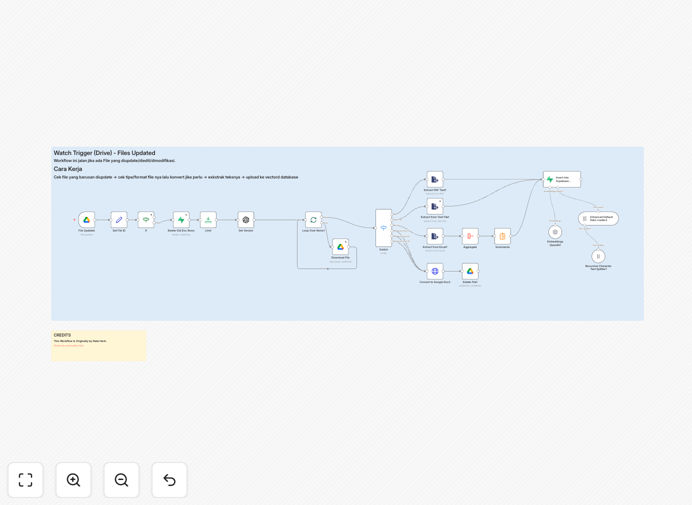
1. Update Detection & Filtering
The workflow activates using Google Drive's "File Updated" trigger for your designated document folders. An intelligent filtering node prevents duplicate runs by distinguishing between genuine content updates and system-generated events like format conversions.
2. Old Data Removal
Once a legitimate update is confirmed, the workflow queries your Supabase vector database to find and delete all existing embeddings associated with that file ID. This clean removal prevents conflicting or outdated information from persisting in your RAG system.
3. Smart Versioning
The system retrieves the previous version number from metadata and uses logic to increment it (v1 → v2, v1.2 → v1.3). This creates an audit trail and ensures your AI can reference which document version informed its responses.
4. Content Reprocessing Pipeline
Updated files route through format-specific processing: PDFs undergo text extraction, Google Docs use API retrieval, spreadsheets parse cell data, and presentations extract slide content. The text is then chunked appropriately for embedding generation.
5. Embedding & Database Insertion
Text chunks convert to vector embeddings using your chosen AI model, then insert into Supabase with enriched metadata including the new version number, update timestamp, and file properties. The RAG system immediately gains access to the updated information.
Who This Is For
This automation delivers maximum value to businesses where document accuracy directly impacts operations and customer experience. Customer support teams using AI chatbots need immediate updates to policy changes. Consulting firms with evolving methodologies require real-time knowledge base synchronization. Legal practices updating case files must ensure research assistants reference current information.
Product teams maintaining technical documentation, sales organizations with frequently changing pricing sheets, and compliance departments updating regulatory materials also benefit significantly. Essentially, any organization where employees collaborate on Google Drive documents that need to be instantly searchable and referenceable by AI systems should implement this automation.
Pro tip: Start with a single "mission-critical" folder rather than your entire Drive. Monitor performance and accuracy before expanding to broader document sets. This reduces initial complexity and allows for refinement based on real usage patterns.
What You'll Need
- n8n instance (cloud or self-hosted) with workflow execution capabilities
- Google Drive access with API credentials for the folder(s) containing documents
- Supabase account with a vector database table configured for document embeddings
- AI embedding model access (OpenAI, Cohere, or local embedding service)
- Existing document ingestion workflow (this complements initial upload processes)
- Test documents to validate the update process before full deployment
Quick Setup Guide
Follow these steps to implement this RAG update automation in your environment:
- Import the template into your n8n instance using the downloaded JSON file
- Configure Google Drive node with your API credentials and specify the folder to monitor
- Set up Supabase connection with your database URL, API key, and table name
- Connect your embedding service (OpenAI, Cohere, or alternative) with appropriate API keys
- Test with sample updates by modifying a document in your monitored folder and verifying the vector database updates
- Deploy and monitor the workflow, checking logs for successful processing and error handling
Key Benefits
Eliminate manual update processes that consume 30-60 minutes per document. Automation reduces this to seconds while ensuring 100% consistency and eliminating human error in document processing and database management.
Maintain AI accuracy and trust by guaranteeing your RAG system references only current information. This prevents embarrassing or costly errors where AI assistants provide outdated pricing, discontinued policies, or superseded procedures to customers and employees.
Scale document management effortlessly as your company grows. Whether you have 50 documents or 50,000, the automation handles updates with identical efficiency, freeing your team from proportional increases in maintenance workload.
Create audit trails and version control automatically. Every update receives proper versioning, timestamps, and metadata preservation, making it easy to track which document version informed specific AI responses for compliance and debugging purposes.
Integrate seamlessly with existing workflows through n8n's flexible architecture. The update process complements rather than replaces your current document management systems, adding intelligence without disrupting established processes.