n8n API Tutorial HTTP Requests Education Free Template

Learn API Fundamentals with an Interactive Hands-On Tutorial

Master API concepts through practical lessons inside n8n—no coding experience required. Understand HTTP requests, methods, headers, and authentication with a simple restaurant analogy.

Download Template JSON · n8n compatible · Free
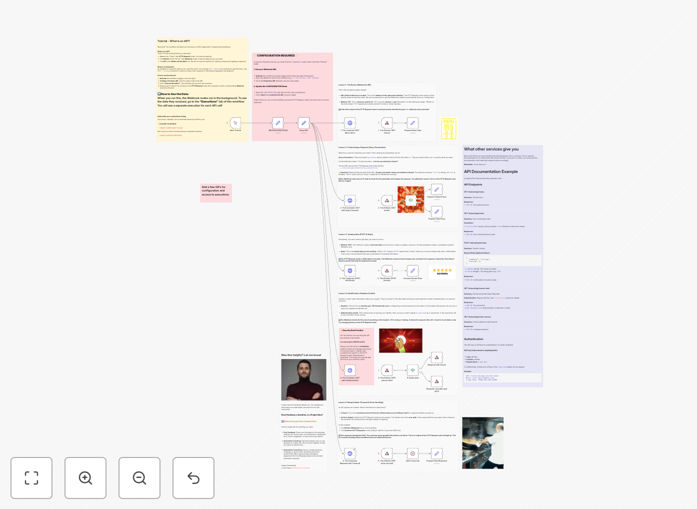
Interactive API tutorial workflow showing HTTP request and webhook nodes in n8n canvas

What This Workflow Does

This interactive tutorial demystifies APIs (Application Programming Interfaces) by teaching fundamental concepts through hands-on experience right inside your n8n canvas. Instead of reading abstract documentation, you learn by doing—making actual API calls and seeing immediate responses.

The workflow uses a simple restaurant analogy to explain complex technical concepts: you're the customer (HTTP Request node), the kitchen is the server (Webhook node), and the API is the menu and waiter system that facilitates communication between them. This approach makes technical concepts accessible to business users, marketers, and non-developers who need to understand how systems connect.

By completing this tutorial, you'll gain practical understanding of how APIs power modern business automation, enabling you to confidently integrate different software tools, automate data flows, and communicate effectively with technical teams about integration requirements.

How It Works

The tutorial is organized as five self-contained lessons, each demonstrating a key API concept through paired nodes in the n8n workflow canvas.

Lesson 1: The Basics – Making a GET Request

You'll learn how to make a simple GET request to retrieve information from a server, similar to asking for a restaurant menu. This lesson covers URL structure, HTTP methods, and reading response data—the foundation of all API interactions.

Lesson 2: Customizing Requests with Query Parameters

Discover how to filter and modify API requests using query parameters, like asking for specific menu items or filtering results. This teaches you how to make precise data requests instead of receiving everything available.

Lesson 3: Sending Data with POST Methods

Learn to send information to servers using POST requests and request bodies—equivalent to placing an order at a restaurant. This covers data formatting (JSON), content types, and creating new records through APIs.

Lesson 4: Identification with Headers and Authentication

Understand how APIs verify identity through headers and authentication methods. You'll learn about API keys, authorization headers, and security best practices for protecting sensitive data in integrations.

Lesson 5: Handling Delays with Timeouts

Explore how to prevent workflow stalls by implementing timeouts—crucial for building robust automations that don't get stuck waiting indefinitely for slow API responses.

Pro tip: Read the sticky notes next to each lesson node—they contain clear explanations of what's happening at each step. This "learning by exploring" approach helps concepts stick better than passive reading.

Who This Is For

This tutorial is perfect for business owners, operations managers, marketers, and aspiring automation specialists who need to understand how different software systems connect. If you've ever wondered how data moves between your CRM, email platform, and database—or if you're tired of manual copy-paste between tools—this tutorial provides the foundational knowledge you need.

It's also valuable for technical teams onboarding new members, educators teaching API concepts, and anyone preparing to work with developers on integration projects. The hands-on approach makes it especially effective for visual learners who understand concepts better by interacting with them directly.

What You'll Need

  1. A running n8n instance (cloud or self-hosted) where you can import and execute workflows
  2. Basic familiarity with n8n's interface—knowing how to import workflows and execute nodes
  3. No external accounts or API keys required—this tutorial is completely self-contained
  4. Approximately 30-45 minutes to work through all five lessons thoroughly
  5. Curiosity about how systems connect—the most important requirement!

Quick Setup Guide

Follow these steps to start learning API fundamentals through hands-on experience:

  1. Download and import the template JSON file into your n8n instance using the import workflow function
  2. Execute the entire workflow once to see all lessons in action—watch how data flows between nodes
  3. Explore each lesson individually by clicking on HTTP Request and Webhook nodes to examine their configuration
  4. Read the explanatory notes attached to each lesson—they provide context for what you're seeing
  5. Experiment with modifications—try changing parameters or adding your own nodes to reinforce learning
  6. Apply concepts immediately by creating a simple integration between two tools you use daily

Learning strategy: Don't rush through the lessons. Spend time understanding why each configuration works, not just how. The real value comes from grasping the underlying principles you can apply to any API integration.

Key Benefits

Demystifies technical concepts through practical experience. Instead of abstract theory, you learn by making actual API calls and seeing real responses. This concrete understanding helps you communicate effectively with technical teams and make informed decisions about automation projects.

Reduces dependency on developers for basic integrations. With fundamental API knowledge, you can implement simple automations yourself and better scope complex projects for development teams. This accelerates automation initiatives and reduces costs.

Builds confidence for working with any API documentation. Once you understand the core concepts demonstrated here, you can approach any API documentation—whether for Salesforce, Google Sheets, or custom systems—with confidence rather than intimidation.

Creates a foundation for advanced automation learning. This tutorial establishes the mental models needed for more complex n8n workflows involving conditional logic, data transformation, error handling, and multi-step integrations.

Saves countless hours of trial-and-error learning. The structured, analogy-based approach helps you avoid common pitfalls and misunderstandings that typically consume weeks of self-directed API learning.

Frequently Asked Questions

Common questions about API automation and integration

APIs (Application Programming Interfaces) are sets of rules that allow different software applications to communicate with each other. They're essential for business automation because they enable you to connect tools like CRM systems, email platforms, databases, and payment processors without manual data entry.

APIs transform isolated business tools into integrated systems that work together automatically, saving hours of repetitive work and reducing human error. For example, when a new lead submits a form on your website, APIs can automatically add them to your CRM, send a welcome email, and create a task for your sales team—all without human intervention.

  • Enable real-time data synchronization between systems
  • Automate repetitive manual processes across departments
  • Create custom workflows tailored to specific business needs

HTTP requests are the fundamental method of communication in API integrations. When you make an API call, you're sending an HTTP request to a server, which processes it and returns an HTTP response. There are different types of requests: GET retrieves data, POST sends new data, PUT updates existing data, and DELETE removes data.

Each request includes a URL (the address of the API endpoint), method (what action to perform), headers (metadata about the request), and sometimes a body with the actual data being sent or requested. The server processes this information and returns a response with a status code (like 200 for success or 404 for not found) and usually some data in return.

GET and POST are two primary HTTP methods used in APIs. GET requests retrieve information from a server without changing anything—like asking for a menu at a restaurant. They're typically used for reading data and can include query parameters in the URL to filter results.

POST requests send data to a server to create or update resources—like placing an order at a restaurant. They include data in the request body and are used for actions that modify server data, such as creating new records, submitting forms, or triggering processes. POST requests are generally used when you're changing data on the server, while GET is for retrieving information.

  • GET: Safe, idempotent, data in URL, limited length
  • POST: Can change data, data in body, no length limits
  • Use GET for searches, POST for submissions

API authentication verifies that a request comes from an authorized source, while headers provide metadata about the request. Common authentication methods include API keys (secret tokens sent with each request), OAuth tokens (for delegated access without sharing passwords), and basic authentication (username/password encoded).

Headers can include content type (JSON, XML), authorization tokens, rate limiting information, caching instructions, and custom metadata. Proper authentication ensures only authorized users access sensitive data, while headers help servers understand how to process requests correctly and efficiently.

Businesses commonly face several API integration challenges: inconsistent data formats between systems, authentication complexity, rate limiting restrictions, error handling when APIs fail, version changes that break existing integrations, and documentation that's unclear or outdated.

Additionally, maintaining integrations over time requires monitoring for failures, updating credentials, and adapting to changes in connected services—all of which can consume significant technical resources without proper automation tools. Many businesses struggle with the "last mile" of integration: transforming data between different systems' formats and handling edge cases.

Automation platforms like n8n simplify API integrations by providing visual workflow builders that abstract away complex coding. They offer pre-built connectors for popular services, handle authentication automatically, manage error retries, and provide data transformation tools.

Instead of writing hundreds of lines of code, businesses can drag and drop nodes to create integrations, set up conditional logic visually, and monitor all API calls through a unified dashboard—dramatically reducing development time and technical expertise required. These platforms also handle rate limiting, pagination, and error recovery automatically, making integrations more robust.

  • Visual interface eliminates coding for common integrations
  • Built-in error handling and retry logic
  • Centralized monitoring and logging

Yes, absolutely. While this free template teaches API fundamentals, real business automation often requires custom solutions tailored to your specific systems, workflows, and data requirements. Our team at GrowwStacks specializes in building custom API automations that connect your unique software stack, handle complex business logic, and scale with your operations.

We work with businesses of all sizes to create robust, maintainable automation systems that deliver measurable time and cost savings. Whether you need to connect legacy systems, implement complex data transformations, or build complete automation ecosystems, we can design and implement solutions that fit your exact needs and budget.

  • Custom connectors for proprietary or legacy systems
  • Complex data transformation and validation logic
  • Ongoing maintenance and support options

Need a Custom API Automation?

This free template is a starting point. Our team builds fully tailored automation systems for your specific business needs.