What This Workflow Does
This workflow solves the time-consuming challenge of creating consistent, high-quality LinkedIn content. Instead of manually drafting posts, searching for images, and scheduling updates, it automates the entire process from a central Google Sheet.
Marketers, agency owners, and solopreneurs can plan campaigns in a spreadsheet, then let AI generate the post text based on real-time trends, create matching visuals, and publish to LinkedIn—with a built-in approval step to ensure quality control.
The result is a scalable content engine that produces professional LinkedIn posts without daily effort, freeing up hours for strategic work while maintaining a strong social media presence.
How It Works
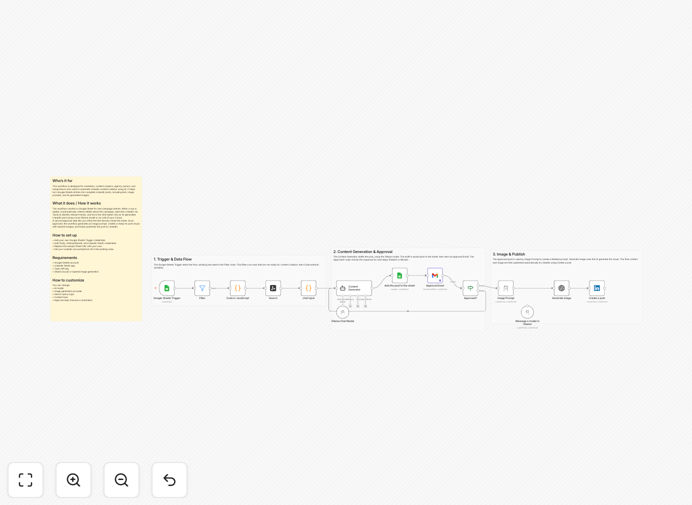
Step 1: Trigger from Google Sheets
The workflow monitors a specific Google Sheet for new rows. Each row represents a content campaign with details like topic, target audience, tone, and posting date.
Step 2: Research Trends with Tavily
Using the Tavily node, the automation searches LinkedIn and relevant web sources to gather current trends and data related to your campaign topic, ensuring content is timely and relevant.
Step 3: AI Post Generation
An AI model (Ollama or OpenAI) crafts a LinkedIn post using the campaign details and trend research. It formats the post for engagement, adds hashtags, and optimizes length.
Step 4: Human Approval in Sheets
The draft post is written back into the Google Sheet for review. Team members can edit, refine, and approve the content directly within the spreadsheet before it proceeds.
Step 5: AI Image Creation
Once approved, the workflow generates an image prompt from the post content and uses an image generation service (like OpenAI DALL-E) to create a custom visual that matches the post theme.
Step 6: LinkedIn Publishing
The final step posts the approved text and generated image to your LinkedIn account via the LinkedIn OAuth node, scheduling it according to the date specified in the sheet.
Who This Is For
This automation is ideal for businesses and individuals who rely on LinkedIn for professional branding, lead generation, or community engagement.
- Marketing Teams: Manage content calendars and ensure consistent posting across company accounts.
- Content Creators & Solopreneurs: Maintain a regular posting schedule without spending hours writing and designing.
- Agency Owners: Scale content production for multiple clients using a centralized approval system.
- Business Leaders: Build thought leadership presence with AI-assisted posts that reflect industry insights.
- Social Media Managers: Reduce manual workload while increasing post quality and frequency.
What You'll Need
- A Google Sheets account with a spreadsheet prepared as your content calendar.
- LinkedIn OAuth app credentials (create via LinkedIn Developer Portal).
- Tavily API key for web and trend research.
- Access to an AI model: Ollama (local) or OpenAI API for text generation.
- Image generation service access (OpenAI Images, Stable Diffusion, etc.).
- An n8n instance (cloud or self-hosted) to run the workflow.
Quick Setup Guide
Follow these steps to import and configure the workflow in your n8n environment.
- Download the template: Click the download button above to get the JSON file.
- Import into n8n: In your n8n editor, go to Workflows → Import and upload the JSON file.
- Configure Google Sheets: Replace the sample sheet URL with your own content calendar sheet. Set up the Google Sheets trigger credentials.
- Set up AI services: Add your Tavily API key, Ollama/OpenAI credentials, and image generation service keys in the respective nodes.
- Connect LinkedIn: Create a LinkedIn OAuth app and add your credentials to the LinkedIn node. Specify your LinkedIn account/person ID.
- Test and activate: Add a test row to your Google Sheet and run the workflow manually to verify each step works. Then activate the schedule.
Pro tip: Use a dedicated "Approval Status" column in your Google Sheet. The workflow can check this column before publishing, allowing multiple reviewers to sign off.
Key Benefits
Save 5–10 hours per week: Eliminate manual content creation, research, and posting. The automation handles drafting, image creation, and publishing.
Improve content relevance: AI incorporates real-time trend data from Tavily searches, making your posts more timely and engaging than static manual content.
Maintain brand consistency: Define tone and style in your sheet; AI adheres to these guidelines across all generated posts, ensuring a uniform brand voice.
Scale without extra staff: Agencies can manage content for dozens of clients using the same workflow—just separate sheets and slight AI tuning per client.
Reduce human error: Approval workflow ensures every post is reviewed before going live, preventing typos, off-brand messages, or scheduling mistakes.