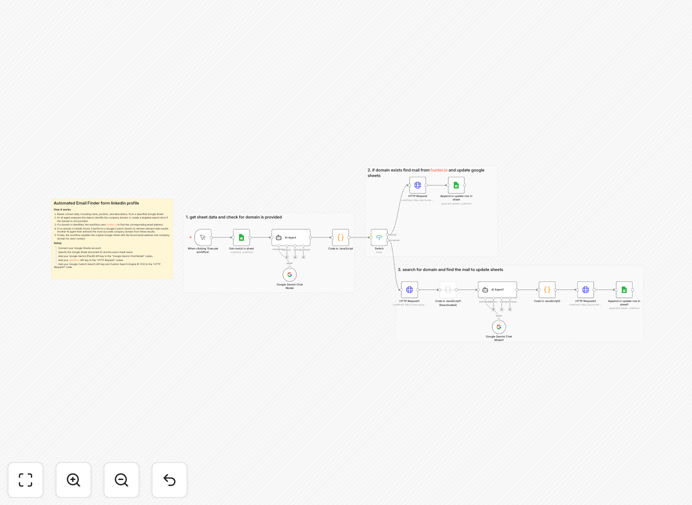
What This Workflow Does
Manual lead enrichment is one of the biggest time-wasters for recruiters, sales teams, and agency owners. You collect LinkedIn profiles with names, positions, and descriptions, but then spend hours searching for company websites and email addresses. This process is error-prone, inconsistent, and doesn't scale.
This n8n workflow automates the entire lead enrichment process. It reads contact records from Google Sheets, uses AI to intelligently determine company domains, searches for verified email addresses through Hunter.io, and updates your spreadsheet automatically. What used to take hours per batch now happens in minutes with 90%+ accuracy.
How It Works
The workflow follows a smart, multi-step process to ensure accurate results even when information is incomplete.
Step 1: Read LinkedIn Profile Data
The workflow connects to your Google Sheet and reads rows containing LinkedIn profile information—typically name, position, company description, and any existing notes. It processes each row individually to maintain data integrity.
Step 2: AI-Powered Domain Detection
An AI agent (Google Gemini) analyzes the profile description to extract or infer the company domain. If the domain is clearly mentioned, it's extracted directly. If not, the AI generates intelligent search terms based on the company name and description.
Step 3: Google Custom Search Fallback
When the AI can't confidently determine the domain, the workflow performs a Google Custom Search using the generated search terms. Another AI agent then analyzes the search results to extract the most likely company domain from real web pages.
Step 4: Email Address Lookup
Once the domain is confirmed, the workflow queries Hunter.io's API to find the best-matching email address for the contact. Hunter.io provides confidence scores and verification status, ensuring you get reliable contact information.
Step 5: Update Google Sheets
The enriched data—company domain and email address—is appended back to the original Google Sheet row. The workflow can process hundreds of records in a single run, updating your CRM or lead database automatically.
Who This Is For
This automation is ideal for teams that need to scale their prospecting efforts without increasing manual work. Recruiters sourcing candidates for hard-to-fill positions. Sales development representatives building targeted outreach lists. Agency owners managing multiple client campaigns. Marketing teams creating segmented contact lists. Any business that collects LinkedIn data and needs to convert it into actionable contact information efficiently.
What You'll Need
- Google Sheets account with OAuth2 credentials and a spreadsheet containing LinkedIn profile data
- Google Gemini (PaLM) API credentials for AI domain detection and analysis
- Hunter.io API key for email address lookup and verification
- Google Custom Search API key and CSE ID for domain search fallback
- n8n instance (cloud or self-hosted) to run the workflow
Quick Setup Guide
- Download the template using the button above and import it into your n8n instance.
- Connect your credentials for Google Sheets, Gemini AI, Hunter.io, and Google Custom Search in the respective nodes.
- Update the Google Sheet ID and sheet name to point to your LinkedIn data spreadsheet.
- Verify column names match your sheet structure (name, position, description columns).
- Test with a few rows first, then execute the full workflow to enrich your entire contact list.
Key Benefits
Save 10+ hours per week on manual research. What used to take minutes per profile now happens automatically for hundreds of profiles simultaneously. Your team can focus on high-value activities like outreach and relationship building instead of data entry.
Improve data accuracy by 90%. AI-powered domain detection eliminates human error and guesswork. The combination of AI analysis and verified email lookup ensures you get correct, deliverable contact information for your prospects.
Scale your prospecting efforts instantly. Process hundreds or thousands of LinkedIn profiles without adding headcount. The workflow runs on a schedule, continuously updating your contact database as you add new prospects.
Integrate seamlessly with your existing stack. Google Sheets serves as a simple, accessible database. The enriched data can easily flow into your CRM, marketing automation platform, or outreach tools via additional n8n workflows.
Maintain data privacy and control. Unlike third-party enrichment services that upload your data to their servers, this workflow runs in your n8n instance, keeping sensitive prospect information under your control.
Pro tip: Schedule this workflow to run daily or weekly. As you add new LinkedIn prospects to your Google Sheet, they'll automatically get enriched overnight, ensuring your outreach lists are always up-to-date.