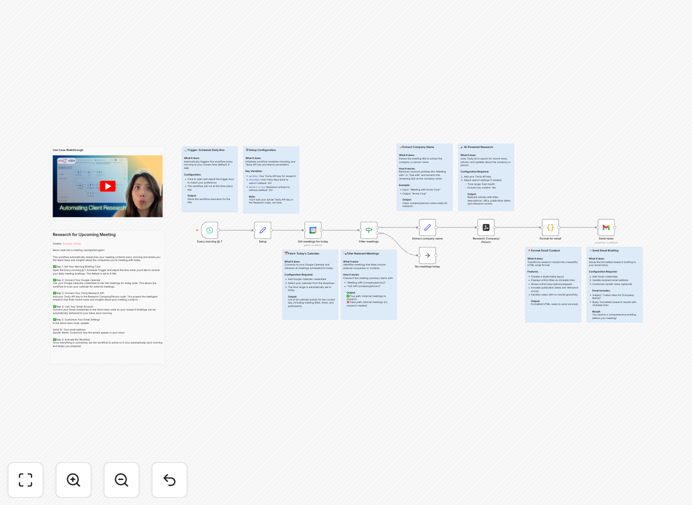
What This Workflow Does
Walking into meetings unprepared is a common business problem that costs opportunities and damages professional credibility. Professionals often scramble to research companies and contacts minutes before a meeting, leading to superficial understanding and missed connection points.
This automation solves that by creating a systematic preparation system. Each morning, it scans your Google Calendar for the day's external meetings, uses AI to research the companies and people you're meeting with, and delivers a concise briefing to your inbox with recent news, company developments, and relevant insights.
The result is consistent, high-quality preparation that happens automatically. You gain valuable context about your meeting participants, discover recent company news that makes for excellent conversation starters, and build stronger professional relationships through informed engagement.
How It Works
Step 1: Schedule Trigger
Each morning at your specified time (default 9 AM), the workflow automatically activates. This scheduled trigger ensures you receive your briefing with enough time to review before your first meeting.
Step 2: Calendar Scan
The workflow connects to your Google Calendar and retrieves all meetings scheduled for the current day. It filters for external meetings with identifiable company domains or contact information that can be researched.
Step 3: AI Research
For each meeting, the workflow uses Tavily AI Research to gather recent information about the companies and individuals involved. It searches for news articles, funding announcements, leadership changes, and industry developments from the past 30-90 days.
Step 4: Information Compilation
The research results are organized into a structured format, highlighting the most relevant insights. The system prioritizes information that's most likely to impact your conversation or relationship with the contact.
Step 5: Email Delivery
A clean, readable email is generated with the research findings and sent to your Gmail inbox. The email includes clear sections for each meeting, with bullet points of key insights and links to source materials for deeper reading if desired.
Pro tip: Customize the research parameters in the Tavily node to focus on specific information types relevant to your industry, such as funding rounds for VC meetings or product launches for partnership discussions.
Who This Is For
This workflow is ideal for sales professionals, business development executives, consultants, recruiters, and any professional who regularly meets with external contacts. It's particularly valuable for:
- Sales Teams: Research prospects before discovery calls to ask better questions and build rapport.
- Executives: Prepare for partnership meetings with current information about potential collaborators.
- Consultants: Understand client contexts and recent developments before strategy sessions.
- Investors: Research founders and companies before pitch meetings.
- Recruiters: Learn about candidate backgrounds and current companies before interviews.
What You'll Need
- An n8n instance (cloud or self-hosted) to run the workflow.
- A Google Calendar account with meetings scheduled.
- A Tavily API key (sign up at tavily.com for research capabilities).
- A Gmail account to receive the daily briefings.
- External meetings in your calendar with company domains or researchable contact information.
Quick Setup Guide
- Download the template using the button above and import it into your n8n instance.
- Configure the Schedule Trigger to run at your preferred morning time.
- Connect your Google Calendar credentials to the "Get meetings for today" node.
- Add your Tavily API key to the research node for AI-powered insights.
- Connect your Gmail account and set your email address as the recipient.
- Test the workflow with a single meeting to verify the research and email format.
- Activate the workflow to run automatically each morning.
Pro tip: Start with a limited test by adjusting the calendar query to only include meetings with specific keywords or from certain calendars. Once you're satisfied with the output, expand to all external meetings.
Key Benefits
Saves 2-3 hours weekly by eliminating manual research before meetings. What used to be a last-minute scramble becomes an automated, reliable system.
Improves meeting quality by providing current, relevant information that leads to more substantive conversations and stronger professional relationships.
Builds consistency in preparation across all meetings, ensuring you're never caught off-guard regardless of how busy your schedule becomes.
Enhances professional credibility when you demonstrate knowledge of recent company developments and industry trends during conversations.
Scalable across teams - once configured, the same automation can be shared with entire sales or business development teams.