Docker Telegram AI Analysis n8n

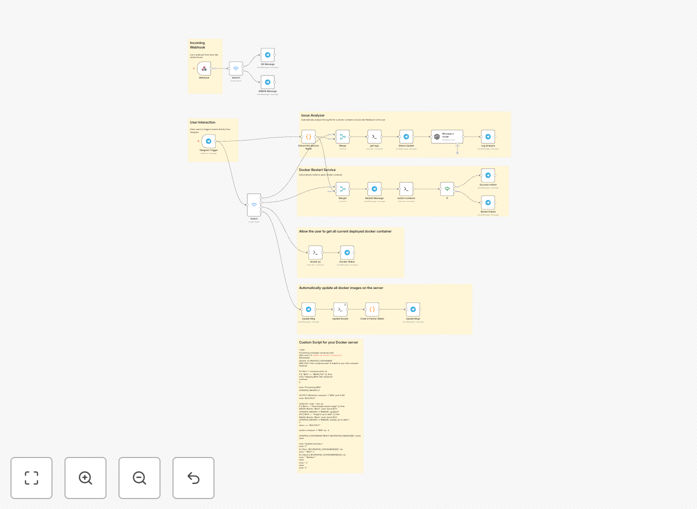
Monitor & manage Docker containers with Telegram bot & AI log analysis

Smart Telegram command center for Docker container management with AI-powered log analysis

Download Template JSON · n8n compatible · Free
Telegram bot interface for Docker container management

What This Workflow Does

This workflow transforms Telegram into a powerful command center for managing Docker containers remotely. It solves the challenge of monitoring and troubleshooting containerized applications when you're away from your workstation or server.

The AI-powered log analysis component automatically scans container logs for errors, anomalies, and performance patterns, delivering actionable insights directly to your Telegram chat. This eliminates the need for manual log inspection and provides intelligent alerts before small issues escalate.

How It Works

1. Telegram command processing

The workflow listens for specific commands in your Telegram chat (/status, /restart, /logs etc.) and authenticates the user before processing.

2. Docker API integration

Commands are translated into Docker API calls to inspect container states, retrieve logs, or execute management actions like restarting services.

3. AI log analysis

Logs from containers are processed through AI models that identify error patterns, performance bottlenecks, and security concerns, summarizing findings in plain English.

Who This Is For

This workflow is ideal for developers, sysadmins, and homelab enthusiasts who manage Docker environments and want:

  • Remote access to container management without SSH
  • Automated monitoring and alerting for container issues
  • Intelligent log analysis without manual inspection
  • Mobile-friendly administration interface

What You'll Need

  1. n8n instance (self-hosted or cloud)
  2. Telegram bot token (create via @BotFather)
  3. Docker host with API access enabled
  4. AI service API key (OpenAI or similar)
  5. Basic understanding of Docker commands

Quick Setup Guide

  1. Import the JSON template into your n8n instance
  2. Configure Telegram bot credentials in the webhook node
  3. Set up Docker API connection details
  4. Add your AI service API key
  5. Test basic commands like /status and /logs

Pro tip: For production use, implement additional security like IP whitelisting and command rate limiting.

Key Benefits

Reduce troubleshooting time by 60-80% with AI-powered log analysis that highlights the most critical issues and suggests solutions.

Respond to incidents from anywhere using Telegram's mobile app to restart containers, scale services, or check logs without VPN access.

Prevent small issues from becoming outages through proactive anomaly detection in container behavior patterns.

Eliminate terminal dependence with natural language commands and responses that make container management accessible to less technical team members.

Frequently Asked Questions

Common questions about Docker automation and Telegram integration

AI transforms raw log data into actionable insights by identifying patterns humans might miss. Instead of scrolling through thousands of lines, you get summarized reports highlighting critical errors, performance trends, and security concerns.

The AI learns your specific application patterns over time, reducing false positives and providing more accurate troubleshooting suggestions. For example, it can correlate memory spikes with specific events or detect subtle signs of impending failures.

  • Identifies recurring error patterns
  • Provides plain English explanations
  • Learns your application's normal behavior

Telegram's MTProto protocol provides strong encryption for messages in transit. For production environments, we recommend additional security layers like command whitelisting, user authentication, and IP restrictions.

Many enterprises use this approach for emergency access when VPNs aren't available. The workflow can be configured to require secondary authentication for destructive commands like container restarts or service scaling.

  • Use secret commands for sensitive actions
  • Implement rate limiting
  • Restrict to private chats/channels

The workflow supports all common Docker operations including status checks, log viewing, container starts/stops/restarts, and basic service scaling. More advanced implementations can handle docker-compose operations, image updates, and resource allocation adjustments.

A development team might use it to quickly restart a failing microservice during an outage, while a homelab user could check storage usage across containers without logging into their server.

  • Full container lifecycle management
  • Real-time log streaming
  • Performance metric monitoring

This solution complements traditional monitoring by adding mobile-friendly interaction and AI analysis. While tools like Prometheus excel at metrics collection, they often require dashboards and lack conversational interfaces.

The Telegram integration shines for quick checks and emergency actions. A sysadmin might use their monitoring dashboard daily but switch to Telegram commands when responding to alerts while commuting or during off-hours.

  • Faster response to critical alerts
  • No dashboard login required
  • Natural language interaction

Yes, the workflow supports team collaboration through Telegram groups or individual chats. You can implement role-based access control where junior team members get read-only access while seniors have full management privileges.

Activity logging ensures accountability for all operations. Some teams configure it to post important actions to a dedicated channel, creating an audit trail of who performed what operation and when.

  • Granular permission levels
  • Operation audit trails
  • Team-wide alerting

Large language models like GPT-4 excel at understanding unstructured log data. For specialized needs, fine-tuned models trained on specific application logs can provide even better accuracy.

The workflow is compatible with most AI APIs. Some teams start with general-purpose models then transition to custom-trained ones as they collect enough labeled log data to train specialized classifiers for their stack.

  • Start with general-purpose models
  • Fine-tune with your log data over time
  • Combine multiple models for best results

Absolutely! GrowwStacks specializes in building tailored automation solutions for container management. We can create custom workflows that integrate with your existing monitoring stack, implement enterprise-grade security, and support your specific Docker use cases.

Our engineers will work with your team to understand your pain points and design a solution that saves hours of manual work each week. Common customizations include Kubernetes support, compliance logging, and integration with internal ticketing systems.

  • Enterprise security features
  • Custom command sets
  • Integration with existing tools

Need a Custom Docker Automation?

This free template is a starting point. Our team builds fully tailored automation systems for your specific needs.