What This Workflow Does
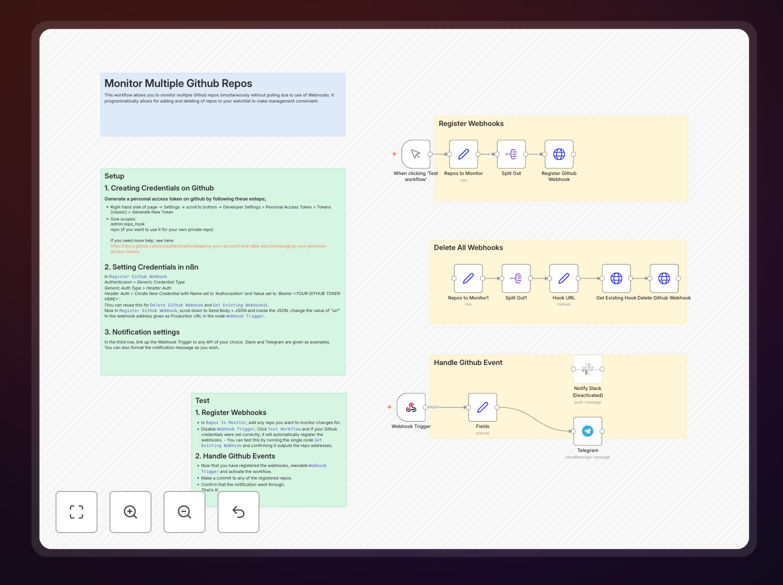
This automation solves the common problem of manually tracking changes across multiple GitHub repositories. Instead of constantly checking each repo or setting up individual notifications, this workflow uses GitHub webhooks to monitor all your repositories simultaneously. Whenever a commit, push, pull request, or other event occurs, you receive instant notifications through your preferred channels like Slack, email, or Microsoft Teams.
The system programmatically manages webhook registration and removal, making it easy to add or remove repositories from your watchlist without manual configuration. This eliminates the resource-intensive polling approach, where systems repeatedly check for changes, and replaces it with efficient, event-driven notifications that save bandwidth and server resources while providing faster alerts.
How It Works
1. Webhook Registration
The workflow automatically registers webhooks with your specified GitHub repositories using a personal access token. It sets up endpoints that GitHub will call whenever specific events occur, creating a direct communication channel between GitHub and your notification system.
2. Event Listening & Processing
When GitHub sends a webhook payload (triggered by repository activity), the workflow receives it instantly. The system parses the JSON payload to extract relevant information: who made the change, what was changed, which repository was affected, and the type of event.
3. Intelligent Notification Routing
Based on configurable rules, the workflow determines where and how to send notifications. You can set up different channels for different types of events—for example, critical commits might go to a team channel while routine updates go to a dedicated notifications channel.
4. Dynamic Repository Management
The workflow includes functionality to programmatically add or remove repositories from monitoring. This means you can update your watchlist through a simple interface without manually configuring each webhook in GitHub's settings.
Who This Is For
This automation is ideal for development teams, engineering managers, DevOps professionals, and organizations managing multiple codebases. It's particularly valuable for agencies serving multiple clients, companies with microservices architectures, open-source project maintainers, and any team that needs visibility into code changes across different repositories. If you're tired of missing important commits or spending time manually checking repositories, this workflow provides the automated oversight you need.
What You'll Need
- A GitHub account with admin access to the repositories you want to monitor
- A GitHub personal access token with
repoandadmin:repo_hookpermissions - An n8n instance (cloud or self-hosted) to run the workflow
- Destination channels for notifications (Slack, Teams, Discord, email, etc.)
- A publicly accessible webhook URL (provided by n8n when you activate the workflow)
Quick Setup Guide
- Download and import the template JSON file into your n8n instance.
- Configure GitHub credentials by creating a credential with your personal access token in the HTTP Request nodes.
- Update the webhook URL in the Register GitHub Webhook node with your n8n production URL.
- Add repository URLs to the "Repos to Monitor" list in the workflow.
- Connect notification channels by configuring Slack, Telegram, or other nodes with your destination details.
- Test the workflow by making a commit to one of your monitored repositories and verifying the notification arrives.
Pro tip: Start by monitoring just 1-2 repositories to verify everything works correctly before adding your entire portfolio. This helps you fine-tune notification formats and routing rules with minimal noise.
Key Benefits
Real-time awareness without constant checking: Get notified within seconds of any repository activity instead of periodically checking multiple repos throughout the day. This ensures you never miss critical changes while freeing up mental bandwidth for actual development work.
Reduced infrastructure load: Webhooks eliminate the need for polling, which can make hundreds of API calls per hour. This significantly reduces bandwidth usage, avoids GitHub API rate limits, and minimizes server resource consumption compared to traditional polling approaches.
Centralized monitoring across all projects: Instead of managing notifications separately for each repository, get a unified view of all activity in one place. This is especially valuable for teams managing client projects, internal tools, and open-source contributions simultaneously.
Automated compliance tracking: Maintain automatic audit trails of all code changes with timestamps, user information, and change details. This documentation is invaluable for security reviews, compliance requirements, and post-incident investigations.
Scalable team coordination: As your team grows or you take on more projects, the system scales effortlessly. New repositories can be added programmatically, and notification rules can be adjusted to match evolving team structures and workflows.