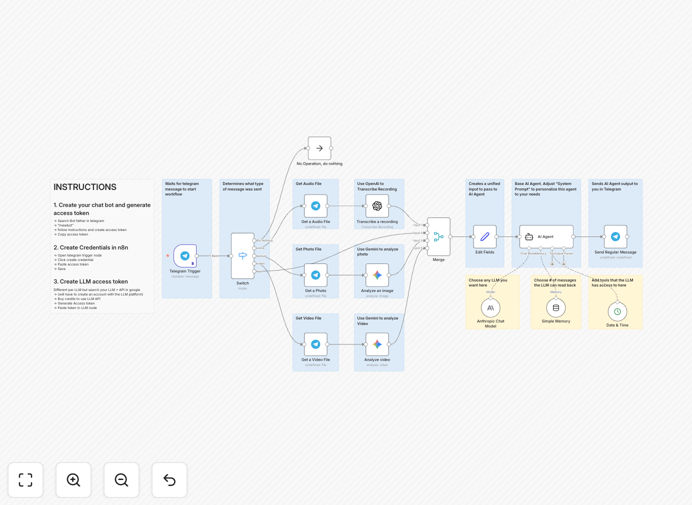
What This Workflow Does
This automation transforms Telegram from a simple messaging app into a powerful AI-powered assistant capable of understanding and responding to multiple types of media. Traditional chatbots only handle text, but this workflow processes voice messages, images, and videos—converting them into actionable insights using cutting-edge AI models.
The template serves as a foundation for building sophisticated Telegram AI agents that can provide customer support, analyze user-submitted content, answer questions about visual materials, or create interactive educational tools. By combining Telegram's accessibility with multimodal AI capabilities, you can create automated systems that feel remarkably human in their understanding and responses.
Businesses save significant time on manual content review and customer interaction while providing 24/7 intelligent support. The workflow automatically routes different media types to appropriate AI processors, synthesizes the information, and delivers coherent, context-aware responses—all without human intervention.
How It Works
The automation follows a sophisticated pipeline that intelligently processes different input types:
1. Telegram Message Reception
The workflow starts with a Telegram trigger node that listens for incoming messages to your bot. It captures all message types—text, voice notes, photos, and videos—along with user metadata and chat context.
2. Media Type Detection & Routing
A switch node analyzes the message content to determine its type. Text messages proceed directly to the AI agent, while voice, image, and video messages are routed to specialized processing branches. This intelligent routing ensures each media type gets appropriate handling.
3. Multimodal AI Processing
Voice messages are transcribed using OpenAI's Whisper or similar speech-to-text models. Images and video frames are analyzed by Google Gemini or Claude's vision capabilities to extract text, identify objects, and understand context. The system preserves the original media while creating AI-readable text representations.
4. AI Agent Analysis & Response Generation
The processed content (whether original text or converted media) is sent to your chosen LLM (Claude, GPT, or others) with a customizable system prompt. The AI understands the context, references previous conversation history if configured, and generates a thoughtful, relevant response tailored to the user's query and media content.
5. Response Delivery & Logging
The AI-generated response is sent back through Telegram to the user. The workflow can optionally log conversations, update databases, or trigger additional automations based on the interaction—creating a complete closed-loop system for customer engagement or internal processes.
Pro tip: Customize the AI's system prompt to match your brand voice and specific use case. A well-crafted prompt can transform this from a generic assistant to a specialized expert in your field.
Who This Is For
This template is ideal for businesses and developers building AI-powered communication tools. Customer support teams can handle inquiries sent as voice messages or product images. Content creators can automate feedback on visual submissions. Educational platforms can build tutors that explain diagrams. E-commerce businesses can create assistants that recommend products based on photos.
Community managers running Telegram groups can use it to moderate content and answer member questions. Internal teams can build assistants that process screenshots or voice notes from colleagues. The flexibility makes it valuable for anyone needing to automate conversations that go beyond simple text exchanges.
What You'll Need
- Telegram Bot Token: Created through BotFather on Telegram (free)
- OpenAI API Key: For voice message transcription (speech-to-text)
- Google Gemini or Anthropic Claude API Key: For image and video analysis
- Primary LLM Access: API key for your chosen AI model (Claude, GPT, or others) for the main conversation agent
- n8n Instance: Either n8n.cloud account or self-hosted installation
- Webhook URL: For Telegram to send messages to your n8n workflow (automatically configured in most setups)
Quick Setup Guide
Follow these steps to deploy your multimodal Telegram AI bot:
- Create Your Telegram Bot: Message @BotFather on Telegram, use /newbot command, follow prompts, and save the access token provided.
- Import the Template: Download the JSON file above and import it into your n8n instance using the "Import from File" option.
- Configure Credentials: In the Telegram trigger node, create a new credential with your bot token. Set up credentials for OpenAI, Gemini/Claude, and your primary LLM in their respective nodes.
- Customize the AI Prompt: Edit the system prompt in the AI agent node to define your bot's personality, expertise areas, and response guidelines.
- Test and Deploy: Activate the workflow, send a test message (text, voice, or image) to your bot, and verify responses. Adjust any parameters based on initial results.
- Add Business Logic: Extend the workflow by connecting to your CRM, database, or other tools based on conversation outcomes.
Implementation note: Start with text-only functionality first, then gradually add voice and image processing. This incremental approach helps isolate issues and ensures each modality works correctly before combining them.
Key Benefits
24/7 Multimodal Support: Handle customer inquiries sent as voice messages, product photos, or demonstration videos without human intervention, reducing response time from hours to seconds.
Reduced Operational Costs: Automate routine visual and auditory analysis tasks that would otherwise require staff review, potentially saving 15-25 hours per week per support agent.
Improved Customer Experience: Users can communicate naturally using their preferred medium (speaking, showing, or typing) rather than being forced into text-only interactions.
Scalable Content Moderation: Automatically review user-uploaded images and videos for compliance, inappropriate content, or specific criteria at any volume.
Actionable Insights from Media: Extract structured data from visual content—like reading text from screenshots, identifying objects in photos, or summarizing video content—for business intelligence.