Slack Weather API Team Automation n8n Free Template

National Weather Service 7-day forecast in Slack

Get instant weather forecasts in Slack with a custom slash command. Automate weather updates for your team's planning and coordination.

Download Template JSON · n8n compatible · Free
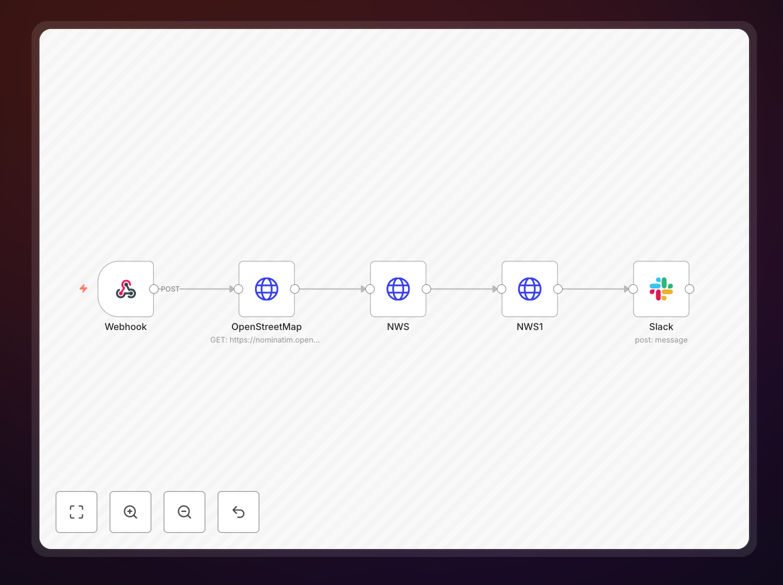
Slack weather command automation workflow interface showing forecast integration

What This Workflow Does

This automation solves the problem of fragmented weather information by bringing real-time forecasts directly into your team's Slack workspace. Instead of team members checking different weather apps or websites, they can simply type /weather [cityname] and get an instant 7-day forecast from the National Weather Service.

The workflow transforms how teams access weather information for planning purposes. Whether you're coordinating outdoor events, managing field operations, or simply helping remote employees plan their week, this automation ensures everyone has access to reliable, up-to-date weather data without leaving their primary communication platform.

Beyond basic forecasts, the system can be adapted to provide weather alerts, monitor multiple locations, and integrate with other business systems. It eliminates the manual work of weather checking while improving team coordination and operational planning.

How It Works

The automation follows a clear sequence to transform a simple Slack command into detailed weather intelligence.

1. Slack Command Trigger

When a team member types /weather New York in Slack, the custom slash command sends a webhook to the automation workflow. The command includes the location parameter that the user specified.

2. Location Geocoding

The workflow converts the city name into precise latitude and longitude coordinates using OpenStreetMap or similar geocoding services. This ensures accurate weather data retrieval regardless of how users phrase location names.

3. Weather Data Retrieval

The coordinates are sent to the National Weather Service API, which returns comprehensive forecast data including temperature, precipitation probability, wind speed and direction, humidity, and detailed condition descriptions for the next 7 days.

4. Data Formatting & Enrichment

The raw weather data is processed and formatted into a user-friendly message. The workflow extracts the most relevant information for team planning and presents it in a clear, actionable format suitable for Slack's interface.

5. Slack Response Delivery

The formatted weather forecast is posted back to the Slack channel where the command was issued. The response appears as a structured message with emojis, formatting, and clear sections for different forecast periods.

Who This Is For

This automation is ideal for teams that need quick access to weather information for planning and coordination. Remote teams with members in different locations benefit from instant local forecasts. Event planning companies can check venue conditions. Construction and field service businesses can monitor worksite weather. Logistics operations can plan around weather disruptions.

Marketing teams running outdoor campaigns, sports organizations scheduling practices, and educational institutions planning activities all find value in having weather information integrated directly into their team communication platform. Even office-based teams appreciate knowing commute conditions or planning outdoor lunch breaks.

What You'll Need

  1. A Slack workspace where you have permission to install custom apps
  2. Ability to create a custom Slack app with slash command permissions
  3. An n8n instance (cloud or self-hosted) to run the automation workflow
  4. Basic understanding of webhook URLs for connecting Slack to your automation
  5. Optional: Multiple location coordinates if monitoring several sites

Pro tip: Start with a single location to test the workflow, then expand to multiple locations once you're comfortable with the setup. Consider creating different Slack commands for different locations your team frequently checks.

Quick Setup Guide

Follow these steps to implement this weather automation in your Slack workspace:

  1. Download the template using the button above and import it into your n8n instance
  2. Create a Slack app at api.slack.com/apps with a new slash command named "/weather"
  3. Configure the webhook URL in your Slack app to point to your n8n webhook trigger URL
  4. Set up OAuth permissions for your Slack app to post messages to channels
  5. Install the app to your Slack workspace and authorize the necessary permissions
  6. Test the command by typing /weather [yourcity] in any Slack channel
  7. Customize as needed for additional locations or notification formats

Key Benefits

Save 2-3 hours per week that teams typically spend checking weather across different apps and websites. Centralized weather information eliminates redundant lookups and ensures everyone works from the same data.

Improve decision accuracy with official National Weather Service data instead of varied commercial sources. Having reliable, consistent weather information supports better planning for outdoor work, events, and logistics.

Enhance team coordination by making weather information instantly accessible where teams already communicate. No more "Did you check the weather?" conversations—everyone can see the same forecast in context.

Scale across locations with minimal additional effort. Once the system is working for one location, adding more cities or regions is straightforward, making it ideal for distributed teams.

Reduce weather-related disruptions through proactive information sharing. Early awareness of adverse conditions allows teams to adjust plans before issues arise, minimizing operational impacts.

Frequently Asked Questions

Common questions about weather automation and integration

You can set up a custom Slack slash command like /weather that triggers an automation workflow. This workflow fetches data from the National Weather Service API and posts formatted forecasts directly into your chosen Slack channel. It eliminates the need for team members to check separate weather apps or websites.

This approach centralizes weather information where your team already communicates. For example, a construction team can check site conditions, an event planner can monitor venue weather, and remote teams can coordinate based on local forecasts—all without leaving Slack.

Automating weather information improves operational planning and team coordination. For businesses with field teams, outdoor events, or logistics operations, having instant weather updates prevents disruptions and supports better decision-making. It saves time otherwise spent manually checking forecasts and ensures everyone has the same information.

Beyond time savings, automated weather integration reduces weather-related risks. Teams can proactively adjust schedules, resource allocation, and safety protocols based on reliable forecasts. This leads to fewer cancellations, better resource utilization, and improved safety compliance.

Yes, you can configure the automation to monitor multiple locations relevant to your business. The workflow can be set to provide daily forecasts for office locations, client sites, or event venues. You can also create conditional alerts for specific weather conditions like storms, high winds, or extreme temperatures that might impact operations.

For instance, a logistics company could monitor weather along delivery routes, while a retail chain could track conditions at different store locations. The system can send different alert levels based on severity thresholds you define, ensuring teams only get notified when weather actually affects their work.

The National Weather Service API is highly reliable and provides official government weather data. It's free to use and offers comprehensive forecast information suitable for business planning. The data includes temperature, precipitation, wind conditions, and detailed forecasts up to 7 days, making it trustworthy for operational decisions.

Unlike some commercial weather services that may have usage limits or costs, the NWS API is designed for public use and has excellent uptime. Businesses across industries—from agriculture to transportation—rely on this data for critical planning, making it a proven choice for automation integration.

You can adapt this automation to send weather updates to Microsoft Teams, Discord, email distribution lists, or even SMS/text messages. The workflow structure remains similar—you simply change the output channel. This flexibility allows you to reach team members through their preferred communication method.

For field teams without constant Slack access, SMS alerts might be more effective. For executive summaries, formatted email reports work well. The same weather data can be distributed through multiple channels simultaneously, ensuring everyone gets information in their preferred format.

Weather data can be integrated with calendar systems to flag outdoor events, with project management tools to adjust timelines, or with CRM systems to notify sales teams about client location conditions. You can combine weather data with other business data to create intelligent alerts and automated responses to changing conditions.

For example, automatically rescheduling outdoor maintenance when rain is forecasted, adjusting delivery routes based on storm patterns, or notifying clients about weather-related service changes. These integrations turn weather data from passive information into active business intelligence.

You need to create a custom Slack app with slash command permissions, set up an automation platform like n8n to receive webhooks and process weather data, and configure the National Weather Service API integration. The initial setup takes about 30-60 minutes, after which the system runs automatically.

The technical requirements are minimal: basic familiarity with Slack app configuration and webhook concepts. Most of the complex logic is handled by the pre-built workflow template, which you simply import and configure with your specific Slack and location details.

Yes, GrowwStacks specializes in building custom weather automation solutions tailored to specific business needs. We can create systems that monitor multiple locations, integrate with your existing tools, send conditional alerts, and provide detailed forecasting for operational planning. Our team handles the complete implementation from design to deployment.

We work with businesses across industries to develop weather intelligence systems that go beyond basic forecasts. Whether you need integration with field service software, automated safety alerts, or weather-dependent workflow triggers, we can build a solution that fits your exact requirements and scales with your operations.

Need a Custom Weather Automation?

This free template is a starting point. Our team builds fully tailored automation systems for your specific business needs.