LinkedIn AI Personalization Browser Automation Lead Generation n8n

Personalized LinkedIn Network Outreach with Groq AI & Browserflow

Automate targeted LinkedIn connection requests with AI-generated personalization. Scrape profiles, craft custom messages, and send outreach at scale while maintaining authenticity.

Download Template JSON · n8n compatible · Free
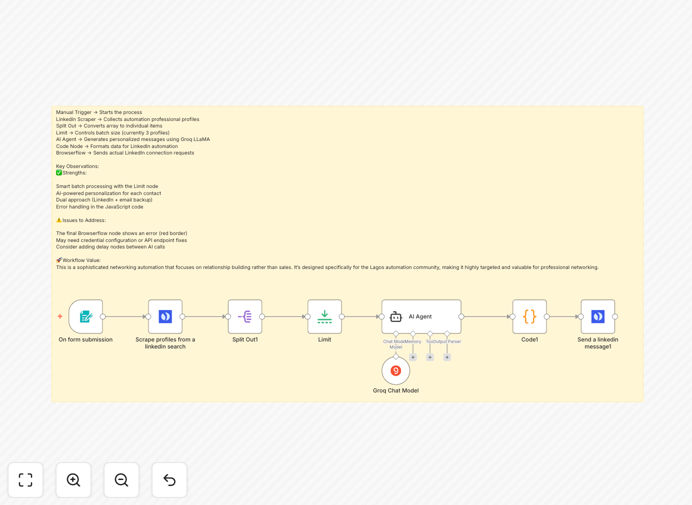
LinkedIn automation workflow diagram showing AI personalization and browser automation integration

What This Workflow Does

Manual LinkedIn outreach is time-consuming and often generic, resulting in low connection acceptance rates. Sales teams and business developers spend hours each week searching for prospects, crafting messages, and sending connection requests—only to achieve minimal engagement.

This automation solves that problem by creating a complete, intelligent outreach system. It discovers relevant professionals based on your criteria, analyzes their profiles using AI, generates genuinely personalized connection messages, and automatically sends requests through browser automation. The workflow maintains human-like interaction patterns with built-in delays and compliance safeguards.

Instead of blasting generic messages, you build meaningful professional networks with people who are actually relevant to your business. The AI ensures each message references specific details from the recipient's profile, dramatically increasing response rates while saving 10-15 hours of manual work weekly.

How It Works

1. Profile Discovery & Scraping

The workflow begins by searching LinkedIn for professionals matching your target criteria—industry, location, skills, or job titles. It extracts profile data including names, headlines, summaries, and URLs, creating a structured dataset for personalization.

2. AI-Powered Message Generation

Each profile is analyzed by Groq AI (using the LLaMA model) to identify key talking points. The AI crafts unique connection messages that reference specific skills, experiences, or interests mentioned in the profile, creating genuine relevance rather than template-based outreach.

3. Intelligent Batch Processing

To maintain LinkedIn compliance and avoid detection, the workflow processes profiles in controlled batches with variable delays between actions. This mimics human browsing patterns and prevents rate limiting while allowing scalable outreach.

4. Automated Connection Requests

Browserflow automation navigates to each LinkedIn profile and sends the personalized connection request with the AI-generated message. The system includes error handling, retry logic, and success tracking for complete campaign management.

Who This Is For

This workflow is ideal for B2B service providers, agency owners, recruiters, consultants, and SaaS companies who rely on professional networking for business growth. Marketing teams targeting specific industries, sales professionals building prospect pipelines, and founders expanding their professional networks will see immediate value.

It's particularly valuable for businesses with clear ideal customer profiles who want to move beyond spray-and-pray outreach. If you're currently spending more than 5 hours weekly on manual LinkedIn networking or struggling with sub-10% connection acceptance rates, this automation will transform your approach.

Pro tip: Start with small batches (3-5 profiles daily) to test your messaging and compliance settings before scaling. Monitor response rates and adjust your AI prompts based on what generates the best engagement.

What You'll Need

  1. Self-hosted n8n instance (this workflow uses community nodes not available in Cloud)
  2. Groq API access for AI message generation (cost-effective compared to other AI services)
  3. Browserflow account for LinkedIn browser automation
  4. LinkedIn Sales Navigator (recommended for advanced search filters)
  5. Clear targeting criteria (industry, location, job titles, skills)

Quick Setup Guide

1. Download the template and import it into your self-hosted n8n instance.

2. Configure the Browserflow node with your authentication credentials and test the LinkedIn connection.

3. Set up your Groq API key in the AI Agent node and adjust the system prompt to match your networking style.

4. Modify the search criteria in the scraping node to target your ideal audience (adjust location, industry, keywords).

5. Test with a small batch of 2-3 profiles to verify message quality and automation reliability.

6. Schedule the workflow to run daily with appropriate limits that respect LinkedIn's usage policies.

Important: Always prioritize quality over quantity. Better to send 10 highly personalized requests daily that get 50% acceptance than 100 generic ones that get ignored or reported.

Key Benefits

3-5x Higher Connection Rates: AI-generated personalization based on actual profile data creates genuine relevance that generic templates can't match. Recipients recognize you've done your homework and are more likely to accept.

Save 10-15 Hours Weekly: Automate the entire discovery, research, and outreach process. What used to take hours of manual work now happens automatically while you focus on higher-value conversations.

Scalable Yet Compliant Outreach: Built-in rate limiting, random delays, and batch processing ensure you grow your network without risking account restrictions. The system respects platform limits while maximizing allowed activity.

Consistent Pipeline Building: Turn LinkedIn from a sporadic activity into a systematic lead generation channel. Maintain steady relationship-building even during busy periods when manual outreach would slip.

Data-Driven Optimization: Track which message approaches, targeting criteria, and personalization tactics deliver the best results. Continuously refine your AI prompts based on actual performance data.

Frequently Asked Questions

Common questions about LinkedIn automation and AI-powered outreach

The safest approach is to combine intelligent delays, personalized messaging, and batch processing. Automation tools should mimic human behavior by adding random pauses between actions, limiting daily connection requests, and avoiding spammy content.

Using AI to create genuinely relevant messages based on profile data significantly reduces spam reports. LinkedIn's algorithms detect patterns—varying your activity timing and maintaining reasonable volumes (typically under 30 requests daily) keeps your account healthy.

  • Implement variable delays between actions (30-90 seconds)
  • Limit connection requests to 20-30 per day
  • Never send identical messages to multiple recipients
  • Regularly monitor your account's "Social Selling Index" score

AI personalization can dramatically improve connection acceptance rates when done correctly. By analyzing a prospect's profile, industry, skills, and recent activity, AI can craft messages that reference specific details, creating a 3-5x higher response rate compared to generic templates.

The key is using quality data inputs and focusing on genuine networking value rather than sales pitches. For example, an AI might notice someone recently published an article about marketing automation and reference that in your connection request, showing authentic interest in their work.

This combination creates a complete outreach system: browser automation handles the repetitive UI interactions (searching, navigating, clicking), while AI provides the intelligence for personalization. Together, they enable scalable yet authentic networking.

You maintain human-like interactions at scale, saving 10-15 hours weekly on manual outreach tasks. The system can process hundreds of profiles, extract relevant information, craft personalized messages, and send connection requests—all while you focus on actual conversations with interested prospects.

Implement conservative rate limiting (typically 20-30 connection requests daily), add variable delays between actions (30-90 seconds), avoid mass identical messaging, and regularly monitor your account health. Quality over quantity is crucial.

Focus on building genuine relationships rather than maximizing volume, which aligns with LinkedIn's professional networking purpose. Track your acceptance rates—if they drop below 20%, your approach may be too aggressive or your messaging too generic.

B2B service providers, agencies, consultants, recruiters, and SaaS companies see the greatest ROI. These businesses rely on professional relationships and have clear target personas that can be identified through LinkedIn's search filters.

Automation helps them systematically build their network within specific industries, locations, or skill sets, turning LinkedIn from a passive profile into an active lead generation channel. The initial connection often leads to discovery calls, demos, or partnership discussions.

Yes, advanced automation workflows can sync LinkedIn outreach data directly to CRMs like HubSpot, Salesforce, or Pipedrive. When someone accepts your connection request or responds to your message, that interaction can create or update a contact record.

The workflow can track the conversation stage and trigger follow-up sequences—creating a seamless sales pipeline from initial outreach to closed deal. This eliminates manual data entry and ensures no prospect falls through the cracks.

The distinction lies in relevance and value. Automation becomes spam when it sends identical messages to irrelevant recipients purely for self-promotion. Ethical automation personalizes each interaction based on the recipient's actual profile.

It focuses on mutual benefit and respects opt-out preferences. The goal is scaling genuine networking, not blasting advertisements. If your automation helps build professional relationships that benefit both parties, it's a tool—not spam.

Yes, GrowwStacks specializes in building tailored LinkedIn automation systems for specific business needs. We analyze your target audience, messaging strategy, and integration requirements to create custom workflows that align with your sales process while maintaining platform compliance.

Our solutions typically deliver 3-5x more qualified connections than manual outreach. We handle the technical implementation, compliance safeguards, and optimization—you get a turnkey system that builds your professional network while you focus on running your business.

  • Custom targeting based on your ideal customer profile
  • Brand-aligned messaging that sounds like you
  • Integration with your existing CRM and tools
  • Ongoing optimization based on performance data

Need a Custom LinkedIn Automation?

This free template is a starting point. Our team builds fully tailored automation systems for your specific business needs.