LinkedIn AI Personalization Lead Generation Google Sheets PhantomBuster

Automate Personalized LinkedIn Outreach with GPT-4O

Transform raw leads into high-converting connection requests using AI-powered personalization and automated sending.

Download Template JSON · n8n compatible · Free
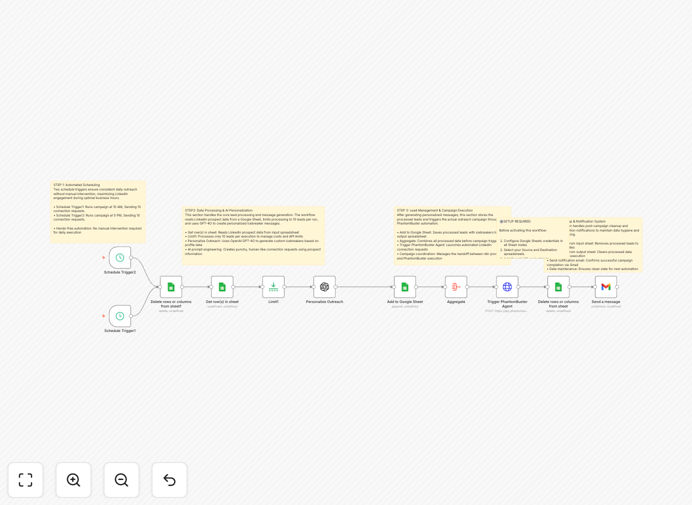
Diagram showing LinkedIn automation workflow with GPT-4O and PhantomBuster integration

What This Workflow Does

Manual LinkedIn outreach is time-consuming and often yields low response rates due to generic messaging. This workflow solves that by automating the entire process—from lead data collection to sending personalized connection requests—while maintaining authentic, human-like communication.

The system processes LinkedIn profile data through GPT-4O to generate unique icebreakers for each prospect, then automatically sends connection requests via PhantomBuster at optimal times. It runs twice daily, processes leads in batches to stay within LinkedIn's limits, and tracks everything in Google Sheets for complete visibility.

Instead of spending hours crafting individual messages, you get a hands-off system that delivers personalized outreach at scale, increasing connection acceptance rates while freeing up your time for actual conversations with qualified leads.

How It Works

The automation follows a four-phase sequence designed for efficiency and compliance.

Phase 1: Lead Acquisition & Processing

Twice daily scheduled triggers activate the workflow. It first cleans previously processed leads from your source Google Sheet to prevent duplicates, then fetches fresh LinkedIn profile data including names, titles, companies, locations, and profile URLs.

Phase 2: AI-Powered Personalization Engine

Retrieved leads are processed in batches of 10 through GPT-4O. The AI analyzes each profile and generates personalized icebreakers following proven templates, paraphrasing information rather than copying it directly to ensure messages feel human-written.

Phase 3: Data Storage & Campaign Launch

Processed leads with their AI-generated icebreakers are stored in a dedicated tracking sheet. The system aggregates all data and triggers your PhantomBuster agent to execute LinkedIn connection requests using the personalized messages.

Phase 4: Cleanup & Notification

After successful campaign launch, processed leads are removed from the source sheet, email confirmations are sent, and the system prepares for the next execution cycle—creating a self-maintaining lead generation machine.

Who This Is For

This workflow is ideal for sales development representatives, recruitment agencies, business development professionals, coaches, consultants, and marketing agencies who need to scale their LinkedIn networking while maintaining personalization.

It's perfect for businesses targeting specific industries or roles where personalized outreach significantly increases conversion rates. If you're spending hours each week manually sending connection requests or struggling with low acceptance rates, this automation delivers immediate value.

What You'll Need

  1. Google Sheets with OAuth2 access configured in n8n
  2. OpenAI API key with GPT-4O access
  3. PhantomBuster account with API key and configured LinkedIn connection agent
  4. Gmail account for notification emails
  5. LinkedIn Sales Navigator (recommended for better targeting)
  6. n8n instance (cloud or self-hosted)

Quick Setup Guide

  1. Prepare Google Sheets: Create source and destination sheets with required columns (firstName, lastName, title, companyName, location, linkedInProfileUrl).
  2. Configure API Credentials: Set up OAuth2 for Google Sheets, add your OpenAI API key, and configure PhantomBuster with your LinkedIn agent ID.
  3. Import the Workflow: Download and import the JSON template into your n8n instance.
  4. Update Configuration: Replace placeholder sheet IDs, API keys, and agent IDs with your actual credentials.
  5. Test with Sample Data: Run the workflow manually with 2-3 test profiles to verify icebreaker generation and PhantomBuster integration.
  6. Schedule Execution: Set the schedule trigger for optimal times (e.g., 10 AM and 5 PM in your target timezone).
  7. Monitor & Optimize: Review acceptance rates in your tracking sheet and adjust AI prompts or targeting as needed.

Pro tip: Start with small batches (5-10 leads daily) to test deliverability and acceptance rates before scaling. Monitor LinkedIn's response to ensure compliance.

Key Benefits

25-40% Higher Connection Rates: AI-generated personalization based on profile specifics dramatically outperforms generic templates, making prospects more likely to accept your request.

Save 50+ Hours Monthly: Automating research, writing, and sending eliminates manual work, freeing sales teams to focus on qualified conversations instead of prospecting.

Scalable Without Additional Cost: Process hundreds of leads with the same infrastructure—no per-lead fees beyond your API costs, making it cost-effective at any volume.

Platform-Compliant Automation: Built with LinkedIn's limits in mind, using batch processing and natural timing to mimic human behavior and avoid restrictions.

Complete Funnel Visibility: Track every lead from initial data through connection request to eventual conversion in your Google Sheets dashboard.

Frequently Asked Questions

Common questions about LinkedIn automation and AI-powered outreach

The most effective LinkedIn outreach automation combines AI personalization with platform-safe automation tools. Using GPT-4O to analyze profiles and generate unique icebreakers, then sending via a tool like PhantomBuster maintains authenticity while scaling.

This approach respects LinkedIn's limits and creates genuine connections, unlike generic spam messages. The key is balancing automation with personalization—machines handle the repetitive tasks while AI ensures each message feels individually crafted.

  • AI analyzes profile specifics for relevance
  • Automation handles timing and sending
  • Human oversight maintains quality control

AI personalization can increase LinkedIn connection acceptance rates from 5-10% to 25-40% by creating messages that reference specific details from a prospect's profile.

Instead of generic templates, AI analyzes job titles, company info, and recent activity to craft relevant icebreakers that demonstrate genuine interest and understanding. For example, mentioning someone's recent promotion or published article shows you've done your homework.

  • References specific profile elements
  • Creates contextually relevant messages
  • Demonstrates genuine interest

Yes, by following best practices: stay within LinkedIn's weekly connection limits (typically 100-200), space out requests throughout the day, personalize every message, avoid aggressive follow-ups, and use automation tools designed for platform compliance.

The key is mimicking human behavior rather than bulk blasting. This workflow processes leads in small batches, uses varied messaging, and maintains natural timing patterns that appear manual to LinkedIn's detection systems.

  • Respect daily/weekly connection limits
  • Space requests throughout business hours
  • Avoid identical messaging patterns

Effective personalization requires: prospect's name, current position, company, location, recent posts or articles, skills, and education. The more specific the data, the better the AI can craft relevant messages.

Tools like PhantomBuster can extract this data, which GPT-4O then transforms into natural-sounding connection requests. Additional data points like mutual connections, shared groups, or recent career changes further enhance personalization quality.

  • Basic profile information (name, title, company)
  • Recent activity and accomplishments
  • Shared connections or interests

Manual LinkedIn outreach takes 5-10 minutes per prospect for research and messaging. Automation reduces this to seconds per lead while improving quality.

A system processing 20 leads daily saves 2-3 hours daily, or 50+ hours monthly, allowing sales teams to focus on qualified conversations instead of manual prospecting. This time savings compounds as you scale—processing 100 leads daily would save 10-15 hours daily.

  • Eliminates manual profile research
  • Automates message composition
  • Handles sending at optimal times

With 20 daily personalized outreaches at 25% acceptance and 10% conversion to opportunities, businesses can generate 15 qualified leads monthly. At a 20% close rate and $2,000 average deal size, that's $6,000 monthly revenue.

The system pays for itself quickly while being infinitely scalable with minimal additional cost. Beyond direct revenue, it builds a pipeline of relationships that can yield opportunities months or years later, creating compounding value over time.

  • Direct revenue from immediate conversions
  • Pipeline building for future opportunities
  • Brand awareness through expanded network

Absolutely. This workflow can connect to Salesforce, HubSpot, Pipedrive, or any CRM with an API. Accepted connections can trigger CRM lead creation, schedule follow-ups, and track the entire funnel.

You can also enrich CRM data with LinkedIn insights and automate nurturing sequences based on connection status. For example, automatically add connected prospects to specific email sequences or assign them to sales reps based on company size or industry.

  • Automatic lead creation in CRM
  • Enriched contact data from LinkedIn
  • Automated follow-up sequences

Yes, GrowwStacks specializes in building custom LinkedIn automation systems tailored to your specific industry, target audience, and sales process. We can integrate with your existing tech stack, create industry-specific AI prompts, build multi-channel sequences, and ensure compliance with platform limits.

Our team designs workflows that align with your business goals while maintaining authentic engagement. We'll handle the technical implementation so you can focus on conversations with qualified leads rather than building and maintaining automation systems.

  • Industry-specific personalization templates
  • Integration with your existing CRM and tools
  • Ongoing optimization and support

Need a Custom LinkedIn Automation?

This free template is a starting point. Our team builds fully tailored automation systems for your specific business needs.