What This Workflow Does
Businesses accumulate thousands of scanned documents, PDFs, and OCR outputs that contain valuable information but remain trapped in unstructured formats. Employees waste hours manually searching through files, copying text, and trying to organize content for future reference. This creates knowledge silos, slows decision-making, and prevents teams from leveraging institutional knowledge effectively.
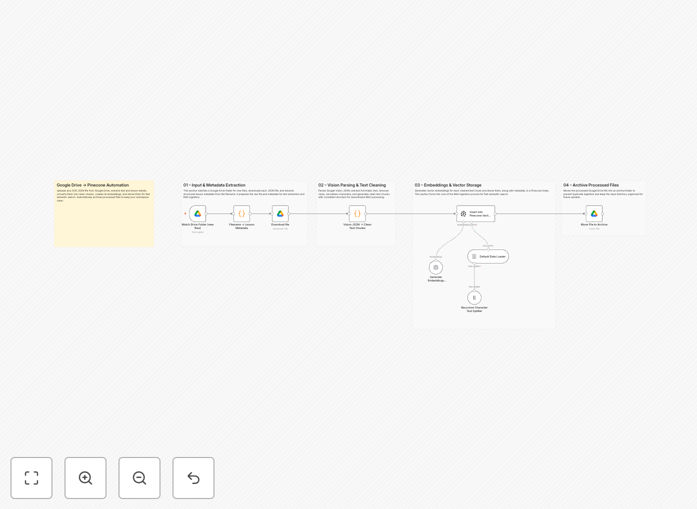
This n8n workflow automates the entire document intelligence pipeline. It monitors a designated Google Drive folder for new OCR JSON files, extracts and cleans the text content, uses OpenAI to generate semantic embeddings, and stores them in a Pinecone vector database. The result is an instantly searchable knowledge base that understands context and meaning, not just keywords. Once processed, documents are automatically archived to prevent duplication, creating a fully hands-off system.
How It Works
The automation follows a sophisticated RAG (Retrieval-Augmented Generation) ingestion pipeline that transforms raw documents into intelligent search assets.
1. Document Detection & Retrieval
The workflow starts with a Google Drive trigger that monitors a specific folder for new OCR JSON files. When a file is added, it automatically retrieves the file metadata and content without manual intervention. This ensures real-time processing as soon as documents become available.
2. Text Extraction & Cleaning
The OCR JSON content is parsed to extract raw text, which often contains formatting artifacts, inconsistent spacing, or recognition errors. The workflow applies cleaning algorithms to normalize the text, remove irrelevant characters, and structure the content for optimal AI processing, particularly handling Arabic or multilingual text effectively.
3. Semantic Chunking & Embedding
Clean text is split into logical chunks based on semantic boundaries (paragraphs, sections) rather than arbitrary character counts. Each chunk is sent to OpenAI's embedding model, which converts the text into high-dimensional vectors that capture meaning and context—transforming words into mathematical representations that machines can understand relationally.
4. Vector Storage & Indexing
Generated embeddings are stored in Pinecone, a specialized vector database that enables lightning-fast similarity searches. Each vector is indexed with metadata including source file, timestamp, and document type, creating a fully organized knowledge repository that supports complex queries.
5. Automated Archiving & Completion
After successful processing, the original OCR file is automatically moved to an archive folder in Google Drive. This prevents reprocessing of the same document, maintains a clean input folder, and creates an audit trail of all processed materials.
Who This Is For
This automation delivers exceptional value for businesses drowning in unstructured documents. Legal firms can process case files and precedents. Research institutions can organize academic papers and findings. Healthcare organizations can manage patient records and medical literature. Enterprises can transform internal manuals, SOPs, and training materials into accessible knowledge. Any team that regularly works with scanned documents, contracts, reports, or multilingual materials will benefit from eliminating manual processing and gaining instant semantic search capabilities.
What You'll Need
- Google Drive account with API access and a designated folder for OCR files
- OpenAI API key for generating text embeddings (GPT-3.5-turbo or similar)
- Pinecone account with an existing vector index configured
- n8n instance (cloud or self-hosted) with internet connectivity
- OCR output files in JSON format containing extracted text and metadata
Pro tip: Start with a small test folder containing 5-10 documents to verify the pipeline works correctly before scaling to production volumes. Monitor the first few runs to ensure text cleaning handles your specific document format effectively.
Quick Setup Guide
Import and configure this workflow in under 15 minutes with these straightforward steps:
- Download and import the JSON template into your n8n instance using the workflow import function.
- Configure Google Drive connection by adding your OAuth credentials and specifying the input folder ID where OCR files will appear.
- Set up OpenAI integration by adding your API key in the credentials manager and selecting the appropriate embedding model.
- Connect Pinecone with your API key, environment, and index name where vectors should be stored.
- Test the workflow by placing a sample OCR JSON file in your Google Drive folder and triggering a manual execution.
- Activate the workflow once testing succeeds, setting it to run automatically on a schedule or real-time trigger.
Key Benefits
Eliminate manual document processing entirely. What previously took employees 15-30 minutes per document now happens automatically in seconds, reclaiming hundreds of hours monthly for strategic work instead of administrative tasks.
Create a living knowledge base that improves over time. Every processed document enriches your searchable repository, making institutional knowledge accessible to everyone rather than trapped in individual files or siloed departments.
Enable semantic search beyond keyword matching. Employees can ask natural language questions and find relevant documents even when their exact search terms don't appear in the text, dramatically improving information discovery.
Scale processing without additional staffing. The system handles 10 or 10,000 documents with identical reliability, eliminating the linear relationship between document volume and processing costs.
Future-proof your AI strategy with structured data. Clean, embedded document chunks become the foundation for chatbots, recommendation systems, and advanced analytics that would be impossible with unstructured files.