What This Workflow Does
Manual lead management from social media is chaotic and inefficient. Messages get buried, responses are delayed, and potential customers slip away. This workflow solves that by creating a fully automated pipeline that captures, enriches, and routes every inquiry instantly.
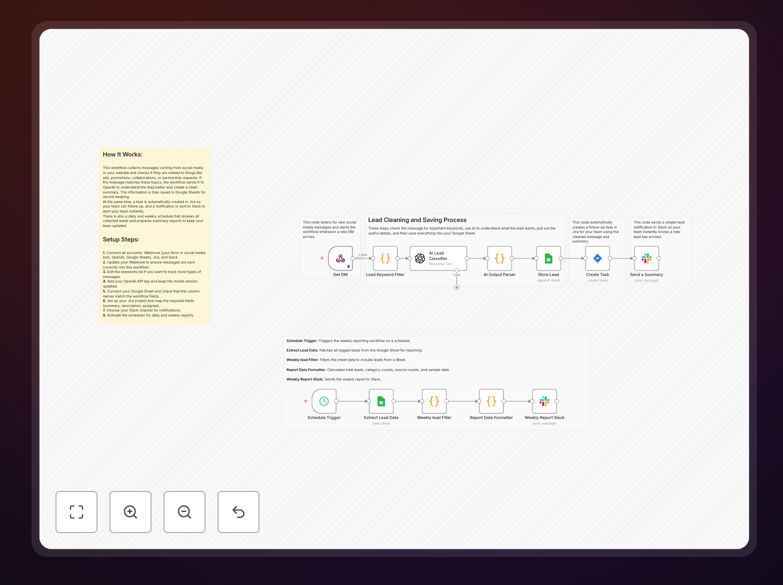
It listens for new messages via a webhook, uses AI to understand the intent and summarize the request, logs all details to a Google Sheets database for tracking, creates a corresponding task in Jira for follow-up, and notifies the right team channel on Slack—all within seconds. A weekly reporting feature also aggregates lead metrics to give you insights into performance.
This turns scattered social media DMs and form submissions into a structured, actionable sales process, ensuring no opportunity is missed and your team can respond with context and speed.
How It Works
The automation is built as a sequence of logical steps in n8n, connecting multiple apps without code.
1. Webhook Trigger & Initial Filter
A webhook node acts as the entry point, receiving incoming lead data from connected platforms. A Code node then filters messages based on keywords (like "collaboration," "partnership," "price") to separate genuine business inquiries from general comments or spam.
2. AI Classification & Summarization
Qualified messages are sent to an OpenAI (GPT-4.1) node. The AI analyzes the text, classifies the lead type (Sales, Support, etc.), and generates a concise, actionable summary. This turns vague messages into structured data.
3. Central Logging in Google Sheets
The structured lead data—including username, source, category, AI summary, and timestamp—is appended to a designated Google Sheet. This creates a permanent, searchable record of all incoming leads for analysis and backup.
4. Task Creation in Jira
Simultaneously, a Jira node uses the enriched data to create a new story or task in your project. The issue includes the lead summary, category, and source, automatically assigning it to the appropriate team or sprint for follow-up.
5. Instant Team Notification via Slack
A Slack node posts a formatted message to a designated channel, alerting the sales or support team in real-time. The notification includes key details and a link to the newly created Jira ticket for immediate action.
6. Scheduled Weekly Reporting
A separate scheduled workflow triggers weekly to query the Google Sheet, calculate totals, categorize leads, and post a performance summary back to Slack. This provides ongoing visibility into lead volume and sources without manual reporting.
Who This Is For
This template is ideal for marketing agencies, SaaS companies, e-commerce brands, and any business that generates leads through digital channels. It's particularly valuable for:
- Marketing & Sales Teams: Who need to capture and qualify leads from Instagram, LinkedIn, Twitter, or Facebook quickly.
- Small Business Owners: Wearing multiple hats who can't constantly monitor every social platform.
- Customer Support Teams: That handle inquiries and need to create support tickets from social media messages.
- Agencies: Managing multiple client campaigns who require a standardized process for inbound partnership requests.
- Teams using Jira & Slack: That want to bridge communication between lead generation and task management seamlessly.
Pro tip: Connect this workflow to a CRM like HubSpot or Salesforce as an add-on step to create full contact records and deal pipelines automatically, turning a simple notification into a complete sales automation.
What You'll Need
- An n8n cloud account or self-hosted instance.
- A way to send lead data to a webhook (using native platform integrations, Zapier, Make, or a simple form).
- An OpenAI API key for GPT-4.1 or similar model access.
- A Google Sheets spreadsheet ready to receive data (with appropriate headers).
- Jira Cloud credentials (API token, email, domain) and a project key for creating issues.
- A Slack Bot Token with permissions to post to your desired channel.
- A list of relevant keywords to filter marketing-related messages (e.g., "ad request," "demo," "price," "collab").
Quick Setup Guide
Follow these steps to get this automation running in your n8n environment in under 15 minutes.
- Import the Template: Download the JSON file using the button above. In your n8n workspace, go to Workflows > Import from File and select the downloaded file.
- Configure Credentials: Set up the required credentials in n8n for OpenAI, Google Sheets, Jira, and Slack. Use OAuth2 or API tokens as prompted.
- Set Your Webhook URL: Copy the unique webhook URL generated by n8n's Webhook node. Connect this to your lead source (e.g., configure Zapier to send form submissions to this URL).
- Customize Your Sheets & Jira: Update the Google Sheets node with your specific spreadsheet ID and sheet name. In the Jira node, set your project key and any custom field mappings.
- Test the Flow: Activate the workflow and send a test message that contains one of your filter keywords. Verify the lead appears in Sheets, a Jira ticket is created, and a Slack notification is sent.
- Activate Weekly Reports: Enable the Schedule Trigger node for the weekly reporting workflow and set your preferred day/time for the summary.
Key Benefits
Eliminate Manual Triage: Stop copying and pasting messages between platforms. The workflow automatically captures and routes every inquiry, saving 5–10 hours per week per team member.
Respond Faster with Context: AI summaries give your team immediate understanding of the lead's intent, allowing for personalized, informed responses that increase conversion rates.
Never Lose a Lead: With automatic logging to Google Sheets and Jira, every inquiry is recorded and tracked. No more lost DMs or forgotten follow-ups.
Improve Team Collaboration: Slack alerts keep everyone in the loop instantly, while Jira tickets assign clear ownership, reducing internal confusion and speeding up resolution.
Gain Actionable Insights: Weekly automated reports show lead volume, top sources, and common categories, helping you refine your marketing strategy based on real data.