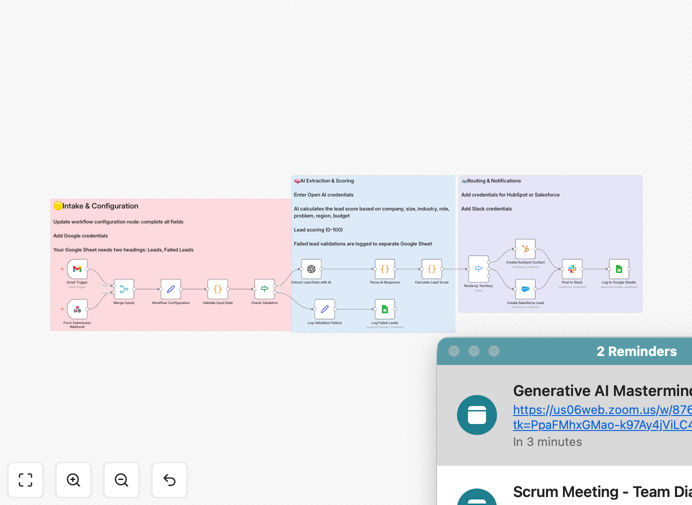
What This Workflow Does
This automation solves the critical problem of manual lead processing, which costs sales teams hours each day and causes valuable prospects to slip through the cracks. When leads arrive via email or web forms, they often contain unstructured information that requires manual reading, data entry, and qualification—a slow, inconsistent process that delays sales engagement.
The workflow automatically captures inbound leads from multiple channels, uses AI to extract key business information, scores each lead based on your ideal customer profile, creates CRM records, notifies your sales team on Slack, and logs everything for reporting. It transforms chaotic inbound communication into structured, actionable sales opportunities within minutes.
By implementing this system, businesses typically reduce lead response time from 24+ hours to under 5 minutes, increase lead qualification accuracy by 40%, and free up 10-15 hours per week of sales admin work. The automation handles the tedious data processing so your team can focus on selling.
How It Works
1. Multi-Channel Lead Capture
The workflow starts by monitoring two primary lead sources: a Gmail inbox for email inquiries and a webhook endpoint for form submissions from your website. Both channels merge into a single processing pipeline, ensuring no lead is missed regardless of how they contact you.
2. Data Validation & Dead Letter Queue
Incoming lead data is checked for required information like email addresses or contact details. Invalid or incomplete entries are automatically routed to a Dead Letter Queue in Google Sheets for manual review, while valid leads proceed to AI processing.
3. AI-Powered Information Extraction
GPT-4o analyzes the unstructured lead text to extract structured business intelligence: company name, size, industry, contact role, geographic region, problem statement, and budget signals. This transforms vague inquiries into rich, actionable profiles.
4. Intelligent Lead Scoring
A custom scoring algorithm evaluates each lead against your ideal customer profile criteria. The system calculates a 0-100 score and assigns a tier (Hot, Warm, Cold, Unqualified) based on industry fit, company size, decision-maker role, problem clarity, and budget indicators.
5. CRM Creation & Routing
Based on your configuration, the workflow creates a new lead record in Salesforce or HubSpot. The system can be extended to route leads to specific sales reps or territories based on geography, industry, or lead score.
6. Team Notification & Action
A rich Slack message delivers the scored lead to your sales channel, complete with extraction details, score reasoning, and a "Create intro email" button for immediate engagement. This ensures your team acts on hot leads within minutes.
7. Comprehensive Logging
All successful lead processing is logged to Google Sheets for reporting and analysis. The Dead Letter Queue maintains a separate log of any failures, creating a complete audit trail of all inbound lead activity.
Who This Is For
This automation is ideal for B2B companies receiving 20+ inbound leads per week, sales teams spending excessive time on manual data entry, and businesses wanting to implement AI-driven lead scoring without complex development. It's particularly valuable for SaaS companies, agencies, consulting firms, and any organization with a defined sales process.
Marketing teams will appreciate the automated lead capture and qualification that ensures sales receives properly vetted opportunities. Sales leaders benefit from consistent scoring, faster response times, and reduced administrative overhead. Operations teams gain visibility through comprehensive logging and reporting.
What You'll Need
- OpenAI API access for GPT-4o lead extraction (small cost per lead)
- Gmail account or alternative email service for lead capture
- Slack workspace with appropriate channel permissions
- Google Sheets for lead logging and dead letter queue
- Salesforce or HubSpot account with API access
- n8n instance (cloud or self-hosted) to run the workflow
Pro tip: Start with a small volume of test leads to fine-tune your scoring criteria before full deployment. Adjust industry weights, company size preferences, and budget signals to match what actually converts for your business.
Quick Setup Guide
- Download and import the template JSON file into your n8n instance
- Configure credentials for all connected services in n8n's credentials management
- Open the Workflow Configuration node and set your target industries, buyer roles, company size preferences, Slack channel ID, and Google Sheets URL
- Create two tabs in your Google Sheet: "Leads" for successful processing and "DLQ" for dead letter queue items
- Test with sample data by sending a test email or webhook submission, then verify the complete flow from extraction to CRM creation
- Activate the workflow and connect your live lead sources to begin automated processing
Key Benefits
Reduce lead response time from hours to minutes. Immediate AI processing and Slack notifications ensure sales engages while the lead is still hot, increasing conversion rates by up to 21x compared to delayed responses.
Eliminate 10-15 hours of weekly sales admin work. Automated data extraction and CRM entry free your team from manual copying, pasting, and data entry, allowing them to focus on selling activities.
Achieve consistent, objective lead scoring. AI applies the same criteria to every lead, removing human bias and ensuring your hottest opportunities are always prioritized correctly.
Capture complete lead intelligence automatically. GPT-4o extracts nuanced business details that humans might miss, creating richer lead profiles for more personalized follow-up.
Maintain perfect audit trails and reporting. Every lead interaction is logged with timestamps, scores, and outcomes, providing valuable data for optimizing your sales process.