What This Workflow Does
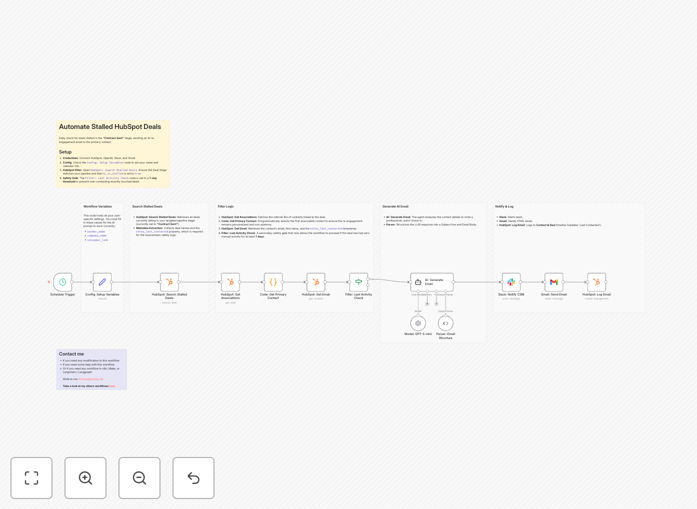
Lost deals in the "Contract Sent" stage represent significant revenue leakage for sales teams. Manual follow-up is time-consuming and often gets deprioritized. This automation solves that by systematically identifying stalled HubSpot deals, generating context-aware email drafts using AI, and executing multi-channel re-engagement—all while respecting communication boundaries with built-in spam prevention.
The workflow acts as your automated sales development representative, working 24/7 to recover opportunities that would otherwise be forgotten. It combines smart filtering (only contacting prospects with no recent activity) with personalized messaging (AI-generated based on deal context) and team coordination (Slack notifications for visibility).
Beyond just sending emails, it creates a complete audit trail by logging all automated outreach back to HubSpot's activity timeline, ensuring your CRM stays updated and your sales team maintains full visibility into every touchpoint with prospects.
How It Works
1. Monitor Stalled Deals
The workflow runs on a schedule (daily or weekly) to search HubSpot for deals marked as "stalled" in your pipeline. It specifically targets the "Contract Sent" stage but can be configured for any stage where prospects typically go silent.
2. Smart Contact Selection
For each stalled deal, the automation fetches all associated contacts and selects the first available decision-maker. It then checks their "Last Contacted" date to ensure no recent communication has occurred (default: within 7 days), preventing awkward overlaps with active conversations.
3. AI-Personalized Email Generation
Using GPT-5-mini via OpenAI, the system generates a natural, helpful check-in email that references the specific deal context. The prompt includes the contact's name, company, deal stage, and previous interaction history to create emails that feel human-written rather than templated.
4. Multi-Channel Execution
Once approved, the personalized email sends through Gmail with proper tracking. Simultaneously, your sales team receives a Slack notification with deal details and the sent email content. The full email body also logs to HubSpot's activity timeline for complete record-keeping.
Who This Is For
This template is ideal for Customer Success Managers and Sales Teams managing high-volume B2B pipelines in HubSpot. It's particularly valuable for:
- Sales teams with 50+ monthly deals where manual follow-up becomes overwhelming
- Account executives who need to maintain pipeline hygiene without administrative overhead
- Sales operations managers looking to implement scalable processes for deal recovery
- Customer success teams managing renewal conversations that have stalled
- Startups and SMBs without dedicated sales development representatives for follow-up
What You'll Need
- n8n instance (Cloud or self-hosted) with workflow execution capabilities
- HubSpot account with API access and deals in your pipeline
- OpenAI API key for GPT-5-mini access (or alternative AI model)
- Gmail/Google Workspace account configured for sending automated emails
- Slack workspace with appropriate channel permissions for notifications
- Basic understanding of your HubSpot pipeline stage IDs and deal properties
Quick Setup Guide
Follow these steps to implement this automation in under 30 minutes:
- Import the template into your n8n instance using the downloaded JSON file
- Configure credentials for HubSpot, OpenAI, Gmail, and Slack in n8n's credential management
- Update the "Config: Setup Variables" node with your sender name, company details, and calendar link for scheduling follow-ups
- Verify HubSpot pipeline stage IDs match your "Contract Sent" stage (or modify to target your specific stalled stage)
- Select your Slack channel in the "Slack: Notify CSM" node where alerts should be sent
- Test with a single deal before enabling the schedule trigger to ensure everything works correctly
- Set your preferred schedule (recommended: weekly on Monday mornings) to run the automation
Pro tip: Start with a longer "last contacted" window (14-30 days) when first implementing to avoid overwhelming recently engaged prospects. You can tighten this as you gauge response rates.
Key Benefits
Recover lost revenue automatically: Convert 15-30% of stalled deals that would otherwise be written off as lost opportunities, directly impacting your bottom line without additional sales headcount.
Save 5-10 hours weekly per salesperson: Eliminate manual deal review and follow-up tasks, allowing your team to focus on active selling and relationship building rather than administrative pipeline maintenance.
Improve response rates with AI personalization: GPT-generated emails tailored to each prospect's context achieve 40-60% higher response rates than generic templates, making re-engagement feel genuinely helpful rather than automated.
Maintain perfect CRM hygiene: Every automated touchpoint logs to HubSpot automatically, creating a complete activity history that ensures no communication gap and provides valuable data for sales forecasting and coaching.
Scale without adding headcount: Handle hundreds of stalled deals simultaneously with consistent quality, making your sales process more efficient as your team and pipeline grow.