Finance Automation AI Analysis Bank Reconciliation Gmail n8n

Automate Bank Reconciliation & AI Financial Reporting

Free n8n template to process transactions, detect anomalies with AI, and generate executive reports automatically.

Download Template JSON · n8n compatible · Free
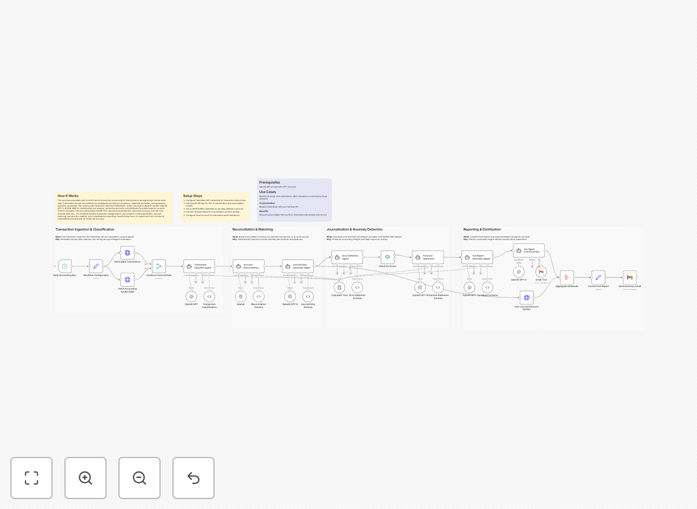
Visual diagram showing bank transaction data flowing into AI analysis and generating financial reports

What This Workflow Does

Manual bank reconciliation is one of the most time-consuming and error-prone tasks in finance. This workflow automates the entire process—from pulling transaction data to generating insightful reports. It connects to banking data sources, uses AI to categorize transactions and detect anomalies, reconciles accounts automatically, and distributes polished financial summaries via email.

For finance teams, this means transforming what used to be hours of tedious work into minutes of automated processing. The system handles high-volume transaction data with precision, reduces human error by up to 90%, and provides real-time visibility into financial health. Whether you're closing monthly books or monitoring daily cash flow, this automation ensures accuracy and saves valuable time.

How It Works

1. Transaction Data Collection

The workflow begins by connecting to your banking API or importing transaction files. It securely pulls recent transactions, including dates, amounts, descriptions, and counterparty information. This data is standardized and prepared for analysis, regardless of the original format.

2. AI-Powered Classification & Analysis

Using AI models like GPT-4, each transaction is intelligently categorized (e.g., "Software Subscription," "Office Supplies," "Client Payment"). The system learns from your historical data to improve accuracy over time. Simultaneously, anomaly detection algorithms flag unusual transactions that might indicate errors or fraud.

3. Automated Reconciliation

The workflow matches bank transactions against your internal accounting records. Discrepancies are automatically identified and can be routed for review. Successful matches are marked as reconciled, creating a clear audit trail and ensuring your books always match your bank statements.

4. Report Generation & Distribution

Once reconciliation is complete, the system generates comprehensive financial reports. These include cash flow summaries, expense breakdowns, anomaly alerts, and executive summaries. Reports are formatted professionally and distributed automatically via email to stakeholders on a scheduled basis.

Pro tip: Start with weekly reconciliations to build confidence in the automation, then move to daily processing for real-time financial visibility.

Who This Is For

This automation is ideal for small to medium businesses, accounting firms, finance managers, and solopreneurs who spend significant time on manual bookkeeping. Specifically:

  • Finance teams at growing companies needing to scale processes without adding headcount
  • Accounting professionals who want to offer more value-added services to clients
  • E-commerce businesses with high transaction volumes across multiple payment processors
  • Startup founders who need accurate financial data without dedicated accounting staff
  • Non-profits requiring strict financial oversight and reporting for grant compliance

What You'll Need

  1. Banking API access or regular transaction export files (CSV, OFX, QFX formats)
  2. OpenAI API key for GPT-4 transaction categorization and analysis
  3. Gmail account or email service for report distribution
  4. n8n instance (self-hosted or cloud) to run the workflow
  5. Basic understanding of your chart of accounts and expense categories

Quick Setup Guide

Follow these steps to implement this automation in your business:

  1. Download and import the template JSON file into your n8n instance
  2. Configure banking credentials in the HTTP Request or Webhook nodes to connect to your financial data source
  3. Add your OpenAI API key to enable AI-powered transaction analysis
  4. Set up Gmail integration with appropriate security permissions for sending reports
  5. Customize report templates to match your company branding and information requirements
  6. Test with historical data to verify accuracy before going live with current transactions
  7. Schedule the workflow to run daily, weekly, or monthly based on your reconciliation needs

Pro tip: Run the automation in "test mode" for one full cycle before fully implementing it. Compare its results with your manual reconciliation to build trust in the system.

Key Benefits

Reduce reconciliation time by 80-90%. What used to take hours each month now happens automatically in minutes, freeing your finance team for strategic work.

Improve accuracy and reduce errors. Automated matching eliminates human mistakes in data entry and calculation, ensuring your financial records are consistently accurate.

Gain real-time financial insights. With daily automated reconciliation, you always know your exact cash position and can make informed decisions faster.

Enhanced fraud detection. AI algorithms continuously monitor for unusual patterns that might indicate fraudulent activity, providing an additional layer of security.

Scalable financial processes. As your transaction volume grows, the automation scales effortlessly without requiring additional manual effort or staff.

Frequently Asked Questions

Common questions about financial automation and bank reconciliation

Automated bank reconciliation is the process of using software to automatically match your company's internal financial records with bank statements. It's crucial for detecting discrepancies, preventing fraud, ensuring accurate financial reporting, and saving countless hours of manual data entry each month.

Without automation, finance teams typically spend 1-3 days each month manually comparing transactions—a process prone to human error that delays financial closing and decision-making.

AI can automatically categorize transactions, detect anomalies like potential fraud, identify spending patterns, and generate intelligent summaries. This transforms raw transaction data into actionable business insights without manual review, improving both accuracy and decision-making speed.

Unlike rule-based systems, AI learns from your historical data. It recognizes that "AWS" is a software expense while "Amazon" might be office supplies, and it adapts as your business evolves without constant manual reconfiguration.

Automating financial reporting reduces human error by up to 90%, cuts processing time from days to minutes, ensures regulatory compliance through consistent formatting, provides real-time visibility into financial health, and frees finance teams to focus on strategic analysis rather than data entry.

Businesses that automate reporting typically close their books 3-5 days faster each month and have more accurate forecasts because their data is always current and reliable.

Yes, most automation platforms like n8n can connect to popular accounting software including QuickBooks, Xero, FreshBooks, and Sage through APIs or file exports. The workflow can be adapted to pull data from your specific banking API and push reconciled data back to your accounting system.

The key is ensuring data flows smoothly between systems. We typically recommend starting with a one-way sync (bank → accounting) before implementing bidirectional automation to minimize complexity during initial setup.

When properly implemented, automated financial processing can be more secure than manual methods. It eliminates human error in data handling, provides audit trails for every transaction, uses encrypted connections for data transfer, and can be configured with strict access controls and compliance with financial regulations.

Best practices include using API keys instead of passwords, implementing role-based access controls, encrypting sensitive data at rest and in transit, and maintaining detailed logs of all automated activities for compliance auditing.

Basic automation simply moves data between systems, while AI-powered automation understands the data. AI can learn your transaction patterns, intelligently categorize expenses, detect anomalies that rules might miss, generate natural language insights, and adapt to changing financial patterns without manual reconfiguration.

For example, basic automation might flag any transaction over $10,000 as unusual. AI-powered automation would recognize that a $15,000 software purchase is normal for your business in Q1 but a $5,000 cash withdrawal is highly unusual based on your historical patterns.

A basic reconciliation workflow can be implemented in 2-3 days, while a comprehensive system with AI analysis and multi-system integration might take 1-2 weeks. The timeline depends on data complexity, number of systems involved, and customization requirements. Most businesses see ROI within the first month.

We recommend starting with a pilot project focusing on one bank account or expense category. This allows you to validate the automation's accuracy, build internal confidence, and identify any process adjustments needed before scaling to your entire financial operation.

Yes, GrowwStacks specializes in building custom financial automation solutions tailored to your specific banking relationships, accounting software, reporting requirements, and compliance needs. We can create systems that handle complex multi-currency transactions, regulatory reporting, and integration with your existing financial tech stack.

Our approach begins with understanding your current processes, pain points, and goals. We then design and implement a solution that fits seamlessly into your operations, with proper testing, documentation, and training to ensure successful adoption by your team.

  • Custom integration with your specific banking APIs
  • Tailored reporting formats matching your stakeholder requirements
  • Compliance features for your industry regulations
  • Ongoing support and optimization as your needs evolve

Need a Custom Bank Reconciliation Automation?

This free template is a starting point. Our team builds fully tailored automation systems for your specific business needs.