Typeform Demio Event Registration Webinar Automation Lead Generation

Automate Event Registration: Typeform to Demio

Instantly register webinar attendees when they submit your Typeform. Eliminate manual copy-pasting and reduce no-shows.

Download Template JSON · n8n compatible · Free
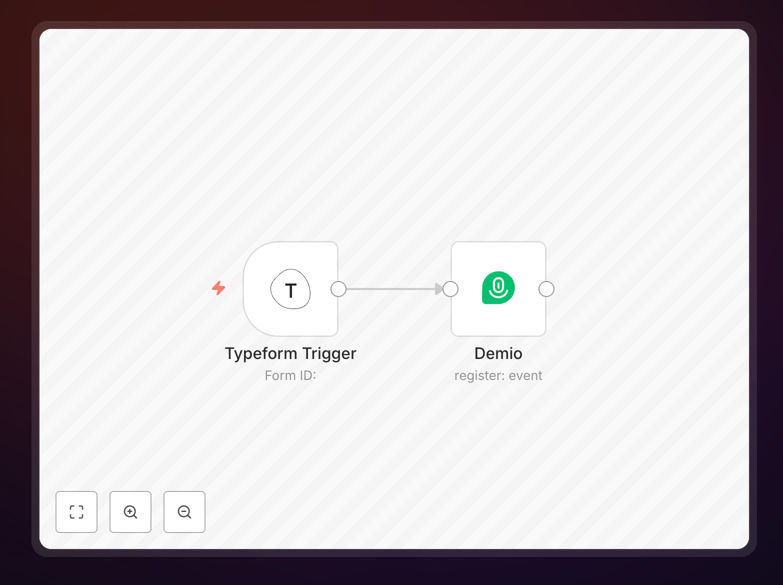
Automated workflow connecting Typeform to Demio for event registration

What This Workflow Does

Manual event registration is a time-consuming bottleneck that costs businesses hours of administrative work and leads to registration errors, delayed confirmations, and lower attendance rates. Every time someone fills out your Typeform for a webinar, workshop, or demo, someone on your team must manually copy their details into Demio—a process prone to mistakes and delays.

This automation solves that completely. When a prospect submits your Typeform, their information is instantly and accurately transferred to Demio, registering them for your event automatically. They receive immediate confirmation, your team saves hours, and you eliminate the risk of missed registrations or incorrect data entry.

The workflow captures the respondent's name, email, and any custom fields from Typeform, maps them to Demio's registration requirements, creates the attendee record, and can even trigger follow-up sequences. It turns a multi-step manual process into a seamless, instant operation that works 24/7.

How It Works

Step 1: Typeform Trigger

The workflow starts when someone submits your Typeform. The Typeform Trigger node listens for new submissions and captures all form data—including hidden fields, calculated scores, or conditional answers. This data becomes available for the rest of the workflow.

Step 2: Data Mapping & Transformation

The workflow extracts specific fields needed for Demio registration: email (required), first name, last name, company, and any custom questions relevant to your event. You can use Set nodes to rename fields, combine values, or format data to match Demio's expected structure.

Step 3: Demio Registration

The Demio node takes the mapped data and creates a new registrant for your specified event. It uses Demio's API to add the attendee, ensuring they appear in your event dashboard immediately. The node can handle multiple events, waitlists, or different registration types based on form responses.

Step 4: Confirmation & Follow-up

After successful registration, the workflow can trigger additional actions: send a custom confirmation email via your email service, add the registrant to a CRM segment, schedule calendar reminders, or notify your team in Slack. This creates a complete registration-to-attendance pipeline.

Who This Is For

This automation is ideal for marketing teams running webinars, sales teams hosting product demos, educators conducting online workshops, and event organizers managing virtual conferences. If you regularly collect registrations via forms and host events on Demio, this workflow eliminates your manual bottleneck.

Specifically beneficial for: SaaS companies with weekly demo calls, consultants hosting masterclasses, nonprofits organizing virtual fundraisers, course creators launching live sessions, and agencies managing client workshops. Any business spending more than 2 hours per week manually transferring form data to event platforms will see immediate ROI.

What You'll Need

  1. Typeform account with a form collecting event registrations
  2. Demio account with an event created and API access enabled
  3. n8n instance (cloud or self-hosted) to run the workflow
  4. API credentials for both Typeform and Demio (available in account settings)
  5. Event details including Demio event ID and registration field mappings

Pro tip: Add a hidden field in Typeform to capture the event ID or type. This lets one form handle multiple events by dynamically selecting which Demio event to register for based on the respondent's selection or source.

Quick Setup Guide

  1. Download the template using the button above and import it into your n8n instance.
  2. Connect your Typeform account by adding your API key in the Typeform Trigger node settings.
  3. Connect your Demio account by adding your API credentials in the Demio node.
  4. Map your form fields by updating the field mappings between Typeform responses and Demio registration fields.
  5. Test with a submission by filling out your Typeform and verifying the registrant appears in Demio.
  6. Activate the workflow and set it to live—it will now run automatically for every new submission.

Key Benefits

Save 2-3 hours per event on manual data entry. No more copying emails, names, and details from spreadsheets to Demio. The automation handles it instantly, freeing your team for higher-value tasks like engaging attendees.

Reduce registration errors by 90%. Manual entry leads to typos, missed registrations, and duplicate entries. Automated mapping ensures accurate data transfer every time, improving your attendance analytics and follow-up effectiveness.

Improve attendance rates with instant confirmation. When registrants receive immediate confirmation after submitting your form, they're more likely to remember and attend. Automation sends confirmations within seconds versus hours or days with manual processes.

Scale your event operations without adding staff. Whether you host 10 or 100 events monthly, the same workflow handles all registrations automatically. You can increase event frequency without proportional increases in administrative overhead.

Create seamless attendee experiences. Connect registration to pre-event sequences, reminder emails, and post-event follow-ups automatically. Build a complete attendee journey that nurtures prospects from registration to conversion.

Frequently Asked Questions

Common questions about event registration automation and integration

You can automate event registration by connecting form tools like Typeform to webinar platforms like Demio using workflow automation. When someone submits a form, their details are automatically sent to the webinar platform, registering them instantly. This eliminates manual copy-pasting, reduces errors, and ensures attendees receive confirmation emails immediately.

Automation platforms like n8n provide pre-built connectors for both Typeform and Demio. You create a workflow that triggers on form submission, maps the response fields to the webinar platform's registration requirements, and creates the attendee record via API. The entire process takes seconds instead of hours.

Automating webinar registration saves 2-3 hours per event on manual data entry, reduces registration errors by 90%, and ensures attendees get instant confirmations—improving attendance rates. It also creates a seamless experience where respondents feel immediately welcomed, and you can automatically segment registrants based on their form responses for follow-up campaigns.

Beyond time savings, automation provides consistency. Every registrant gets the same prompt confirmation and reminder sequence. You can also integrate with CRM systems to track registration-to-attendance conversion rates, giving you data to optimize future events.

Yes, most automation platforms support multiple form tools. You can replace Typeform with Google Forms, JotForm, Microsoft Forms, or custom webhooks. The workflow logic remains the same: capture form submissions, map fields to Demio's registration requirements, and create the attendee record. This flexibility lets you use your preferred tools while maintaining automation.

The key is ensuring your form collects the necessary information Demio requires (email at minimum) and that your automation platform has connectors for both your form tool and Demio. Many platforms offer hundreds of integrations, making tool substitution straightforward.

Automation improves attendance by sending immediate confirmations and reminders, reducing the chance registrants forget. You can automatically add registrants to calendar invites, send pre-event materials, and segment audiences for targeted follow-ups. Studies show automated sequences increase attendance by 25-40% compared to manual processes where delays cause drop-offs.

Timing matters. When someone registers while interested, immediate confirmation reinforces their commitment. Automated reminders 24 hours before, 1 hour before, and post-event follow-ups maintain engagement throughout the journey, significantly reducing no-shows.

Collect essential information: name, email, company, role, and specific questions about their interests or challenges. Keep forms concise—5-7 fields maximum—to maintain completion rates. Use conditional logic to ask relevant follow-ups. Map these fields directly to Demio's attendee fields for seamless registration. Avoid collecting unnecessary data that creates friction.

Strategic questions help with segmentation. Ask "What's your biggest challenge?" or "Which topic interests you most?" to group attendees for targeted follow-up. Balance data collection with conversion rate—each additional field reduces completions by approximately 5%.

Absolutely. After registration, you can trigger automated sequences: send pre-event resources, reminder emails 24 hours before, post-event surveys, and recording links. Connect Demio to your CRM or email platform to nurture attendees into customers. Automation ensures consistent follow-up that manual processes often miss, improving conversion from attendee to lead.

Create a complete nurture sequence: welcome email with agenda, pre-event resource pack, reminder with calendar link, post-event thank you with recording, and follow-up offer based on attendance. Automation handles timing and personalization at scale.

Yes, when using established automation platforms with proper API connections. Data is transmitted securely between services using encrypted connections. You control which data is shared, avoiding sensitive information if needed. Automation actually improves security by reducing manual data handling where errors or exposure can occur. Always use official integrations with API keys.

Follow best practices: use environment variables for API keys, limit data transmission to necessary fields, and ensure your automation platform complies with data protection regulations like GDPR. Automated systems provide audit trails showing exactly what data was transferred when.

Yes, GrowwStacks specializes in custom automation solutions for event registration and webinar management. We can build workflows connecting your specific form tools, webinar platforms, CRM, and email systems with conditional logic, segmentation, and analytics. Custom automation handles complex scenarios like multi-event series, payment integrations, and team notifications.

Our team analyzes your current process, identifies automation opportunities, and builds tailored solutions that save time while improving attendee experience. We handle setup, testing, and documentation so you get a turnkey system that works immediately.

  • Multi-event registration from single forms
  • Payment processing integration for paid events
  • CRM synchronization and lead scoring
  • Team notifications and dashboard reporting

Need a Custom Event Registration Automation?

This free template is a starting point. Our team builds fully tailored automation systems for your specific business needs.