Airtable Google Drive AI Processing Image Automation n8n

Automated AI Background Removal: Airtable to Google Drive

Batch process product photos, portraits, and marketing assets with AI—automatically remove backgrounds and save to cloud storage.

Download Template JSON · n8n compatible · Free
AI background removal workflow diagram showing Airtable to Google Drive automation

What This Workflow Does

This automation solves the tedious, time-consuming task of manually removing backgrounds from images—a common requirement for e-commerce product listings, professional portraits, marketing materials, and social media content. Instead of spending hours in Photoshop or paying for individual image processing, this workflow automatically detects images stored in your Airtable database, sends them to an AI background removal service (APImage API), and saves the cleaned images to Google Drive.

The system handles batch processing of multiple images simultaneously, maintains metadata consistency, and creates an organized asset pipeline. Whether you're preparing 50 product photos for your online store or processing hundreds of client images for a marketing campaign, this automation eliminates manual work while ensuring professional, consistent results.
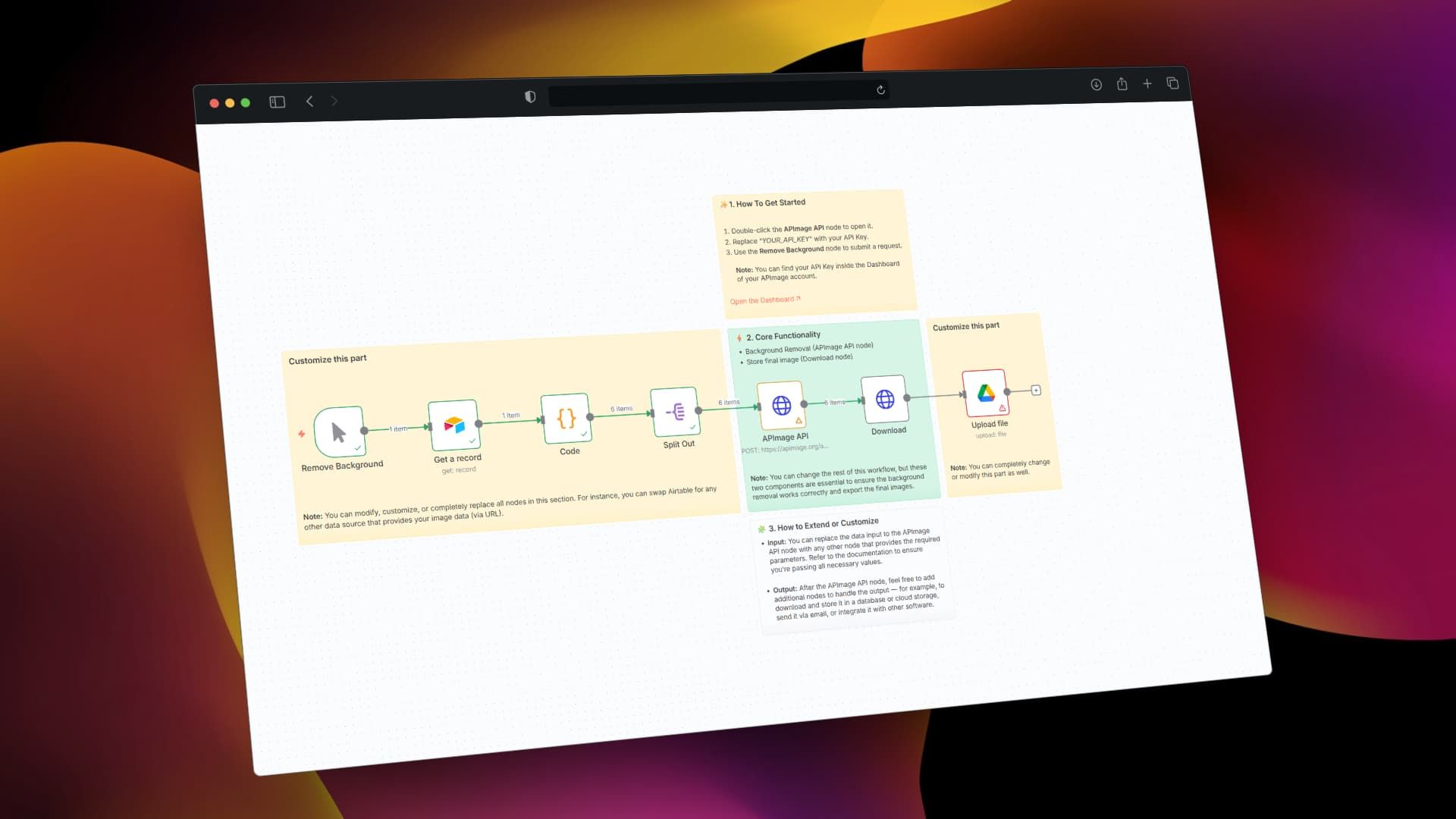
Screenshot of the n8n workflow canvas showing background removal automation nodes
The complete automation workflow connecting Airtable, AI processing, and Google Drive

How It Works

1. Trigger & Data Collection

The workflow starts either manually or on a schedule, fetching image records from your Airtable database. It extracts thumbnail URLs, file names, and metadata from your "Media Files" table or similar structure. The system intelligently selects the highest quality available image version for processing.

2. AI Background Removal

Each image URL is sent to the APImage AI API, which uses machine learning to accurately separate subjects from backgrounds. The API returns a processed image with transparent background, handling complex edges like hair, fur, or translucent objects that are challenging for traditional tools.

3. Download & Processing

The workflow downloads the processed image from the AI service, applies any filename cleaning or formatting rules, and prepares it for storage. JavaScript code nodes handle data transformation, error checking, and metadata preservation throughout this stage.

4. Storage & Organization

Finally, the background-removed images are uploaded to a designated Google Drive folder (like "bg_removal"), with organized naming conventions and folder structures. The system can also update the original Airtable records with links to the processed files.

Who This Is For

This automation is ideal for e-commerce businesses needing clean product photos, marketing agencies processing client assets, photographers editing portrait sessions, content creators preparing social media visuals, and design teams streamlining asset preparation. If you regularly handle more than 10 images per week requiring background removal, this workflow will save significant time and ensure consistency.

Teams using Airtable as a content database or product catalog will find particular value, as the integration maintains the connection between original records and processed assets. The workflow is also valuable for businesses transitioning to automated content pipelines or scaling their visual content production.

Pro tip: Start with a small batch of test images to verify quality before processing your entire catalog. Different AI services perform better with specific image types—product photos vs. portraits vs. illustrations.

What You'll Need

  1. An Airtable account with a base containing image attachments (typically in a "Thumbnail" or "Image" field)
  2. A Google Drive account with storage space for processed images
  3. An APImage API key (free tier available) or alternative background removal service credentials
  4. n8n instance (cloud or self-hosted) to run the automation
  5. Basic understanding of how to import JSON workflows and configure API connections

Quick Setup Guide

  1. Download the template using the button above and import it into your n8n instance
  2. Configure Airtable connection by adding your API key and selecting the correct base and table
  3. Set up APImage API by replacing "YOUR_API_KEY" in the HTTP Request node with your actual key
  4. Connect Google Drive using OAuth and specify your target folder name
  5. Test with a single record first, then scale to batch processing once verified
  6. Schedule automation to run daily, weekly, or trigger via webhook as needed

Key Benefits

Save 80-90% of image editing time by processing hundreds of images simultaneously instead of manually editing each one. What typically takes hours becomes minutes.

Ensure brand consistency across all visual assets with uniform background treatment, improving professional appearance and customer trust.

Scale content production without proportional increases in design costs or delays, enabling faster product launches and campaign execution.

Reduce human error from manual editing fatigue, with AI providing consistent quality regardless of volume or complexity.

Create reusable asset pipelines that can be adapted for different image types, sources, and destinations as your needs evolve.

Frequently Asked Questions

Common questions about AI image processing and automation

AI background removal automatically isolates subjects from their backgrounds in images, creating transparent or white-background photos. This is essential for e-commerce product listings, marketing materials, professional portraits, and social media content where clean, consistent imagery improves conversion rates and brand perception.

For businesses, it transforms a manual design task into an automated process. An e-commerce store can process hundreds of product photos overnight, a marketing agency can deliver client assets faster, and content teams can maintain visual consistency across channels without design bottlenecks.

Manual background removal in tools like Photoshop can take 5-15 minutes per image depending on complexity. Automation processes hundreds of images simultaneously while you focus on other tasks. For a business with 50 product photos weekly, this saves 4-12 hours of design work, allowing faster product launches and content publication.

The time savings compound with volume and frequency. Seasonal campaigns with thousands of images become feasible, and last-minute requests can be accommodated without overtime. The automation also works outside business hours, processing images overnight or during weekends.

Connecting Airtable with Google Drive creates a seamless asset management pipeline. Airtable acts as your image database with metadata, while Google Drive provides scalable, organized storage. Processed images automatically update both systems, eliminating manual file transfers and ensuring version consistency across teams.

This integration enables powerful workflows like automatic categorization by product type, date-based folder structures, and metadata preservation. Team members can access processed images immediately through familiar interfaces without searching through emails or shared drives.

Yes, most automation platforms support multiple AI background removal APIs. Popular alternatives include Remove.bg, BackgroundCut, and Clipdrop. The workflow structure remains similar—you simply replace the API endpoint and authentication. Some services offer better quality for specific image types like hair or transparent objects.

When choosing a service, consider pricing (per-image vs. subscription), quality requirements, processing speed, and API reliability. Many businesses start with a service's free tier for testing, then scale to paid plans based on volume and quality needs.

E-commerce stores, marketing agencies, photographers, content creators, and design teams benefit most. E-commerce businesses process product catalogs, agencies handle client assets, photographers edit portrait sessions, creators prepare social media content, and design teams streamline asset preparation workflows.

The common thread is volume and consistency needs. Any business producing more than 20-30 background-removed images monthly will see ROI through time savings, while those with strict brand guidelines benefit from automated consistency enforcement.

Implement quality checks by sampling processed images, setting resolution thresholds, and adding validation steps. Include error handling for failed API calls, retry logic for network issues, and manual review steps for critical images. Monitor processing success rates and adjust AI service parameters based on your specific image types.

Establish a quality baseline with representative test images before full automation. Create a feedback loop where problematic images are flagged for manual review, helping the system learn and improve over time while maintaining quality standards.

Yes, GrowwStacks specializes in custom automation solutions for image processing and content workflows. We can build systems that integrate with your existing tools, add quality control steps, handle specific file formats, and scale to process thousands of images daily with your preferred AI services and storage solutions.

Our team works with you to understand your specific image types, quality requirements, and integration needs. We design automations that fit seamlessly into your existing processes while providing the scalability and reliability your business requires.

  • Custom integrations with your CMS, PIM, or DAM systems
  • Multi-step quality validation and approval workflows
  • Advanced error handling and notification systems
  • Performance optimization for large image volumes

Need a Custom Image Processing Automation?

This free template is a starting point. Our team builds fully tailored automation systems for your specific business needs.