What This Workflow Does
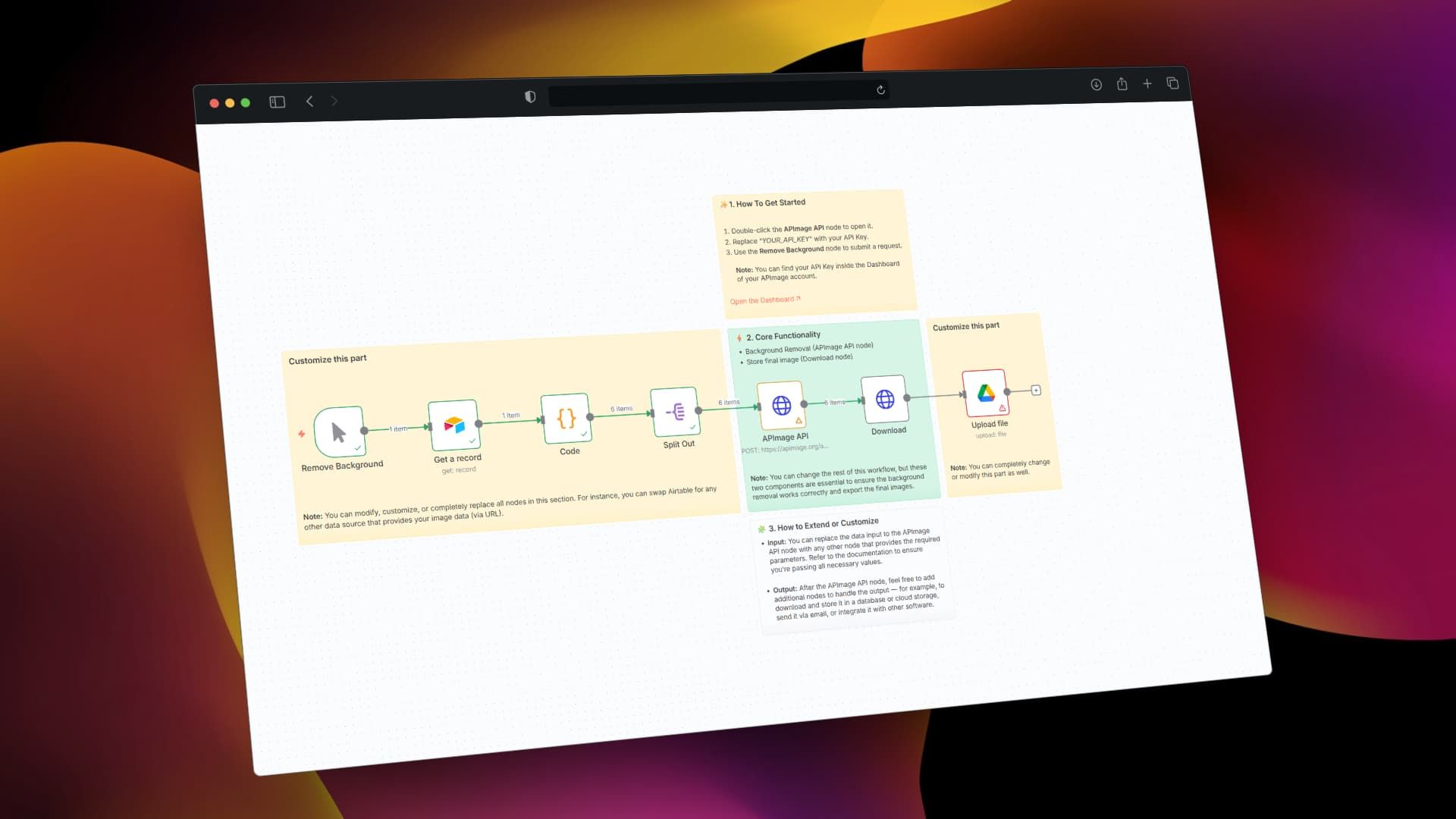
This automation solves the tedious, time-consuming task of manually removing backgrounds from images—a common requirement for e-commerce product listings, professional portraits, marketing materials, and social media content. Instead of spending hours in Photoshop or paying for individual image processing, this workflow automatically detects images stored in your Airtable database, sends them to an AI background removal service (APImage API), and saves the cleaned images to Google Drive.
The system handles batch processing of multiple images simultaneously, maintains metadata consistency, and creates an organized asset pipeline. Whether you're preparing 50 product photos for your online store or processing hundreds of client images for a marketing campaign, this automation eliminates manual work while ensuring professional, consistent results.
How It Works
1. Trigger & Data Collection
The workflow starts either manually or on a schedule, fetching image records from your Airtable database. It extracts thumbnail URLs, file names, and metadata from your "Media Files" table or similar structure. The system intelligently selects the highest quality available image version for processing.
2. AI Background Removal
Each image URL is sent to the APImage AI API, which uses machine learning to accurately separate subjects from backgrounds. The API returns a processed image with transparent background, handling complex edges like hair, fur, or translucent objects that are challenging for traditional tools.
3. Download & Processing
The workflow downloads the processed image from the AI service, applies any filename cleaning or formatting rules, and prepares it for storage. JavaScript code nodes handle data transformation, error checking, and metadata preservation throughout this stage.
4. Storage & Organization
Finally, the background-removed images are uploaded to a designated Google Drive folder (like "bg_removal"), with organized naming conventions and folder structures. The system can also update the original Airtable records with links to the processed files.
Who This Is For
This automation is ideal for e-commerce businesses needing clean product photos, marketing agencies processing client assets, photographers editing portrait sessions, content creators preparing social media visuals, and design teams streamlining asset preparation. If you regularly handle more than 10 images per week requiring background removal, this workflow will save significant time and ensure consistency.
Teams using Airtable as a content database or product catalog will find particular value, as the integration maintains the connection between original records and processed assets. The workflow is also valuable for businesses transitioning to automated content pipelines or scaling their visual content production.
Pro tip: Start with a small batch of test images to verify quality before processing your entire catalog. Different AI services perform better with specific image types—product photos vs. portraits vs. illustrations.
What You'll Need
- An Airtable account with a base containing image attachments (typically in a "Thumbnail" or "Image" field)
- A Google Drive account with storage space for processed images
- An APImage API key (free tier available) or alternative background removal service credentials
- n8n instance (cloud or self-hosted) to run the automation
- Basic understanding of how to import JSON workflows and configure API connections
Quick Setup Guide
- Download the template using the button above and import it into your n8n instance
- Configure Airtable connection by adding your API key and selecting the correct base and table
- Set up APImage API by replacing "YOUR_API_KEY" in the HTTP Request node with your actual key
- Connect Google Drive using OAuth and specify your target folder name
- Test with a single record first, then scale to batch processing once verified
- Schedule automation to run daily, weekly, or trigger via webhook as needed
Key Benefits
Save 80-90% of image editing time by processing hundreds of images simultaneously instead of manually editing each one. What typically takes hours becomes minutes.
Ensure brand consistency across all visual assets with uniform background treatment, improving professional appearance and customer trust.
Scale content production without proportional increases in design costs or delays, enabling faster product launches and campaign execution.
Reduce human error from manual editing fatigue, with AI providing consistent quality regardless of volume or complexity.
Create reusable asset pipelines that can be adapted for different image types, sources, and destinations as your needs evolve.