Zapier Notion Slack Reporting Project Management

Automate Weekly Record Reports from Notion to Slack

Count new submissions, filter by tag, and send automated weekly summaries—no manual work required.

Download Template JSON · n8n compatible · Free
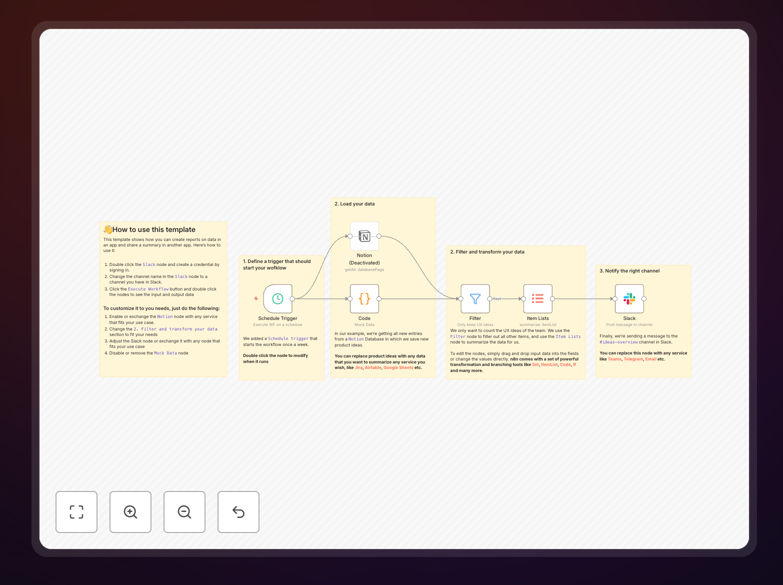
Visual diagram showing automation flow from Notion database to Slack message with weekly record count

What This Workflow Does

This automation solves the tedious task of manually counting and reporting new records in your Notion databases each week. Instead of spending valuable time filtering, counting, and copying numbers into Slack, this workflow automatically queries your Notion database, filters records created in the past 7 days (or any custom timeframe), applies optional filters like specific tags or statuses, counts the results, and posts a clean summary message to your chosen Slack channel.

Perfect for teams tracking project submissions, support tickets, job applications, sales leads, or any other database where weekly updates matter, this template transforms a 30–60 minute manual process into a zero-touch automated report that runs reliably every Monday morning (or any schedule you choose).

The business value is clear: eliminate human error, ensure consistent reporting, and free up team members to focus on analysis and action rather than data gathering. Managers get timely insights without asking, and teams stay aligned with minimal effort.

How It Works

The automation follows a logical sequence to transform raw database entries into actionable insights.

Step 1: Schedule the Trigger

A schedule trigger (like "Every Monday at 9 AM") initiates the workflow automatically. You can adjust the frequency to daily, weekly, or monthly based on your reporting needs.

Step 2: Query Notion Database

The workflow connects to your Notion database using your API credentials. It queries for records created within the specified timeframe (e.g., "last 7 days"). You can configure filters to only count records with specific properties, like a "Status: New" tag or a particular category.

Step 3: Process & Filter Data

Using built-in logic nodes, the automation processes the returned records. It can filter based on multiple criteria—tag, assignee, priority, or custom properties. This ensures the count reflects exactly what you want to track.

Step 4: Format the Message

The count and relevant details (like record titles or key fields) are formatted into a readable Slack message. You can customize the message to include emojis, dynamic values, and direct links back to the Notion database for quick access.

Step 5: Send to Slack

The final step posts the formatted message to your designated Slack channel. You can set it to mention specific team members, send to multiple channels, or even trigger different messages based on the count thresholds (e.g., "High priority alert if over 20 new tickets").

Who This Is For

This template is ideal for business owners, team leads, project managers, and operations specialists who rely on Notion for tracking work and use Slack for team communication. Specifically:

  • Project Managers tracking weekly task submissions or project updates
  • Support Teams monitoring new ticket volumes
  • HR Departments reporting on new job applications
  • Sales Teams measuring lead generation activity
  • Content Teams counting new ideas or published articles
  • Product Teams tracking bug reports or feature requests

If you're manually compiling numbers from Notion into Slack or email updates, this automation will save you hours each month.

What You'll Need

  1. A Notion account with a database you want to monitor
  2. A Slack workspace where you have permission to post messages
  3. API credentials (integration tokens) for both Notion and Slack
  4. Access to an automation platform like n8n, Zapier, or Make (the template is JSON-format compatible)
  5. Basic understanding of how to import and activate a workflow template

Quick Setup Guide

Follow these steps to get your automated weekly report running in under 15 minutes:

  1. Download the template using the button above and import it into your automation platform.
  2. Connect your Notion account by adding your integration token and selecting the target database.
  3. Configure the date filter to define your reporting period (default is "last 7 days").
  4. Set up any additional filters (like specific tags or statuses) if needed.
  5. Connect your Slack account and specify the channel where the report should be posted.
  6. Customize the message to match your team's communication style.
  7. Test the workflow with a manual trigger to ensure data flows correctly.
  8. Activate the schedule (e.g., every Monday at 9 AM) and let it run automatically.

Pro tip: Start with a simple count, then gradually add filters and message enhancements once the basic flow works. Test with a small, dedicated Slack channel before rolling out to entire teams.

Key Benefits

Save 2–5 hours monthly by eliminating manual counting and reporting. That's time your team can reinvest in higher-value work.

Improve data accuracy with automated queries that pull directly from the source, removing human counting errors.

Ensure consistency—reports arrive at the same time every week, keeping everyone informed without reminders.

Enable faster decision-making with timely insights delivered directly to where your team communicates.

Scale effortlessly as your database grows; the automation handles 10 records or 10,000 with the same reliability.

Frequently Asked Questions

Common questions about Notion to Slack reporting automation

Automating weekly reporting eliminates manual data counting and copy-pasting, saving 1-2 hours per week. It ensures reports are delivered consistently, on time, and without human error. This lets managers and teams stay informed automatically, freeing up time for analysis and action instead of data gathering.

Beyond time savings, automated reports reduce the risk of missing important updates during busy periods and create a reliable information flow that doesn't depend on someone remembering to run the report.

You can track any new records added to a Notion database within a specific time window (like 'this week'). Common use cases include new project submissions, customer support tickets, job applications, sales leads, content ideas, or bug reports. The workflow can filter records by status, tag, assignee, or any other property.

The flexibility means you can monitor multiple databases simultaneously—for example, tracking both new sales leads and support tickets in a single weekly summary, giving your team a comprehensive view of business activity.

Yes, the template is fully customizable. You can modify the Slack message to include specific fields from each Notion record, add emojis, format the message as a bullet list or table, and even tag specific team members or channels based on the data. The automation can also include dynamic links back to the Notion database for quick access.

Advanced customization might include conditional formatting—like using ⚠️ when counts exceed certain thresholds or adding celebratory 🎉 emojis when goals are met—making the reports more engaging and actionable.

Automated reporting is significantly more reliable. It runs on a schedule without fail, eliminates human oversight or forgetfulness, and ensures data is always pulled from the source system accurately. You can set up error notifications if the automation fails, providing better oversight than manual processes which often have no failure alerts.

Unlike manual reporting that might be skipped during vacations or busy periods, automation provides consistent, auditable reporting that builds trust in data accuracy across the organization.

The automation uses property names to fetch data, so if you rename properties in Notion, you'll need to update those field mappings in the workflow. However, adding new properties or records doesn't break the automation. The template includes clear documentation on which fields to map, making maintenance straightforward.

For teams with frequently changing databases, consider adding a validation step that checks for expected properties and sends an alert if they're missing, preventing silent failures.

Absolutely. Once you have the count and filtered data, you can extend the automation to create Google Sheets reports, send email summaries to stakeholders, update dashboards in tools like Geckoboard or Databox, or even trigger follow-up actions like assigning tasks or sending reminder messages based on the results.

Common extensions include creating a weekly PDF report, updating a KPI dashboard, or triggering different alerts based on volume thresholds—turning simple reporting into a comprehensive monitoring system.

The template includes step-by-step setup instructions and requires only basic familiarity with connecting Notion and Slack accounts. Most users can have it running in 15-30 minutes. The visual workflow interface makes it easy to see how data flows, and community support is available if you encounter any issues.

If you can copy-paste API tokens and follow a guided setup, you have all the technical skills needed. The template handles the complex logic, so you focus on configuration rather than coding.

Yes, GrowwStacks specializes in building custom automation solutions tailored to your specific business processes. Whether you need multi-database reporting, complex filtering logic, advanced formatting, or integration with additional tools like CRM systems or internal dashboards, our team can design and implement a complete solution that saves your team hours every week.

We'll work with you to understand your exact reporting needs, data sources, and output requirements, then build a robust automation that fits seamlessly into your existing workflows. From simple notifications to comprehensive business intelligence dashboards, we can create exactly what your team needs.

  • Multi-source data aggregation from different platforms
  • Custom alerting based on business rules and thresholds
  • Scheduled reporting across multiple time zones and teams
  • Historical tracking and trend analysis over time

Need a Custom Weekly Reporting Automation?

This free template is a starting point. Our team builds fully tailored automation systems for your specific business needs.