Security WAF Testing Slack Automation Compliance

Run weekly WAF security audits with WAFtester and Slack alerts

Automate continuous security assessments for your web application firewall. Detect vulnerabilities, grade protection, and get instant alerts when security weakens.

Download Template JSON · n8n compatible · Free
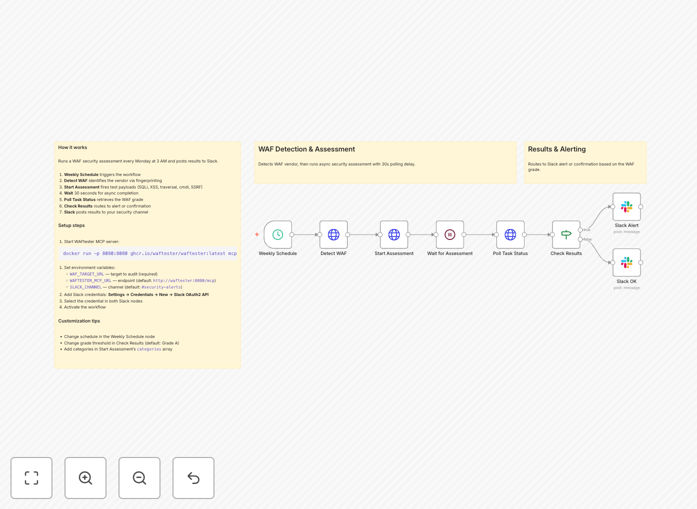
Visualization of WAF security audit automation workflow connecting WAFtester testing tools to Slack alert notifications

What This Workflow Does

Manual security testing is time-consuming, inconsistent, and often gets deprioritized in busy IT schedules. This creates dangerous security gaps where your web application firewall (WAF) might be misconfigured or ineffective against new attack techniques.

This automation solves that problem by running comprehensive WAF security assessments every week without human intervention. It automatically detects your WAF vendor, executes penetration tests using thousands of attack payloads, calculates a security grade, and immediately alerts your team via Slack if protection drops below acceptable levels. What used to be a manual 2-3 hour process now happens automatically while your team focuses on higher-value security work.

How It Works

The workflow orchestrates security testing through a precise sequence of steps:

1. Weekly Schedule Trigger

The automation starts automatically every Monday at 3 AM (configurable to any schedule). This ensures consistent testing without requiring manual initiation.

2. WAF Vendor Detection

The system calls WAFtester's detection tools to fingerprint your specific WAF vendor and CDN. This allows for targeted testing based on your actual security infrastructure.

3. Security Assessment Execution

An asynchronous assessment task launches, testing against critical attack categories including SQL injection, XSS, path traversal, command injection, and SSRF using 2,800+ payloads.

4. Results Processing & Grading

The system polls for completed results, analyzes detection rates and bypass counts, then calculates a letter grade (A+ through F) based on enterprise security scoring metrics.

5. Conditional Alert Routing

Based on the security grade, the workflow routes to appropriate notification channels. Grades "A" or better trigger success reports, while lower grades trigger immediate security alerts.

6. Team Notification

Detailed Slack messages deliver the assessment results, including specific vulnerabilities detected, detection percentages, and actionable recommendations for remediation.

Pro tip: Start with testing your staging environment first. Once confident, point the automation at production with appropriate rate limiting to avoid impacting legitimate traffic.

Who This Is For

This automation delivers value across multiple roles in technology organizations:

Security Teams needing continuous monitoring of WAF effectiveness without manual testing overhead. It provides consistent documentation for compliance audits and reduces mean time to detection for configuration drift.

DevOps & SRE Engineers responsible for maintaining secure infrastructure. The automation helps validate that deployment changes haven't inadvertently weakened security controls.

Compliance Officers requiring regular evidence of security control testing for frameworks like PCI DSS, SOC 2, ISO 27001, or GDPR. Automated reports provide timestamped proof of due diligence.

Technology Leaders (CTOs, CISOs) who need visibility into security posture without micromanaging testing schedules. The Slack alerts provide executive-level awareness of security status.

What You'll Need

  1. WAFtester MCP Server – Either the Docker container running locally or a binary installation accessible to your n8n instance.
  2. Target URL – The web application endpoint you have explicit permission to test (never test systems without authorization).
  3. Slack Workspace – With OAuth2 bot credentials and a dedicated channel for security alerts.
  4. n8n Instance – Self-hosted or cloud version with HTTP Request node capabilities.
  5. Environment Variables – Configure WAF_TARGET_URL, WAFTESTER_MCP_URL, and SLACK_CHANNEL in your n8n settings.

Quick Setup Guide

Follow these steps to implement this security automation in under 30 minutes:

  1. Launch WAFtester – Run the Docker command: docker run -p 8080:8080 ghcr.io/waftester/waftester:latest mcp --http :8080
  2. Import the Template – Download the JSON file above and import it into your n8n instance via the workflow import function.
  3. Configure Environment Variables – Set WAF_TARGET_URL to your test endpoint, WAFTESTER_MCP_URL to your server address, and SLACK_CHANNEL to your alert channel.
  4. Connect Slack – Add your Slack OAuth2 credentials in n8n and select them in both Slack notification nodes.
  5. Test & Activate – Run the workflow once manually to verify connections, then activate it to run on the weekly schedule.

Pro tip: Use the included docker-compose.yml file to run both n8n and WAFtester together if you're deploying this as a dedicated security monitoring solution.

Key Benefits

Save 10-15 hours monthly that security teams would spend on manual WAF testing and reporting. The automation handles the entire process from execution to notification.

Improve security consistency with standardized testing performed at regular intervals. Unlike manual processes that might be skipped during busy periods, automation ensures no testing gaps.

Accelerate incident response by detecting security degradation immediately rather than during quarterly penetration tests. Early detection means faster remediation before exploitation.

Simplify compliance reporting with automatically generated, timestamped security assessment records that demonstrate ongoing due diligence to auditors.

Reduce human error in security testing procedures. The automation follows the exact same testing protocol every time, eliminating variations in manual testing approaches.

Frequently Asked Questions

Common questions about WAF security automation and integration

Continuous WAF testing is critical because web application threats evolve daily. A firewall configuration that was secure last month might have new vulnerabilities today. Automated weekly audits ensure your security posture doesn't degrade over time, helping prevent data breaches, compliance violations, and service disruptions that can cost businesses thousands in recovery and reputational damage.

Without regular testing, you're essentially flying blind between annual penetration tests. Attackers don't wait for your next security assessment—they probe constantly for weaknesses. This automation gives you the same advantage of continuous testing that sophisticated attackers use against you.

Traditional vulnerability scanners check for known weaknesses in your applications and infrastructure. WAF testing specifically evaluates your firewall's ability to block actual attack payloads like SQL injection, cross-site scripting, and command injection.

Think of it this way: vulnerability scanning tells you if you have unlocked doors. WAF testing tells you if your security guard (the firewall) is actually stopping people from walking through those doors. Both are important, but WAF testing validates that your active security controls are working as intended against real attack techniques.

Automating security audits saves security teams 10-15 hours per week that would otherwise be spent on manual testing and reporting. Instead of running tests, compiling results, and creating alert reports manually, the automation handles everything on a schedule.

This efficiency gain allows security professionals to focus on strategic initiatives like threat hunting, policy development, and incident response planning. The automation becomes a force multiplier, enabling smaller teams to maintain enterprise-level security monitoring without proportional increases in headcount.

  • Eliminates repetitive manual testing tasks
  • Provides consistent documentation for audits
  • Enables proactive rather than reactive security

WAFtester simulates over 2,800 attack payloads across 18 critical categories including SQL injection, cross-site scripting (XSS), server-side request forgery (SSRF), server-side template injection (SSTI), command injection, XML external entity (XXE) attacks, and path traversal.

This comprehensive testing ensures your WAF can block the most common and dangerous web application attacks that businesses face daily. The automation tests not just whether attacks are blocked, but also measures detection rates and calculates security grades based on how effectively your firewall identifies and stops each attack type.

Automated security reports provide consistent, timestamped documentation of your security controls' effectiveness. For compliance frameworks like PCI DSS, SOC 2, ISO 27001, and GDPR, these reports demonstrate ongoing security monitoring and due diligence.

They show auditors that you're regularly testing and validating your security measures, not just implementing them once and forgetting about them. The automated nature of the reports eliminates the "checkbox compliance" problem where organizations perform security activities only when audits are imminent rather than as part of continuous operations.

Yes, this workflow can be extended to integrate with virtually any security or communication tool. Beyond Slack, you can send alerts to Microsoft Teams, create Jira tickets for failed tests, log results to Splunk or Datadog for correlation with other security events, trigger PagerDuty for critical failures, or even send encrypted email reports to compliance teams.

The automation acts as a central orchestrator for your security notification ecosystem. Since it's built on n8n's flexible integration platform, adding new notification channels typically takes minutes rather than days of development work.

When the WAF grade drops below your configured threshold (typically 'A' or better), the workflow triggers immediate alerts to your security team via Slack. The alert includes specific details about which attack categories bypassed the firewall, the detection rate percentage, and the number of successful bypasses.

This enables rapid investigation and remediation before attackers can exploit the weakened security posture. The detailed information in the alert helps security engineers quickly identify whether the issue is a misconfiguration, a rule that needs updating, or a new attack technique that your WAF vendor needs to address.

Absolutely. GrowwStacks specializes in building custom security automation solutions tailored to your specific infrastructure, compliance requirements, and team workflows. We can integrate with your existing WAF vendor (Cloudflare, AWS WAF, Azure WAF, etc.), customize the attack simulations based on your threat model, add integration with your SIEM or ticketing system, and create executive dashboards showing security posture over time.

Our team works with you to design, implement, and maintain automation that fits your unique security needs. Whether you need enhanced reporting, integration with additional security tools, or custom testing scenarios for your industry-specific threats, we can build a solution that delivers exactly what your organization requires.

  • Custom integration with your security stack
  • Industry-specific threat modeling
  • Compliance-focused reporting and documentation

Need a Custom WAF Security Automation?

This free template is a starting point. Our team builds fully tailored automation systems for your specific business needs.