What This Workflow Does
Manual security testing is time-consuming, inconsistent, and often gets deprioritized in busy IT schedules. This creates dangerous security gaps where your web application firewall (WAF) might be misconfigured or ineffective against new attack techniques.
This automation solves that problem by running comprehensive WAF security assessments every week without human intervention. It automatically detects your WAF vendor, executes penetration tests using thousands of attack payloads, calculates a security grade, and immediately alerts your team via Slack if protection drops below acceptable levels. What used to be a manual 2-3 hour process now happens automatically while your team focuses on higher-value security work.
How It Works
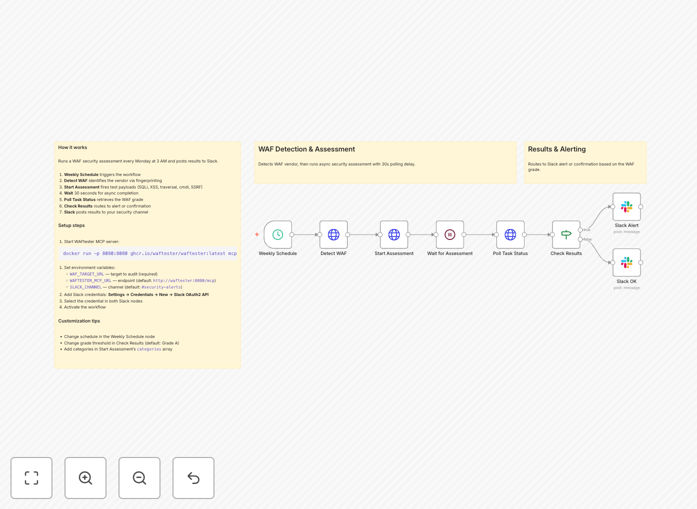
The workflow orchestrates security testing through a precise sequence of steps:
1. Weekly Schedule Trigger
The automation starts automatically every Monday at 3 AM (configurable to any schedule). This ensures consistent testing without requiring manual initiation.
2. WAF Vendor Detection
The system calls WAFtester's detection tools to fingerprint your specific WAF vendor and CDN. This allows for targeted testing based on your actual security infrastructure.
3. Security Assessment Execution
An asynchronous assessment task launches, testing against critical attack categories including SQL injection, XSS, path traversal, command injection, and SSRF using 2,800+ payloads.
4. Results Processing & Grading
The system polls for completed results, analyzes detection rates and bypass counts, then calculates a letter grade (A+ through F) based on enterprise security scoring metrics.
5. Conditional Alert Routing
Based on the security grade, the workflow routes to appropriate notification channels. Grades "A" or better trigger success reports, while lower grades trigger immediate security alerts.
6. Team Notification
Detailed Slack messages deliver the assessment results, including specific vulnerabilities detected, detection percentages, and actionable recommendations for remediation.
Pro tip: Start with testing your staging environment first. Once confident, point the automation at production with appropriate rate limiting to avoid impacting legitimate traffic.
Who This Is For
This automation delivers value across multiple roles in technology organizations:
Security Teams needing continuous monitoring of WAF effectiveness without manual testing overhead. It provides consistent documentation for compliance audits and reduces mean time to detection for configuration drift.
DevOps & SRE Engineers responsible for maintaining secure infrastructure. The automation helps validate that deployment changes haven't inadvertently weakened security controls.
Compliance Officers requiring regular evidence of security control testing for frameworks like PCI DSS, SOC 2, ISO 27001, or GDPR. Automated reports provide timestamped proof of due diligence.
Technology Leaders (CTOs, CISOs) who need visibility into security posture without micromanaging testing schedules. The Slack alerts provide executive-level awareness of security status.
What You'll Need
- WAFtester MCP Server – Either the Docker container running locally or a binary installation accessible to your n8n instance.
- Target URL – The web application endpoint you have explicit permission to test (never test systems without authorization).
- Slack Workspace – With OAuth2 bot credentials and a dedicated channel for security alerts.
- n8n Instance – Self-hosted or cloud version with HTTP Request node capabilities.
- Environment Variables – Configure WAF_TARGET_URL, WAFTESTER_MCP_URL, and SLACK_CHANNEL in your n8n settings.
Quick Setup Guide
Follow these steps to implement this security automation in under 30 minutes:
- Launch WAFtester – Run the Docker command:
docker run -p 8080:8080 ghcr.io/waftester/waftester:latest mcp --http :8080 - Import the Template – Download the JSON file above and import it into your n8n instance via the workflow import function.
- Configure Environment Variables – Set WAF_TARGET_URL to your test endpoint, WAFTESTER_MCP_URL to your server address, and SLACK_CHANNEL to your alert channel.
- Connect Slack – Add your Slack OAuth2 credentials in n8n and select them in both Slack notification nodes.
- Test & Activate – Run the workflow once manually to verify connections, then activate it to run on the weekly schedule.
Pro tip: Use the included docker-compose.yml file to run both n8n and WAFtester together if you're deploying this as a dedicated security monitoring solution.
Key Benefits
Save 10-15 hours monthly that security teams would spend on manual WAF testing and reporting. The automation handles the entire process from execution to notification.
Improve security consistency with standardized testing performed at regular intervals. Unlike manual processes that might be skipped during busy periods, automation ensures no testing gaps.
Accelerate incident response by detecting security degradation immediately rather than during quarterly penetration tests. Early detection means faster remediation before exploitation.
Simplify compliance reporting with automatically generated, timestamped security assessment records that demonstrate ongoing due diligence to auditors.
Reduce human error in security testing procedures. The automation follows the exact same testing protocol every time, eliminating variations in manual testing approaches.