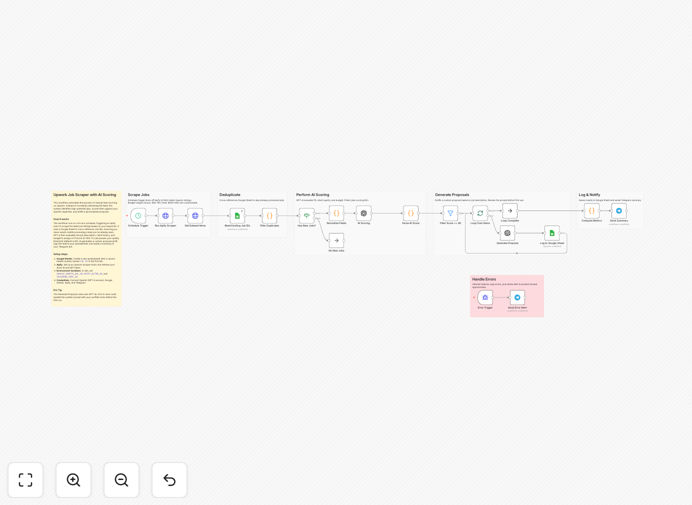
What This Workflow Does
For freelancers and agencies, finding the right projects on Upwork is a constant, time-consuming battle. This automation solves that by turning hours of manual searching and proposal writing into a fully automated, intelligent system. It continuously scours Upwork for new jobs that match your skills and preferences.
Each job is automatically scored by AI based on budget, client history, and project fit. Only the high-potential leads are flagged, and personalized, compelling proposal drafts are generated instantly. Everything is logged in a Google Sheet, and you get a Telegram alert with a summary, so you can apply to the best opportunities in minutes, not hours.
This workflow transforms your lead generation from a reactive, manual chore into a proactive, scalable system. It ensures you never miss a great opportunity and allows you to spend your time doing client work, not just looking for it.
How It Works
The automation runs on a scheduled cycle, acting as your personal research assistant.
1. Scheduled Trigger & Job Scraping
A Schedule Trigger initiates the workflow every 6 hours (configurable). It activates an Apify Scraper node, which programmatically visits Upwork and collects job postings based on your pre-set search criteria (keywords, category, budget range, etc.).
2. Deduplication & Data Cleaning
The workflow checks each scraped job against a Google Sheet log using a unique Job ID. This prevents you from seeing the same job twice. It then cleans and structures the raw data (title, description, budget, client info) into a consistent format for analysis.
3. AI-Powered Scoring & Filtering
Each job's details are sent to the OpenAI (GPT-4o) node. A custom prompt instructs the AI to evaluate the job on a 0-100 scale, considering factors like budget adequacy, client feedback score, description clarity, and alignment with your skills. Jobs scoring below your threshold (e.g., 60) are automatically filtered out.
4. Personalized Proposal Generation
For high-scoring jobs, the AI crafts a tailored proposal draft. It uses the job description and your pre-configured professional bio to generate an opening, highlight relevant experience, and ask pertinent questions, creating a unique, high-quality draft for each opportunity.
5. Logging & Notification
All jobs—their details, scores, and generated proposals—are appended to a Google Sheet for your records and review. Finally, a concise summary of the top new opportunities is sent directly to you via a Telegram bot, so you're immediately informed and can take action.
Who This Is For
This template is ideal for independent freelancers (developers, designers, writers, marketers) and small digital agencies who regularly source work from Upwork. It's perfect for anyone who wants to systemize their lead generation, improve their proposal quality with AI, and reclaim 5-10+ hours per week spent on manual job hunting.
What You'll Need
- An n8n instance (Cloud or self-hosted).
- An Apify account with an Upwork Scraper actor setup.
- An OpenAI API key (GPT-4o or GPT-4 recommended).
- A Google Cloud Project with the Google Sheets API enabled and service account credentials.
- A Telegram Bot Token and Chat ID (created via @BotFather).
- A Google Sheet with a "Job ID" column for deduplication logging.
Pro tip: Use environment variables in n8n to securely store your API keys (GOOGLE_SHEETS_DOC_ID, APIFY_ACTOR_ID, TELEGRAM_CHAT_ID, OPENAI_API_KEY). This keeps your workflow clean and your credentials safe.
Quick Setup Guide
Get this system running in under 15 minutes.
- Import the Template: Download the JSON file above and import it into your n8n workspace.
- Configure Credentials: In n8n, create credentials for Google Sheets (Service Account), Apify (Header Auth), OpenAI, and Telegram Bot.
- Set Environment Variables: In your n8n instance settings, add variables for your Google Sheet ID, Apify Actor ID, and Telegram Chat ID.
- Adjust Search Criteria: In the Apify Scraper node, update the search queries to match your skills, preferred job types, and budget ranges.
- Customize the AI Prompt: Review and tweak the prompts in the OpenAI nodes to better reflect your expertise and proposal style.
- Test the Flow: Execute the workflow once manually to ensure all connections work and data flows correctly to your Sheet and Telegram.
- Activate the Schedule: Turn on the Schedule Trigger node and set it to your desired frequency (e.g., every 6 hours).
Key Benefits
Eliminate Manual Grind: Automate the most tedious parts of freelancing—searching and initial outreach—freeing up significant time for billable work.
Improve Proposal Quality: AI-generated drafts are consistently well-written, personalized, and highlight the right skills, increasing your response rate.
Never Miss an Opportunity: With 24/7 automated monitoring, you get alerted to high-quality jobs as soon as they're posted, giving you a first-mover advantage.
Data-Driven Decisions: The scoring system helps you objectively evaluate opportunities, focusing your energy on clients and projects most likely to convert and be profitable.
Centralized Lead Management: All potential leads are neatly organized in a Google Sheet, creating a searchable database of opportunities for analysis and follow-up.