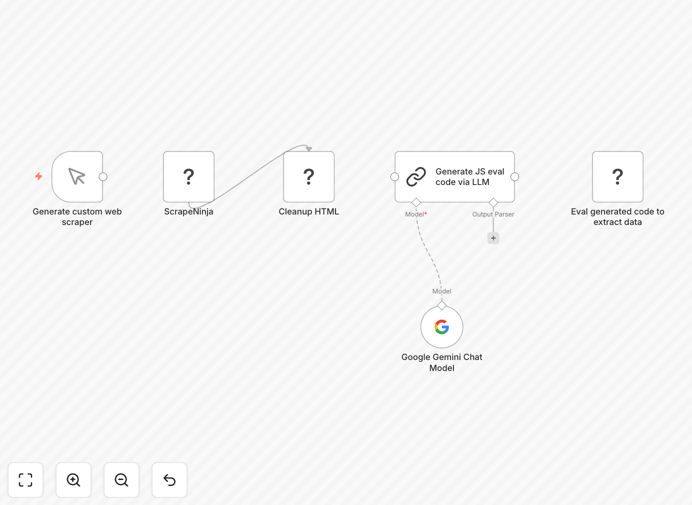
What This Workflow Does
Manual web scraping is fragile—website layouts change, CSS selectors break, and your data pipeline fails. This n8n workflow solves that problem by combining reliable scraping with AI-powered data extraction.
It automatically fetches any webpage using the ScrapeNinja community node, sends the HTML to Google Gemini AI, and asks it to generate JavaScript code that extracts the specific data you need. The workflow then executes that generated code in a sandboxed environment to produce clean, structured JSON output.
Whether you're monitoring competitor prices, aggregating product listings, collecting leads from directories, or tracking news articles, this automation adapts to website changes without requiring constant manual updates to your scraping logic.
How It Works
The workflow follows a smart three-step process that mimics how a human would extract data but does it automatically at scale.
Step 1: Fetch Webpage HTML
The ScrapeNinja node retrieves the complete HTML of the target webpage, handling JavaScript rendering, proxy rotation, and anti-bot measures that often block simple HTTP requests.
Step 2: AI Analysis & Code Generation
The raw HTML is sent to Google Gemini with instructions about what data to extract. The AI analyzes the page structure and generates a custom JavaScript function that can locate and extract the target information.
Step 3: Safe Execution & Output
The generated JavaScript runs in a secure sandbox within n8n, executing against the HTML to produce structured JSON data. This approach keeps your main system safe while delivering clean, usable data.
Pro tip: For recurring scraping jobs, add a Schedule Trigger node to run this workflow daily or weekly. The AI will regenerate extraction code if the website layout changes, maintaining data quality over time.
Who This Is For
This template is ideal for marketers, researchers, e-commerce managers, and developers who need reliable web data without maintaining brittle scrapers.
Business analysts can extract market intelligence from competitor sites. Recruiters can gather candidate information from professional networks. E-commerce teams can monitor pricing across multiple retailers. Content teams can aggregate news and trends from industry publications.
If you've ever struggled with websites changing their layout and breaking your data collection, this AI-powered approach provides the adaptability you need.
What You'll Need
- Self-hosted n8n instance – This template uses the ScrapeNinja community node which requires self-hosted n8n.
- ScrapeNinja community node – Install via Settings → Community Nodes (search for "n8n-nodes-scrapeninja").
- Google Gemini API key – Available through Google AI Studio (free tier available).
- Target website URLs – The pages you want to scrape data from.
- Clear extraction instructions – Describe what data you need (product names, prices, contact info, etc.).
Quick Setup Guide
Get this workflow running in under 15 minutes with these steps:
- Import the template – Download the JSON file and import it into your n8n instance.
- Install ScrapeNinja node – Go to Settings → Community Nodes and add "n8n-nodes-scrapeninja".
- Configure API credentials – Add your Google Gemini API key to the LLM Chain node.
- Set your target URL – Replace the example URL with the webpage you want to scrape.
- Define your data requirements – Update the AI prompt to specify exactly what information to extract.
- Test and refine – Execute the workflow once, review the output, and adjust your instructions if needed.
- Add scheduling – Connect a Schedule Trigger node for automated, recurring data collection.
Important: Always respect websites' terms of service and robots.txt files. Use appropriate delays between requests and avoid overloading servers with too many rapid requests.
Key Benefits
Adaptive to website changes – When a site redesign breaks traditional scrapers, the AI simply generates new extraction code, keeping your data flowing without manual intervention.
Reduces maintenance by 80% – No more constantly updating CSS selectors. The AI handles structural changes automatically, saving hours of developer time each month.
Handles complex pages – Extracts data from modern JavaScript-heavy websites that traditional scrapers struggle with, including content loaded dynamically via AJAX.
Clean, structured output – Returns data as ready-to-use JSON that integrates seamlessly with databases, spreadsheets, or other business applications.
Scalable and reliable – Built on n8n's robust workflow engine with error handling, retry logic, and comprehensive logging for production use.