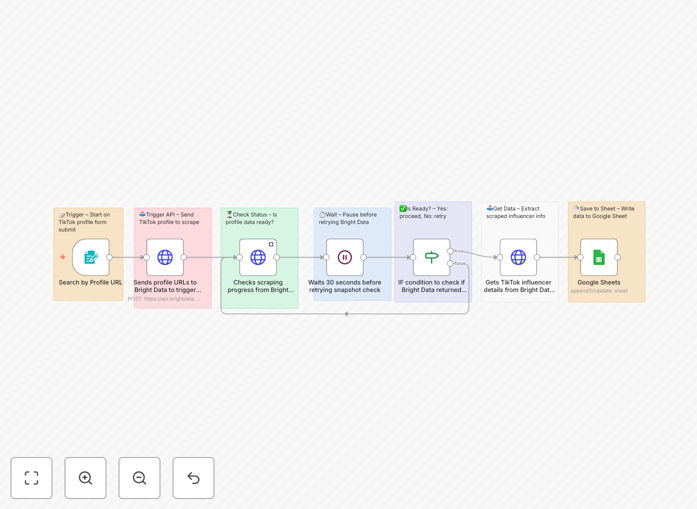
What This Workflow Does
Manual TikTok influencer research is time-consuming and inconsistent. Marketing teams spend hours scrolling through profiles, manually recording follower counts, engagement rates, and contact information—only to have that data become outdated within weeks. This n8n automation solves that problem by systematically scraping TikTok influencer profiles using Bright Data's reliable API and organizing everything into Google Sheets.
The workflow accepts TikTok profile URLs through a simple web form, sends them to Bright Data for processing, monitors the scraping status, retrieves comprehensive profile data, and automatically populates a structured spreadsheet. What used to take hours of manual work now happens automatically in minutes, giving marketing teams accurate, up-to-date data for campaign planning and outreach.
Beyond basic scraping, this template includes intelligent error handling, retry logic for failed requests, and status monitoring—ensuring complete data collection even when dealing with thousands of profiles. The result is a scalable system for influencer discovery, competitive analysis, and market intelligence that grows with your business needs.
How It Works
1. Profile Submission & API Trigger
Users submit TikTok profile URLs through a customizable web form. The workflow captures these URLs and sends them to Bright Data's TikTok dataset API with your specified parameters—including country targeting, data fields to extract, and processing preferences.
2. Intelligent Status Polling
Since TikTok data scraping isn't instantaneous, the workflow implements smart polling. It checks the Bright Data API every 30 seconds to monitor scraping progress, automatically retrying if data isn't ready yet. This ensures reliable completion without manual intervention.
3. Data Extraction & Validation
Once Bright Data returns the scraped information, the workflow extracts and validates key metrics: follower counts, engagement rates, verification status, biography content, profile links, and performance data. It cleans and formats this data for optimal spreadsheet organization.
4. Automated Google Sheets Population
The validated data automatically populates your Google Sheets spreadsheet with structured columns for each metric. The template includes timestamp tracking, status indicators, and error messages—creating a complete audit trail of your influencer research activities.
Who This Is For
This automation is ideal for marketing agencies running influencer campaigns, brands building creator partnerships, market research firms analyzing social trends, and startups identifying brand ambassadors. If you regularly need to evaluate TikTok creators for partnerships, track competitor influencer relationships, or build targeted outreach lists, this workflow eliminates the manual grunt work.
Particularly valuable for teams managing multiple campaigns simultaneously, businesses scaling their influencer marketing efforts, or anyone needing to regularly update creator databases with fresh engagement metrics. The automated approach ensures consistency across team members and prevents data degradation over time.
What You'll Need
- n8n instance (cloud or self-hosted)
- Google account with Sheets access
- Bright Data account with TikTok dataset access
- TikTok profile URLs to test the workflow
- 10-15 minutes for initial setup and configuration
Pro tip: Start with 5-10 test profiles to verify your setup before scaling to hundreds. This helps identify any configuration issues with minimal API usage costs.
Quick Setup Guide
- Import the workflow: Copy the JSON template and import it into your n8n instance under Workflows → Add workflow → Import from JSON.
- Configure Bright Data: Create HTTP Request credentials in n8n with your Bright Data API key as a Bearer Token. Verify access to the TikTok dataset (gd_l1villgoiiidt09ci).
- Prepare Google Sheets: Create a new spreadsheet named "TikTok Influencer Data" with a sheet tab called "TikTok profile by url." Set up Google Sheets OAuth2 credentials in n8n.
- Update workflow settings: Replace the placeholder Google Sheet ID with your actual document ID. Update the Bright Data API key in the HTTP Request node.
- Test with sample profiles: Use the generated webhook URL to submit 2-3 TikTok profile URLs. Monitor execution and verify data appears correctly in your spreadsheet.
- Activate for production: Once testing succeeds, share the form URL with your team and begin scaling your influencer research.
Key Benefits
Save 90%+ research time: What takes hours manually completes in minutes automatically. Process hundreds of profiles while focusing on strategy rather than data entry.
Ensure data consistency: Automated extraction eliminates human error in recording follower counts, engagement rates, and other metrics. Every profile gets evaluated with the same criteria.
Scale effortlessly: From 10 to 10,000 profiles, the system handles volume without additional manual effort. Perfect for growing marketing campaigns or expanding into new markets.
Maintain current data: Regularly refresh your influencer database with up-to-date metrics. Run the workflow monthly to track growth trends and identify rising creators.
Integrate with existing tools: The Google Sheets output easily connects to CRMs, marketing automation platforms, data visualization tools, and team collaboration systems.