What This Workflow Does
Missed pre-surgery instructions and patient no-shows are costly problems for healthcare providers. Manual phone calls and emails are time-consuming, error-prone, and don't scale. This automation solves that by creating a closed-loop communication system that ensures every patient is informed, prepared, and confirmed.
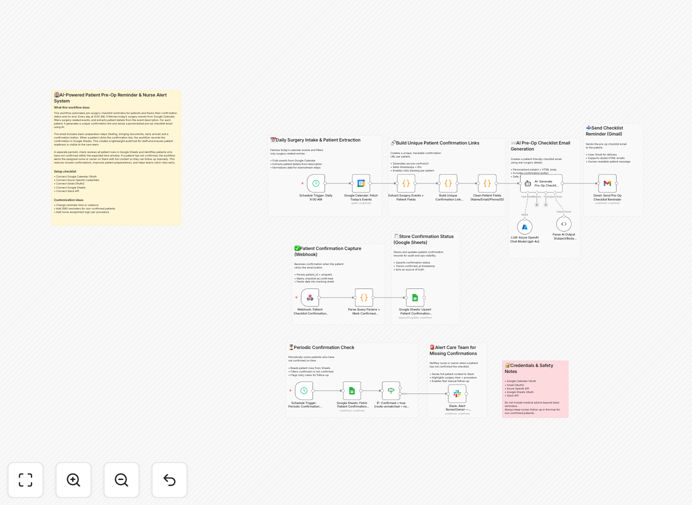
The workflow automatically fetches daily surgery schedules from Google Calendar, extracts patient details, generates personalized AI-powered checklist emails, and sends them via Gmail. Patients confirm with one click, updating a Google Sheets tracker. The system proactively alerts clinical staff via Slack if confirmations are missing, enabling timely intervention. This transforms a chaotic, manual process into a reliable, automated operational backbone.
How It Works
1. Daily Schedule Fetch & Patient Extraction
Every morning at 9:00 AM, the workflow queries Google Calendar for the day's surgery events. It parses each event description to extract critical patient information: name, email, procedure, scheduled time, and any specific notes.
2. AI-Personalized Email Creation
For each patient, GPT-4o generates a calm, professional, and easy-to-understand email. It includes a personalized greeting, clear surgery details, a simple pre-op checklist (like fasting instructions), and a prominent green confirmation button linked to a unique tracking URL.
3. Automated Delivery & Confirmation Capture
The styled HTML email is sent via Gmail. When the patient clicks "Confirm," a webhook captures the action, recording the timestamp and patient ID. This data is immediately written to a Google Sheets spreadsheet, serving as the single source of truth.
4. Proactive Staff Escalation
A separate scheduler periodically scans the Google Sheet for patients who haven't confirmed within a set window. For each missing confirmation, a detailed alert is posted to a designated Slack channel, tagging the assigned nurse or coordinator with full patient context for immediate follow-up.
Who This Is For
This template is ideal for hospital surgical units, outpatient surgery centers, specialty clinics, and healthcare operations teams. It's perfect for care coordinators, clinic managers, and administrative staff drowning in manual reminder calls and tracking spreadsheets. If you're dealing with frequent no-shows, last-minute patient questions, or want to improve pre-operative compliance, this automation provides a immediate, scalable solution.
What You'll Need
- n8n instance (cloud or self-hosted).
- Google Workspace account with OAuth2 access to Calendar, Gmail, and Sheets.
- Azure OpenAI API credentials (or another GPT-4o provider).
- Slack workspace with permissions to post to a channel.
- A publicly accessible URL for the confirmation webhook (if using n8n cloud, this is provided).
Pro tip: Start by testing this workflow with a single "test" calendar event and a dummy patient email address. Once you verify the email generation and confirmation loop works, scale it to your full schedule.
Quick Setup Guide
- Download & Import: Click the download button above and import the JSON file into your n8n instance.
- Configure Credentials: Set up OAuth2 connections for Google Calendar, Gmail, and Google Sheets. Add your Azure OpenAI API key and Slack bot token.
- Customize Calendar Query: Adjust the Google Calendar node to filter for your specific surgery calendar and event naming conventions.
- Update Email Template Logic: Review the AI prompt in the workflow to ensure it matches your clinic's tone and includes your specific pre-op instructions.
- Set Up Slack Channel: Create a dedicated Slack channel for alerts and update the workflow with its ID. Configure the @mentions for the responsible team members.
- Test Thoroughly: Run the workflow manually with a test event. Check the email output, click the confirmation link, and verify the Slack alert triggers correctly.
- Activate Schedules: Enable the two Schedule Trigger nodes (daily reminders and periodic confirmation checks).
Key Benefits
Eliminate manual reminder calls and emails, saving 5–10 hours per week for clinical staff. This time can be redirected to direct patient care and higher-value tasks.
Reduce surgery no-show rates by 15–30% through timely, personalized communication and easy confirmation. Fewer last-minute cancellations mean better OR utilization and increased revenue.
Improve patient preparedness and satisfaction with clear, AI-generated instructions tailored to their specific procedure. Better-informed patients have better outcomes and lower anxiety.
Create a full audit trail in Google Sheets for compliance and quality improvement. Easily report on confirmation rates, identify patterns, and demonstrate process adherence.
Enable proactive care coordination with instant Slack alerts for missing confirmations. Nurses can intervene early rather than discovering issues on the day of surgery.