Healthcare Automation Google Workspace AI Slack n8n

Send AI Pre-Op Reminders with Google Calendar, Gmail, Sheets, Slack & GPT-4o

Automate end-to-end patient pre-surgery checklist reminders, confirmation tracking, and staff alerts. Eliminate manual follow-ups and reduce no-shows.

Download Template JSON · n8n compatible · Free
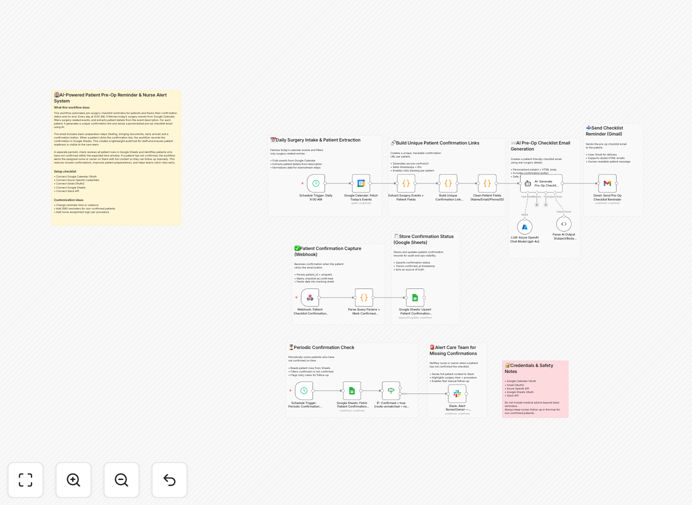
Visual diagram of the AI-powered pre-op reminder automation workflow connecting Google Calendar, Gmail, Sheets, Slack, and GPT-4o

What This Workflow Does

Missed pre-surgery instructions and patient no-shows are costly problems for healthcare providers. Manual phone calls and emails are time-consuming, error-prone, and don't scale. This automation solves that by creating a closed-loop communication system that ensures every patient is informed, prepared, and confirmed.

The workflow automatically fetches daily surgery schedules from Google Calendar, extracts patient details, generates personalized AI-powered checklist emails, and sends them via Gmail. Patients confirm with one click, updating a Google Sheets tracker. The system proactively alerts clinical staff via Slack if confirmations are missing, enabling timely intervention. This transforms a chaotic, manual process into a reliable, automated operational backbone.

How It Works

1. Daily Schedule Fetch & Patient Extraction

Every morning at 9:00 AM, the workflow queries Google Calendar for the day's surgery events. It parses each event description to extract critical patient information: name, email, procedure, scheduled time, and any specific notes.

2. AI-Personalized Email Creation

For each patient, GPT-4o generates a calm, professional, and easy-to-understand email. It includes a personalized greeting, clear surgery details, a simple pre-op checklist (like fasting instructions), and a prominent green confirmation button linked to a unique tracking URL.

3. Automated Delivery & Confirmation Capture

The styled HTML email is sent via Gmail. When the patient clicks "Confirm," a webhook captures the action, recording the timestamp and patient ID. This data is immediately written to a Google Sheets spreadsheet, serving as the single source of truth.

4. Proactive Staff Escalation

A separate scheduler periodically scans the Google Sheet for patients who haven't confirmed within a set window. For each missing confirmation, a detailed alert is posted to a designated Slack channel, tagging the assigned nurse or coordinator with full patient context for immediate follow-up.

Who This Is For

This template is ideal for hospital surgical units, outpatient surgery centers, specialty clinics, and healthcare operations teams. It's perfect for care coordinators, clinic managers, and administrative staff drowning in manual reminder calls and tracking spreadsheets. If you're dealing with frequent no-shows, last-minute patient questions, or want to improve pre-operative compliance, this automation provides a immediate, scalable solution.

What You'll Need

  1. n8n instance (cloud or self-hosted).
  2. Google Workspace account with OAuth2 access to Calendar, Gmail, and Sheets.
  3. Azure OpenAI API credentials (or another GPT-4o provider).
  4. Slack workspace with permissions to post to a channel.
  5. A publicly accessible URL for the confirmation webhook (if using n8n cloud, this is provided).

Pro tip: Start by testing this workflow with a single "test" calendar event and a dummy patient email address. Once you verify the email generation and confirmation loop works, scale it to your full schedule.

Quick Setup Guide

  1. Download & Import: Click the download button above and import the JSON file into your n8n instance.
  2. Configure Credentials: Set up OAuth2 connections for Google Calendar, Gmail, and Google Sheets. Add your Azure OpenAI API key and Slack bot token.
  3. Customize Calendar Query: Adjust the Google Calendar node to filter for your specific surgery calendar and event naming conventions.
  4. Update Email Template Logic: Review the AI prompt in the workflow to ensure it matches your clinic's tone and includes your specific pre-op instructions.
  5. Set Up Slack Channel: Create a dedicated Slack channel for alerts and update the workflow with its ID. Configure the @mentions for the responsible team members.
  6. Test Thoroughly: Run the workflow manually with a test event. Check the email output, click the confirmation link, and verify the Slack alert triggers correctly.
  7. Activate Schedules: Enable the two Schedule Trigger nodes (daily reminders and periodic confirmation checks).

Key Benefits

Eliminate manual reminder calls and emails, saving 5–10 hours per week for clinical staff. This time can be redirected to direct patient care and higher-value tasks.

Reduce surgery no-show rates by 15–30% through timely, personalized communication and easy confirmation. Fewer last-minute cancellations mean better OR utilization and increased revenue.

Improve patient preparedness and satisfaction with clear, AI-generated instructions tailored to their specific procedure. Better-informed patients have better outcomes and lower anxiety.

Create a full audit trail in Google Sheets for compliance and quality improvement. Easily report on confirmation rates, identify patterns, and demonstrate process adherence.

Enable proactive care coordination with instant Slack alerts for missing confirmations. Nurses can intervene early rather than discovering issues on the day of surgery.

Frequently Asked Questions

Common questions about healthcare patient communication automation and integration

Automating pre-surgery communication is critical for patient safety and operational efficiency. Manual reminders are prone to human error, leading to missed instructions, no-shows, and compliance issues. Automation ensures every patient receives consistent, timely, and personalized information, reducing administrative burden and improving clinical outcomes.

For example, a surgical center manually calling 20 patients a day might miss 2-3 calls, leading to unprepared patients. An automated system guarantees delivery, provides a written record, and frees staff for complex patient interactions.

AI transforms generic, templated emails into personalized, empathetic, and clear communications. It can adapt tone based on procedure complexity, generate easy-to-understand checklists, and ensure language is accessible. This personalization increases patient comprehension and adherence, leading to better preparation and reduced anxiety.

Instead of a one-size-fits-all message, AI can note specific details like "your knee arthroscopy is scheduled for 10 AM" and generate relevant instructions about crutches or medication pauses, making the patient feel seen and informed.

Integrating Google Calendar creates a single source of truth for scheduling. It automatically triggers reminders based on actual appointment times, syncs cancellations or reschedules instantly, and provides real-time visibility for staff. This eliminates double-data entry, reduces scheduling conflicts, and ensures communication is always aligned with the latest schedule.

When a surgery is moved, the automation instantly adjusts the reminder timeline. Staff no longer need to cross-reference separate scheduling software, email lists, and spreadsheets—everything flows from one updated calendar.

Automation reduces no-shows through timely, multi-channel reminders (email, SMS), easy confirmation processes, and proactive follow-up for non-responses. Systems can identify high-risk patients for additional outreach and provide staff with dashboards to track confirmation status, enabling targeted intervention before the appointment day.

A clinic might send an initial email 7 days prior, a follow-up SMS 2 days before, and trigger a phone call if no confirmation is received 24 hours out. This layered, automated approach significantly improves show rates.

Key tracking data includes: reminder sent timestamp, confirmation click time, patient acknowledgment, any pre-op questionnaire responses, and follow-up escalation actions. Centralizing this in a tool like Google Sheets provides an audit trail, helps identify patterns in non-compliance, and supports quality improvement initiatives.

Tracking this data allows you to answer questions like: "Do reminders sent in the afternoon have lower confirmation rates?" or "Which procedure types have the highest compliance issues?" This insight drives process improvements.

Yes, with proper design. Automation must use secure connections (OAuth), avoid storing PHI in logs, implement access controls, and ensure compliance with regulations like HIPAA. The workflow should use unique, non-identifiable confirmation links and audit all data access. Many healthcare organizations successfully use automation while maintaining strict security.

Best practices include using encrypted connections for all data transfers, ensuring your n8n instance is properly secured, and regularly reviewing access logs. The template provided uses secure OAuth patterns and minimizes PHI exposure.

Absolutely. GrowwStacks specializes in building tailored automation systems for healthcare providers, clinics, and surgical centers. We can design workflows that integrate with your specific EMR/EHR, comply with your security protocols, and address your unique patient journey. We handle everything from discovery to deployment and support.

Our team will work with you to understand your current process, identify key pain points, and build a system that fits seamlessly into your clinical workflow. We ensure the solution is maintainable, scalable, and delivers measurable ROI.

  • Integration with Epic, Cerner, or other EMR systems
  • Multi-language support for diverse patient populations
  • Advanced analytics dashboards for operational oversight

Need a Custom Healthcare Automation?

This free template is a starting point. Our team builds fully tailored automation systems for your specific business needs.